 10:48
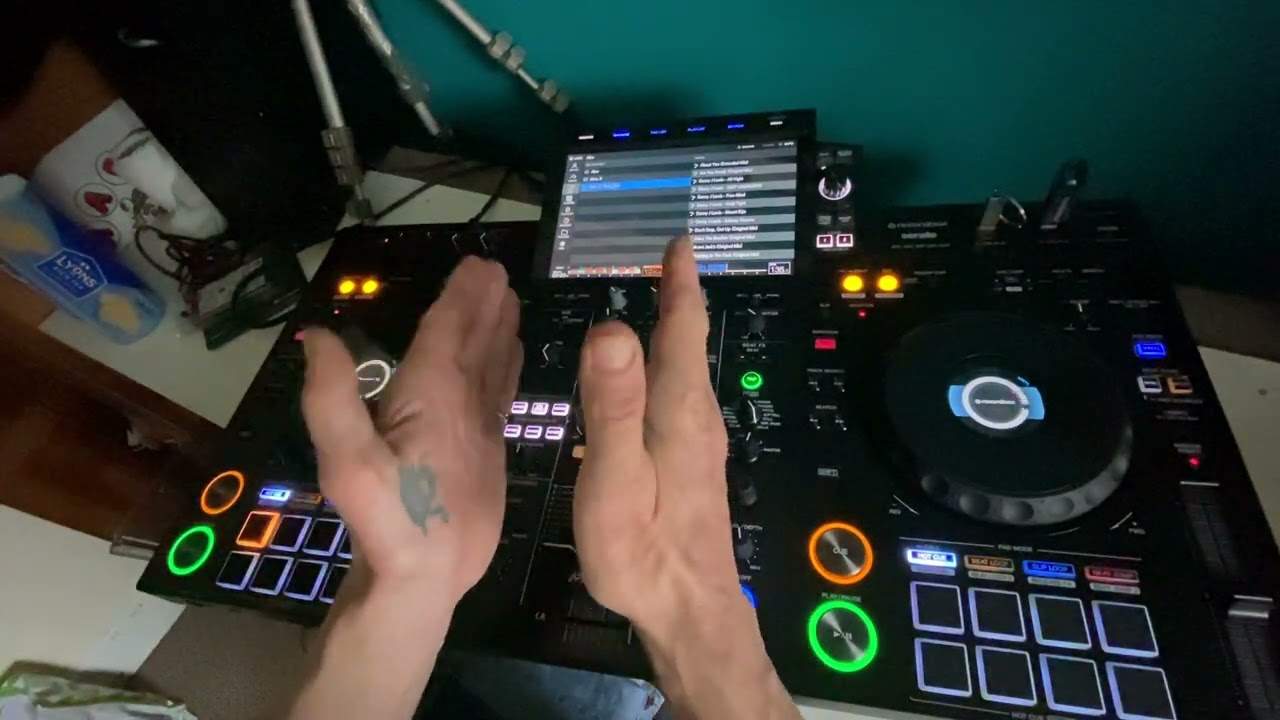
RX3 screen
Contents of the video
0:00 Short video here on the XDJ-RX3
Right guys, short video here on the XDJ-RX3. Just going to look at the screen. So what I'm going to do in this video is show some of the differences between using a track that's been analysed through rekordbox and an MP3 that you've just sort of either downloaded or you've taken off your laptop, stuck on a thumb drive. away you go now as ever with any modern day controller it is highly recommended that you go through the relevant software for that controller now a lot of controllers today as well will use other software i think back in the day it was a little bit like nah you keep away from my controller have your own bloody software but they've realized now it's better just to let everyone Do everything and anything, so use software on all kinds of controllers because it helps each other. So, on USB 1 I have got a bunch of tunes from rekordbox. Now straight away you can see we have the wave format, we can go from artist track...
Key, we've got the albums here, playlist, history folder, records, shopping list and so on. Right, so go to track and accelerator and load. So, all right, so what we can see here as well is we've got the wave format. Now again, exactly like the previous players is We can enlarge the wave format or decrease it. Now again, if it's decreased you still get the information but it's a little bit more difficult to notice let's say when you've got a new phrase or bar coming in because when it's very tightly knit together you can't see that but on the other hand reduce it and For someone who isn't particularly great at timing, there, you can see it coming in. On the other hand, if we have the wave format looking like that, that's great, let's say, if you want to see way in advance when there's going to be a break or a change. Now, hopefully you can see here, but a good way, slightly digressing here...
3:00 Let's go to track or actually it's got a folder
But a good way of knowing how the track is made up is just by looking at the different shades and colours in the wave format. We can see here a slight change, and then over here a slight change and a gap there. Now any gaps with tiny bits of wave format, nine times out of ten, they will be breaks. Okay, so there we go. We've got the source, we're selected, we've got accelerator on. The left-hand deck. So let's go back to source now. I'm going to pull that down and go to USB 2. Okay, so let's have a look. Let's go to track or actually it's got a folder. Okay, so I've got a couple of tunes here from CD Pool Underground March 2022. So again, I can still use the touchpad. And I can click through the tracks and again, I can load them up. So press on load and there you go. But the difference is now is I don't have the wave format through the screen. I've only got the small wave format down the bottom. So it's slightly more limited there. And by the looks of it as well.
All I've got is a blue wave format. I haven't got any colorization. You can see that there. Okay, this track by the way is Dubfire Soundbath Lucid Remix and again this track is from CDPool Underground March 2022. Okay, there will be a link in the description to CDPool. Okay, now again... You have got your tag list, haven't got any tag lists on this playlist. So again in rekordbox let's say you've got uh you know you've got your laptop open you've got all your tracks there and you want to put together some kind of playlist to play later now again you know you can construct some kind of playlist on your laptop anyway so you get a whole bunch of tunes put them in a playlist And then that's where you will find it there. Now again, search. We've got QWERTY keypad so we can go from numbers or letters, icons and so on so we can find tracks. Now again...
5:26 It does seem to be a little brighter
If you're going to be using, you know, big thumb drives, I mean, I'm pretty sure as well you can use external hard drives. Ideally, I would go with solid state and also if you're having issues with a thumb drive and I did, there was a chap who contacted me, I think he had the RX2 or maybe the XZ, he was having issues with the thumb drive not recording. And what we found is that he was using USB 2, so I highly recommend you get and use USB 3. Okay, so let's have a look. Source again, browse. Now, again, what I want to do here is just a very sort of quick video. The screen itself on the RX3 is a lot larger compared to the RX2 and 1. It does seem to be a little brighter. Now again, we can make it brighter or darker by going into settings. So again, there's a lot you can do with settings, definitely. Like for example, EQ, you know, you can go from minus 26 to plus 6 dB or you can have complete kill.
And again, on the left-hand side, you know, we've got our albums. Like I said as well, we've got key. So if you do tend to mix via key, then of course you can choose that. So for example, if we go up here, we can see now that all of those tracks are in that specific key. But then if we go down again, oh actually we've got the same tracks. Ah, there's a few more in different keys. When you're using tracks in the same key, they should, by all accounts, mix harmonically no matter which way, how or whatever you put them. When you have two keys, they should indeed still mix harmonically, but you've maybe got to be slightly more careful. What you've got to do, you can't just, for example, I can't just play the first track into the second, second into third, third, fourth, fourth, fifth and so on. I mean that might sound okay but it probably would be better if I mix say the second into the seventh and the seventh into the first and the first into the ninth because there would be much more of a flowing mix instead of just choosing one, two, three, four, five.
7:51 It is a nice piece of kit
And again, harmonic mixing, completely different ballgame. That is really the ethics of being a good DJ, is understanding how to mix harmonically. Now, footprint here is exactly the same pretty much as the RX1 and 2. You know, we've got the wheel that is really good. It goes through all of... The X-DJ RX3 What do I think about it? Well, it is a nice piece of kit. I haven't used it that much, but compared to the RX2 and the RX1, it is a lot better. But if you've got the RX2 and the RX1 and you're thinking, should I get the RX3? I would probably say no, because why don't you get the XZ? It's bigger, bolder. It's the equivalent of having a DJM900 mixer in the middle and two CDJ-2000s either side, or even the 3000s. Because the 2000s have got the touchpads, the hot cues, where there's only four, I think with the Mark II, there's four of them, but you can double them over so you can get eight. So you can layer them, whereas directly in front of you here, you have got eight.
Touchpads, same really similar to the 3000 where you've got more touchpads. Whereas the XZ is very similar to the RX3. The difference is it's a lot bigger. You have four channels as well. So you are sort of limited with the XDJ-RR, the XDJ-RX. One RX2 and RX3. You're limited if you want to form some kind of mix where you've got two tracks going, you've got an acapella in there or you want to say plug in a drum machine whereas the XZ because it's four channels then you have the option of adding vinyl turntables and doing a mix from a vinyl turntable into two CDs or Two CDs into the player itself, into let's say the laptop, but very similar to this, the RX3, you can use the laptop the same time as you're using the USBs. And again, if you plug in the back, phono, vinyl turntable or CD, you can switch, but you've just got to really...
Thank you very much and practice and enjoy. Nice one.
This transcript was produced automatically from the audio of the video and may contain mistakes.





