 3:41
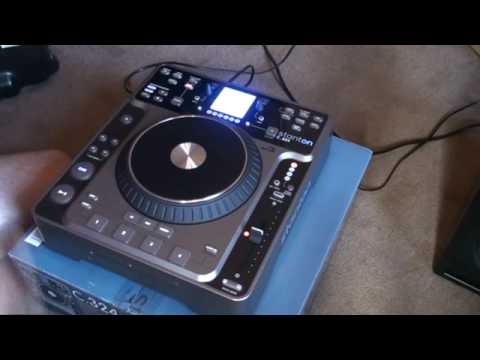
STANTON C.324 Video 1... fun with looping
Contents of the video
0:01 Video number one on this tabletop CD player from a company called Stan
Alright folks, video number one on this tabletop CD player from a company called Stanton. It's known as the C.324. I'll put all relevant information in the description. The track I'm using is by Karma and it's entitled I Need You. Now, a very basic video showing you some of the functionality of this tabletop CD player. Right hand side we have the pitch control, directly above that we have pitch lock. Here, a button with pitch range. We have 8, 16, 25 and 100. So basically what that means is we can set this to do either plus or minus 8% up to 100%. And we can do that just by pressing the button. At the moment we're on 8. Press pitch range, 16. Press it again, 25. Press it again, 100. Press it again, goes back to 8. Press this button here and we can get key lock. Top right hand corner we have the effects.
0:59 Phase, flanger and trans
Phase, flanger and trans. Right hand corner, a couple of good features. We have vinyl mode so we press that and now the jog wheel will be used exactly the same as let's say a vinyl scratch turntablist. Like so. If we hit this guy here, touch rewind, check this out. You're used to but basically what happens as soon as you put your finger on the top of the platter The track will go back to that particular position. Press cue again. Now something I do like about this is messing around with the looping functions. We have in, out and we have re-loop. What we can do, we can save that loop into one of four banks. One, two, three or four. So in a sense you can save four loops. What I'm going to do now is press play, press in and then press out and then I'm going to save that to bank number one.
2:44 Reverse, which is on this guy
Now, bearing in mind you do have to have a bit of practice. We'll do it again. One, two, three, four. Okay, there you go. What I'm going to do now is press save and press one. What we've done now is I've saved that into bank one. What I can do now is if I hit re-loop, listen, I've gone right back to the beginning of that loop. But if I press ReLoop and WOD we can have some fun. Reverse, which is on this guy. I'll be doing more videos in the near future. Practice and enjoy.
This transcript was produced automatically from the audio of the video and may contain mistakes.





