 4:25
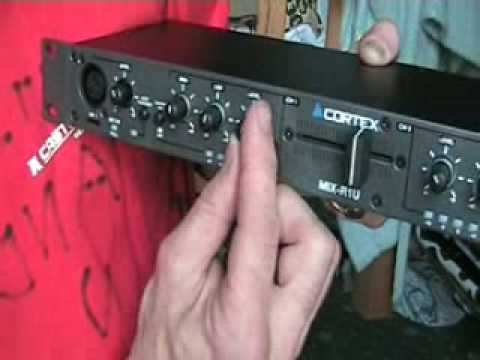
The Cortex MIX-R1U 19" mixer
Contents of the video
0:00 All of the functions on
Alright folks, first demo, first video on this guy here. It is from a company called Cortex and it's known as the Mix R1U. It is a 19 inch rack mount mixer. Yes you can do your set on something like this. There's the front of it and there's the back of it. Now in video number one I'm just going to show you all of the functions on it. Okay, this guy here what we've got This is a Canon XLR microphone input. Now if we look here, what we've got is audio talkover. Basically when that's engaged, that means that the music will dip while you're talking on the microphone and there you've got microphone level as well. Here we've got a switch for line 1, line 2 and phono. I'll show you that in a minute. High and low. There's no mid on this.
1:00 The other side is near enough exactly the same, this area here
Not necessary. Got level volume here, so that's basically exactly the same as your up-faders on your mixer. Then we've got the readout so we can see how much power we're putting into and also in a sense going out of the mixer as you crossfade. The other side is near enough exactly the same, this area here. You know, we've got level, low and high. Here we've got a master level. That will increase and decrease the volume Here, cue and program, so when it's set to cue, we can listen to an individual channel through the headphones. When it's programmed, we can hear anything that's going out of the whole unit, so basically what you'd be listening to is what's going through into the speakers. That button there is for line 3, phono 2 and line 4, so again I'll show you the back of it very shortly and we'll see what that does.
2:29 Here we've got line 4 which is basically CD
Alright, what have we got here? We've got cue 1 and cue 2. So those are basically the equivalent of the buttons on a normal mixer enabling you to just listen to say channel 1 or channel 2. And here we've got the volume control for your headphones and there's your headphone input. Right, if we have a look at the back. Right, this is exactly the same side now as the headphones. We've got an auxiliary volume control, we've got RCA out for recording purposes, we've got a jack input for your microphone. Now here we've got line 4 which is basically CD. Here we can have now phono or line 3. Now that's where the switch comes in here and remember we had front, we had here that switch so we could go from
Line 4 or line 3 and phono. So bearing in mind here, if you want line 4, make sure it's out. If you want line 3, line 2, you make sure that's in. So line 4 out will basically mean you're using line 4. If we go here and we press that in, then we're on line 3 and phono 2. So if we go around, we can see there. Line 3 and Phono 2. And again, we've got another switch here. When we switch this over to PH2, that means we can now use this channel on a vinyl turntable. Switch over, we can now use this channel on a CD player. Near enough exactly the same here. Line 2, Phono 1, Line 1. Now, this guy here, people are always asking me what that's for. Well, that is to secure... The earth cables from your vinyl turntables. Make sure you do that. If you've got an earth cable on your vinyl turntable, use that, otherwise you'll get a buzzing sound. On, off and there is your kettle lead input. And also, there, there's your crossfade. Alright, quick look video number one on this guy here from Cortex. It's known as the Mix R1U. It's basically a 19 inch mixer. Practice and enjoy.
This transcript was produced automatically from the audio of the video and may contain mistakes.





