 12:39
The Pioneer DJ DDJ-400 Is Not a Toy Beats February 2021 CD Pool
Contents of the video
0:00 Got the DDJ-400 and I'm using rekordbox
Alright guys, got the DDJ-400 and I'm using rekordbox. Now, a couple of things before I start. A lot of people seem to think that controllers like this, now they're toys, you know, they're just for bedroom DJs. And if someone sees someone using one of these, they're like, you know what, you're not a real DJ. Well, if the truth be known, that's a load of dangly things stuck behind a very large bull. That sort of jangle in between the back legs, okay? Just work that one out. It's not about the kit you've got, it's about how you use it. I have seen and heard great bedroom DJs with kit like this, completely superior to some high-class DJ with a Nexus setup. To be quite honest, it's not about the looks.
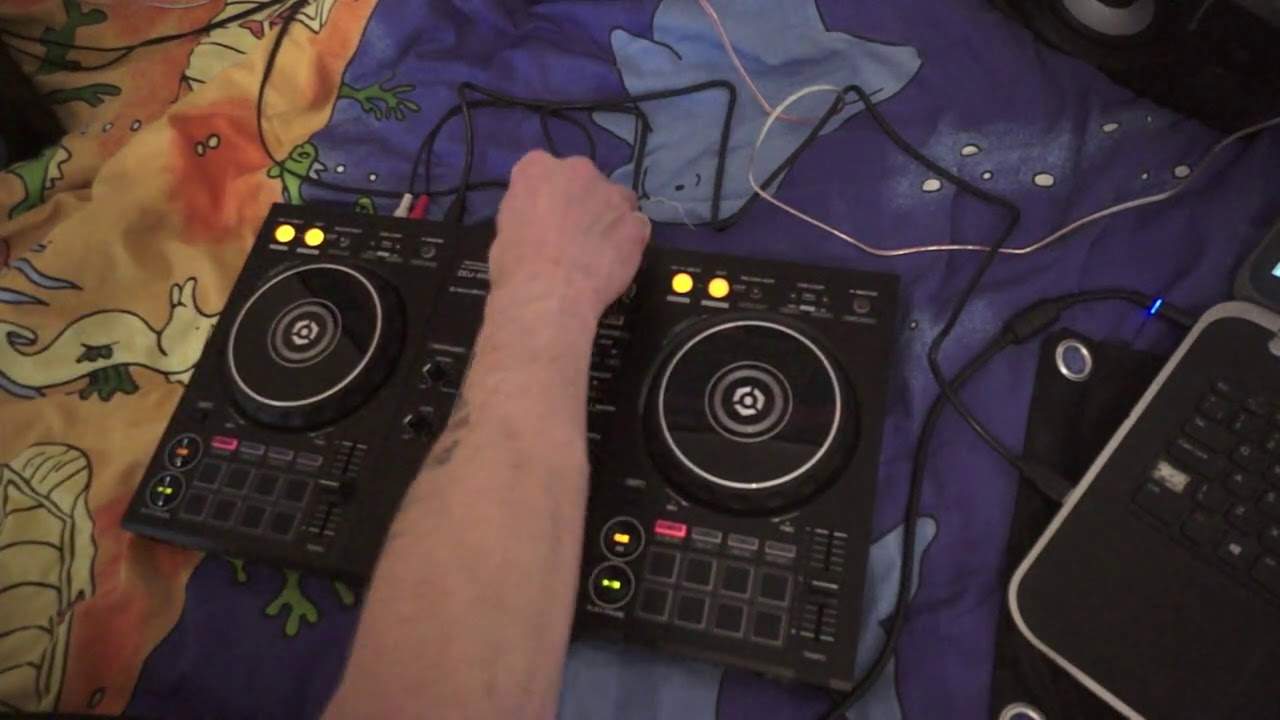
It's about what the people, the person, or should I say the person really, can do with the kit. Now, I would start with something like the DDJ-400 or similar to go and play at, or you should I say, gigs. The likes of the DDJ-200 and similar controllers from other companies, really that they're... They're fit for purpose, but mainly house parties. I wouldn't really personally take the DDJ-200 to a gig and use an app off my phone. To be quite honest, that would not be a professional thing to do. On the other hand, something like this with your laptop will work. It's fine. Now, a couple of things. Well, one important point here I bang on so many times to people. I've got my laptop over there to the right of my controller. I have not got it slap bang in front of me. There's good reason for that. Now, let's imagine you're in your home studio, you're in your bedroom and that's the only place you can put your laptop. Again, we're February 2021. Not many of us are working at the moment. Hopefully when we do go back out to work.
2:34 I digress, let's just play a tune
Please, for God's sake, don't put your laptop in front of you. Put it to the side because A, you want to be looking at the kit, not at wavy lines and B, which is far more important, that people want to see you and what you're doing, not a screen in front of you thinking or they may be thinking you're on Facebook or something like that. I digress, let's just play a tune. Here, this one is Pump Up The Sound. Now, I've already set the hot cue there and there. Now what you can do as well is, not a lot of people know this, let's imagine you want to play the same track on the other side, double tap, the load, and now that's playing on the other side. The great feature here is also any hot cues or anything like that, loops, will automatically go from one side to the other. Beat juggling there. Again, this is like the Karate Kid, wax on, wax off. Alright, so what else have we got here? Let's have a look. You can do the same thing here. This one here is Hot Boy Bling. And again, with these videos, what I try and do is give you...
4:51 It looks like we're starting off with an acapella
A little bit of an insight into the tracks. I don't want to play too much. This is February, the beats releases from CD Pool. Okay, this one here is Money Call. Actually, I've got an idea here. I'm going to cue it up there. Okay, so it looks like we're starting off with an acapella. One, two, three, four, one, two, three, four, one, two. Yeah, I like that. So I'm going to put that on hot cue. Right, so what I'm going to do, I'm going to load up the same track on the other side. All right, so what I'm going to do on this side, I'm going to try and find a place. Where there's no vocals and I've just got a bit of melody, even if it's just two bars, doesn't matter because I can loop it. I'm just going to go to the laptop and skip through it. Alright, sounds like there's rapping all the way through, maybe towards the end. Okay, yeah? Okay.
Okay, so I've got a loop on the end. I've got the beginning of the rap on this side, well both sides actually. So let's get to... Okay, the C in car. Now here that doesn't sound too bad but if you wanted to be a little bit more professional what you would do is you would set that hot cue up that just get car but then you're gonna have to bring that in Inside the bar. Now, this for a lot of people is really, really difficult because most DJs, you know, their mindset is 1, 2, 3, 4, 1, start it there. Whereas if you do listen to a lot of vocals, melodies and bass lines, they too do quite often, I don't know the percentage, tend to start in the bar before... The change in the next phrase. So not every time when you have a new phrase, you'll have everything start there. You will very often have things starting to approach and then in the last bar before the next phrase, you get this kind of introduction and then boom, there it is. And that's what we had there. So what I'm going to do here is...
8:08 Hand side, cues, left
Thank you for watching. There you go, so all right a tiny bit rough I admit it is but you see what you can start to do now using hot cues and loops is you're now in a position to become a remixer not really like a producer but what you're able to do is cut the track up. So let's imagine the controller on my left is the beginning of course we're running through the track and it finishes on the right hand side. Now If you're playing vinyl, a piece of vinyl, you know, you've got to let it play through. Because if you don't let it play through, what's going to happen? You're going to have a big back, wait, back, a gap where you take the needle off the record and you move it back and forwards. But what you can do with using hot cues is very simply set your hot cues in different places. So for example, let me get...
10:06 I'm able to completely redesign the track on the fly by myself
Get rid of these and let me show you, and I'll explain using the hot cues and relevant points on the DDJ-400. So for example my first hot cue could be at the beginning of the player, my second hot cue could be at the end of the jog wheel on the left hand side, and then my third one at the beginning of the jog wheel on the right hand side, and the fourth one at the end of the jog wheel, The right hand side of the player, so 1, 2, 3, 4. Now just because I've set hot cues 1, 2, 3 and 4, the top hot cues from left to right, doesn't mean to say that I've always got to play them from left to right. I could play the second one first, so I could actually have the second hot cue play first. Let that play. Just before it gets to the third hot cue, I could press the first hot cue. So I could go from the second, it's getting to the third, but I'm going to now press the first hot cue. So I'm jumping back. So I'm able to completely redesign the track on the fly by myself. So get that in your head. It is, it's so much fun.
Alright, you know, you can remix a track. Alright, so let's just jump, I'm going to random tune here, load that up. This one here is Skegman. No, Skengum, I think. Yeah, Skengum. Sorry about that, Skegman. Bit of filter. Nice bit of echo there, just slowly fading it out, level depth off and then straight back up. Okay, let's try one more. Okay, this one here is calling her my name. So again, if you're into your R&B, hip-top... Top Hip-Hop 2 Step, oh god blimey it's not getting any better is it? And new style of hip-hop then go and check it out. These are the beats releases. There will be a link in the description to cdpool.com and also if you're a DJ in and around Europe and you're interested in taking part with their CD pool then contact them and terms and conditions apply but you'll get...
50% off your first two months worth of downloads. Don't forget please to like and subscribe, share the video. It does help with the algorithms. It's all about the DJ community, you know? So thank you for watching. Practice and enjoy.
This transcript was produced automatically from the audio of the video and may contain mistakes.





