 9:10
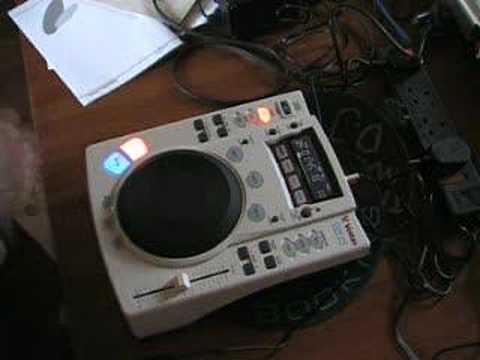
To Abrasaxon and all others a look at the Vestax CDX-05
Contents of the video
0:00 It's known as a tabletop CD player
Alright folks, a couple of people including Abra Saxon has asked me to demo this little unit for you. Now then, it's known as a tabletop CD player. The model is Vestac CDX-05. Now then, I'm not the world's best person at giving sort of demonstrations and explaining things but then again, quite often that could be a good idea because I'm almost like a newbie with this sort of decent technology. Now then, what I will say first of all is that whereas, and this is my own opinion, whereas with a turntable, again, if a turntable is plastic, it feels plasticky, there's something about it. To me a turntable should be metal, it should be hard metal solid. Now this is, maybe it's psychological, I don't know, but this is plastic. Now plastic with this works, this is my opinion, I like this being plastic, it works, there's something about it. It's got, let's just pause it.
There's something about the feel, the touch, the weight, it's nice. It's a decent bit of kit. Sorry, I keep on pressing the button there. Now then, I'm going to show you some of the features because I'm only just getting used to this and to be quite honest, items like this now, these sorts of CD players, I'm not just saying this particular make, I'm saying all of the makes like your Panasonic. Thank you for watching. End of story, period. These guys now, I mean, the only thing these guys can't do is make tea and take you shopping. I like them. Right, now then, we'll start it off, OK? A couple of features which are quite nice with this, and again, with a lot of CD players, you've got a little thing here with a scratch button.
2:04 This guy, when you stop it, it stops
Now years ago when they started making these sorts of CD turntables where you could scratch with, it was terrible because you'd be trying to go all over the place and you wouldn't get the scratch in the right place. So this guy, when you stop it, it stops. And when you want to scratch with it, it scratches. I like it. Now then, I'm going to be straight to the point here. That to me feels and sounds exactly like... A turntable. Alright? Now then, I can give you a definite comparison there because I'm used to, even though I'm pretty rubbish at scratching, I know when I put my finger on a turntable and I do that movement, the sound is corresponding to my hand movements. The same with this. The movements on here are exactly corresponding to the sound that I'm getting. I'll show you again. And again, it doesn't move.
Sometimes, I suppose the cheaper ones, what you'll find is when you start going... You're almost, even though your hand is in the same place back and forwards, what's happening is the sound is moving too much forward or too much back. The sound isn't staying where your fingers should be. So that feature on this is very good. Now then there's a thing called a break. If you press that and stop it, that's pretty cool because it's basically the same sort of thing you'd find on a turntable. So that's pretty good. Now also there's a reverse button here. Now I like this because as soon as you hit it, it doesn't automatically, let's say, stop for a tiny split second like a turntable. If you imagine, right, if you can picture a turntable, there it is, there's the turntable. Now then on the turntable feature, when you've got this automatic reverse button, the turntable has got to stop. There's a lot of weight.
4:36 This, it's not physically impossible, it is possible
On that turntable, and then it's got to reverse. Now, even though it may only be half a second, that deck in that half a second has got to stop and then reverse go around the other way. This, it's instantaneous, so I'll show you. Now that is a nice feature and I would find that very, very difficult to do. In fact, physically, when I mean physically, the physics of turning an actual platter of a turntable, making that platter stop and go the other way in a split second will be almost physically impossible. This, it's not physically impossible, it is possible. Now then again here, pitch control. This particular unit here has got pitch range of minus and plus 100, so there's hell of a way there to go up and down. You can listen. I can't see anyone ever using minus 100, but it's a nice way of slowing the tune down, so you're like... It's almost the equivalent of using the break. So again, you've got...
Plus and minus six. Now again, if you think about it, on a normal turntable, okay, you've got, or quite often now, a lot of turntables are getting like this. They're realising what DJ wants. You have this amount of area here to go say from plus ten to minus ten. But if you want to fine tune it, then of course, instead of let's say when you're in the mix and you're almost getting that beat in the mix, you're moving the pitch very, very slightly. There's tiny, tiny, slight, very small amounts. If you have plus and minus six, then those small amounts can end up being quite big. But then also because you've got bigger movements here on plus and minus six as opposed to plus and minus ten. Then it means you can have even smaller movements here on a plus and minus six, meaning theoretically that you can get it even in tune better. Now I hope you can understand where I'm coming from there. So you've got, excuse me a second, sorry about that, you didn't want to hear me sneeze did you? So there you go, you've got plus and minus six, you've got plus and minus ten, and you've got plus and minus fifty. Now then, there's a bit of a button here called master tempo.
6:42 I'll give you an example
It changes the actual speed of the tune you're listening to, but it keeps it in the same key. In other words, on a normal turntable, when you decrease the speed, it goes slower. But if you listen to the vocals and the melody, it will go in time with the beat. I'll give you an example. So you've got a bass beat, and you hear someone go... Or speed it up the opposite way. Sound like Mickey Mouse. With this, what it does basically is it will slow the beat down but at the same time it slows the beat down, the actual melody and the vocals will stay at the same key. They'll sound the same. So I'll give you a demo of this. I like this. Now this now is on M tempo which keeps the key of the actual melody. Now there is a bit of an echo there but that is to be expected anyway. Same if we speed it up.
Now then, if I depress that, everything slows down. Now probably you had a lot of difference there because I had it on plus and minus 50. If I say just had plus and minus 6, then for fine tuning, okay, because again, quite often what you'll find... You'll have one tune that will be a certain key, another one that will be another key. So you've got two records. This one's one key, this one's another key. But you need to slow this one down a tad, OK, to get it in beat. But what you'll find all of a sudden is you slow it down, the sound starts to change. So all of a sudden now, you're lost because it's a very strange scenario, but all of a sudden, that's the cat running about the place, they're out of key.
So with this device here, it keeps it in key. So if we do it at, where are we now? Say we were at plus and minus six. We'll put it back up again. I'll kick the master tempo in again. And you have a listen. Mind you that's only minus six. Plus six. So that's a good feature. Now then, again, there is a sample unit here and a loop.
This transcript was produced automatically from the audio of the video and may contain mistakes.





