 17:08
Tonor XLR Condenser Microphone Kit TC20 Review and Demo BY Ellaskins the DJ Tutor
Contents of the video
0:00 I would like to introduce you to
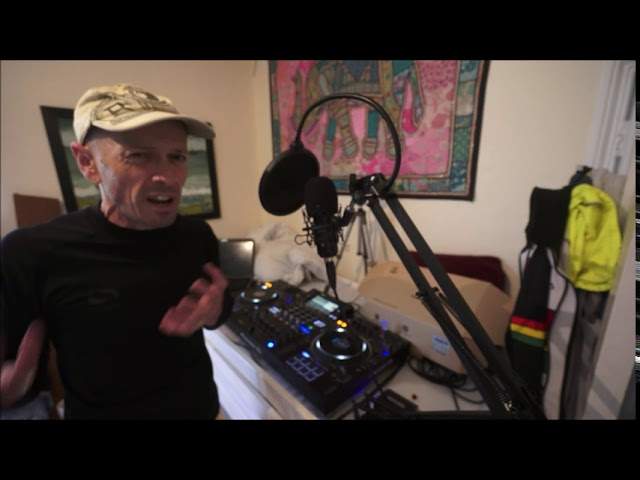
Blaze, say hi. Sabrina, say hi. Meow. The mad cat. Right, ladies and gentlemen, I would like to introduce you to... Ah, Sabrina. OK, Sabrina, you're going to have to get off. Sabrina! You're going to have to get off there, sweetheart. Come on, Blaze, take her off. OK, from Toner we have the TC-20 XLR. Condenser microphone. Now, before I open the box, with what's going on at the moment, loads of people... Sabrina's going to lie on it. Sabrina's going to lie on it. Loads of people are doing live streaming and it's fair to say that, of course, most webcams have got microphones but they're probably not that good. Now, I remember... What's I remember? Maybe you've seen lots of videos of artists singing in studios and they've got these really crazy microphones on a stand with some kind of, I don't know, cover in the front of it. I'll explain what all of these things are but they're hyper expensive. So the TC-20 is one of those but it's the cheaper version. Now that's not to say that it's crap quality. What it is, it's...
It's inexpensive. In other words, you and I can go and buy one without having to pay a fortune. Okay, Sabrina's gone into the cupboard. Comedy. You better get her out there, Blaze. Sabrina! Right, get the cat out of the cupboard. Sabrina, are you going to help us? Look at this cat. Look at that. You are a baby... Oh, okay, maybe she's not a baby. Ah! Give me my handbag! I want my hand, help me, I'm being eaten by a mad cat. Dad? Sabrina, come on. Wait, wait, show them like a party trick thing. Alright, let's see the cat's party trick. Alright, Sabrina, come on. Up. Ow, ow, ow. Alright, enough of that. Come on, enough of that. Enough of the boring stuff, let's open the box. Let's open the box, okay. What's in the box? What is in the box? Now first of all, I'm going to grab...
2:25 Another box that's really heavy because I've got the fisheye
Another box that's really heavy because I've got the fisheye... The fisheye? I've got the fisheye lens. What? Blaze, you're funny. OK, so, here we go. What have we got inside here? We have... Foam! Shush! Two-year warranty card. And the instruction manual. And a cat. She's determined, determined to take over this video. You Muppet! Alright, there we go. Blaze, I think we're going to have to... Can you put... Oh dear, thank you. Ah, see, we have our cat help. Please, Blaze, you better put her out of the room otherwise we're not going to get any peace here. Just careful what she'll scratch you. Okay, so the whole idea of a microphone system like this is that it's user-friendly and it can be positioned in any way. Thus, we have all of these parts. Now here, caution spring-loaded. So again, I suppose you want to watch your fingers here.
Watch your fingers. Watch your fingers, yeah. I'm going to try and watch my fingers. And also, when you buy one of these, slash get one of these if you're advertising it or something, cats are not included. Is that right? Okay, no cats. Kittens, add that one, are not included. Are not included. Okay, so... We'll add the disclaimer at the end. Yeah, I think we'll have to do that. Alright, so what I'll do now, I'll just show you the parts. So, there. Now that is where we house. The microphone. Where was that? That's cool, isn't it? No, it isn't. And this is our clamp for attaching it to wherever. Dad, I've seen a clam and that's not a clam. That's not a clam. No, it's definitely not a clam. It's a clamp. There's a difference between a clam and a clamp. OK, so there's the microphone, the capsule itself. We have excellent attachment here.
5:02 We can move in practically any direction and it's quite sturdy as well
And by the looks of the picture, there should be a cable underneath here. There's quite a bit of weight to this. It doesn't feel light at all. Okay, so this here... Hi there guys and welcome to... That goes over the mic I presume. There we go, look at that. Check it out. Now all of this does look really, really professional. I will explain what this is about very shortly. We have... I presume these here are for just cable tidies, you know, making sure that while you're not using it, you can wrap that around the XLR cable and keep it neat and tidy. OK, so there's the XLR cable. I'm going to put it all together now and we'll do a bit of a demo and let's see what this sucker's like. So let's have a look at the setup. OK, so we have the arm here that...
We can move in practically any direction and it's quite sturdy as well. I like the feel of that. There's the microphone capsule itself. Now this thing here, what on earth is that for? Well, what this does, it's almost like, I suppose a way of describing it, like a windbreak for your voice. So when you talk, not only are you talking... The DJ Tutor offers a wide range of features, including the ability to control the volume of your audio. The DJ Tutor offers a wide range of features, including the ability to control of let's say professional singers in studios you'll find that quite often they've got this sort of really strange thing in front of the mic and that's what it's there for so if i move that out the way here is the microphone now also you get this kind of strange thing on the top of it and this is also another kind of a wind break up until you get to the microphone itself now what i have got uh this mic here
7:20 I'm able to talk here
Needs what's known as phantom power. So in other words, if you get this and you just plug it directly into your DJ mixer, you're not going to get anything out of it. Now I went on the web and I bought this here. This is my phantom power box and this is like peanuts. It was about 12 quid I think. I have gone from the mic input here. So actually let's look at it the other direction. You're talking into this, so this is your mic, so of course your voice or the signal from the voice goes through one cable to the input of the box here. This by the way is the NW-100 and then from the output, so this is the amplifier, this will actually amplify your voice and then the amplified sound then goes from here into...
The mixer. Alright, so I'm going to turn that up. Not too much. One, two, one, two. So there you go. So now I'm able to talk here. I want to give you some really big advice on using microphones and this is potentially some of the most important advice anyone can give anyone about a microphone and it could also save your hearing, also save you having to buy new kit. The list goes on, and I'm not joking. Now, this isn't just about this mic, this is any microphone. So this is some advice that could, like I said, the most important thing that you've got where music's concerned is your ears. It could save your hearing. What you must never, ever, ever do when using any kind of microphone, any kind of microphone, is plug your microphone in...
Turn the microphone volume up on your mixer and then turn the microphone switch on. Now feedback is that whistling sound that you get when the volume through the PA is at a level where the microphone is able to hear itself and you start getting this sound which is a horrible whistling sound. Now, there is more to it. It's slightly more technical but I'm trying to make it so it's simple for us to all understand what I'm on about. I'm going to demonstrate that sound now but only very briefly because it sounds horrendous. Alright, so I'm going to have them... The volume down on my mixer. So if I actually take the camera off the stand, you can see real time what I'm doing. Okay, so I've got the volume down. Now, just for example, if I put the volume up and just put the volume up here slightly, one, two, one, two, one, two. Let me just turn the camera screen around so I can see what I'm doing myself. There we go, I see myself now. One, two, one, two, one, two.
9:57 We turn that off, turn that down, on and slowly up
We turn that off, turn that down, on and slowly up. One, two, there, put it about there. One, two, one, two. Alright, now I'm going to get to the stage where it starts to whistle. Okay, can you hear that? There. Now that was the feedback sound and we don't want that. So if I turn this up, listen. Can you hear that? Alright. So if you imagine now, you've set up all your kit and your volume is up on your mic and you turn it on, it's very likely you will get that feedback straight away. Now I've only, if we look here, I've only turned the level up to about say 11 o'clock. Can you imagine what it would be like if I turned that higher and higher? It wouldn't be... A slow progression of that feedback sound coming in. It would be feedback, boom, in your face straight away. That can not only damage your ears, it can also damage the kit that you're using as well. So this is the correct way of using your mic. This is so important. Trust me, this is so goddamn important. Alright, I know my microphone's plugged in. I know everything's working.
12:21 The setup for this is really, really simple
All the way down, okay? And if you're not familiar with how or where the position of the volume should be, practically with every single pit, pit, pit, piece of kit universal, it is at the 7 o'clock position. Make sure it's at 7 o'clock. On. Now I am ready to go. But if I go to my mic... One, two, one, two. We can't hear anything because the volume is down, but the mic is ready to go. What I'm going to do now is slowly bring this up. Still no feedback. Still no feedback. There. One, two. Now we're starting to get feedback. You can hear that, but I'm now going to bring the volume down. No more feedback. All right? But if I go to my mic now, one, two, one, two, one, two. There you go. That is the correct way to set your mic. Now, the setup for this is really, really simple. So what I'm going to do, I'm just going to turn the microphone off on the mixer so we don't get any crackly sounds. I'm going to turn that off. Now, it's known as a capsule, so the microphone itself, the capsule fits, is placed inside here and I'm just going to take...
Ellaskins, The DJ Tutor. the crossfader Alright, so why do we have this funny kind of contraption? Well, how can I put this? Let's imagine, as I said earlier, you're in a studio and you're the singer. Now, if you imagine in a studio there's lots of vibrations all over the place, maybe from the drummer, even from the keyboard player, from the outside. And in a studio you have got to have pristine sound. And one way of getting that is to have little or no vibration through the microphone. Now that's achieved by this sort of... Crazy construction because what's happened here is you have a circle of metal and inside that you've got sort of rubber bands that have suspended the microphone capsule in its little area there where it's nice and secure. So what happens is if you move that around, it sort of wobbles inside this circle of metal.
14:52 Prices Ellaskins, The DJ Tutor
And that's keeping it away from any outside vibration of any sort at all. Now if you add to that the windbreak that we put over the mic, and if you add to that then the spit break, you have got a complete all-in-one microphone that you can use for your podcasts, for your live streams. It looks professional but... It's a fraction of the cost. And again, the arm itself is articulated so you can move it in any shape, direction you want to. And again, if we look here, I can move the microphone capsule up or down, across, left or right, in any way, shape or form. Now, I'm going to ask you here, I want you to do a test. Go online and look at the prices Ellaskins, The DJ Tutor.
Why don't we make one that is inexpensive and is in the price range of the likes of me and you? So why would you want to buy something like this? Well, like I said, don't trust me. Go online and have a look at people who are doing random podcasts. You'll find a lot of them use microphones like this because they're a little bit more professional and also the sound quality is great. And when you talk, you can talk around it in any way you want. So you'll find a lot of places like, for example, radio stations, when they're interviewing people, they'll have microphones like this. It's the TC-20, so it's known as the TC-20 XLR condenser microphone. Now if you want any more information on this, there will be a whole bunch of information in the description of this video.
Including a hyperlink that will take you directly to where you can get it from. Now I'm going to be using this quite a bit in my video work and hopefully when I start doing a lot more live streams, you should be seeing this in full view. And again, any more info, check out the link in the description, practice and enjoy. Thank you very much.
This transcript was produced automatically from the audio of the video and may contain mistakes.





