 9:01
V Moda Crossfade Wireless Headphones Review BY Ellaskins
Contents of the video
0:00 All of the items inside
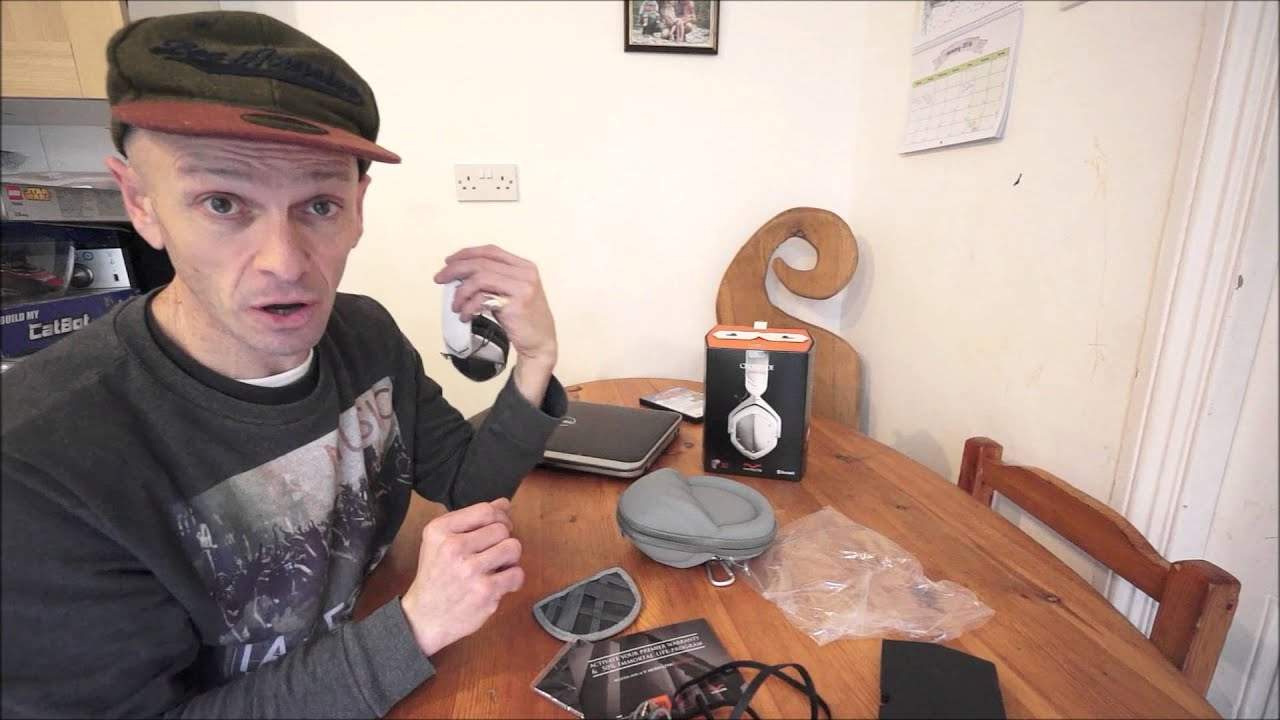
Alright guys, this is my review of the V-Moder Wireless Crossfade Headphones. Now first of all there is the box and I'm now going to show you all of the items inside. Also give you a little bit of a demo. Well no, alright it's absolutely impossible for you to hear what they sound like but I'll explain a few things about the V-Moder headphones and also how you can pair them up with your laptop as well. So there they are. There are the headphones. The left cup is pretty much straightforward and exactly the same as any other of the V-Moder sort of M100s or LPs, very similar. On the right hand cup that's when it gets slightly more interesting, that's where you've got all your buttons for wireless mode. Now they are Bluetooth enabled so what that means is that you can pair them up
With any device that's got Bluetooth capability and there is no need for any leads. It comes with an internal battery and so long as they're charged fully, you'll probably get around about 12 hours of playtime. They're roughly, I think it's 10.3 ounces and they are very similar to the M100s except slightly better fidelity, quality of sound, what the technicians of V-Motor have done. If you're interested in learning more about the DJ Tutor, please visit Ellaskins.com. you forget as we all do to charge them up you can use them like conventional headphones and it will bypass all the internal workings now i have used them wirelessly and the sound quality is pretty damn good but i've been told that the sound quality is even better
3:07 Bed, plug them
If you use them just with the cable, so if you're a DJ on the road and you still like to have a cable attached, you can do so because most mixers these days do not have Bluetooth capability for your headphones. But there they are. Right. What I'm going to do now, let's have a look. Let's quickly show you other bits and bobs. There's one of those in there that is supplied in with the case and that's to attach your cables to. Also, there's a tiny compartment there Throw in this about anyway. Look after it. Okay, you also get a cable here which is a USB cable and that is for charging up your headphones. So some advice for you. Before you go to bed, plug them in. In the morning they're fully charged. Instead of waking up in the morning realising that you've got only two or three hours left of playtime and wondering why you didn't listen to me in the first place and plug them in.
The night before. Okay, so you do get info on vmoda and your headphones and a word of warning here. A lot of people are always asking me where can I get vmoda products from? Now there are certain stores and shops around the world. Make sure they are good shops and if they do sell vmoda headphones then it's highly likely that vmoda have checked them out. Prior to them selling the headphones, if you are a little bit concerned then just go to Amazon. You can get them possibly on eBay but be wary about what you're buying. If the price looks too good then I would say maybe you're not getting the real McCoy because V-Moda Do set standards and the quality is exceptional. So if you do see a set of M100 or the wireless for $200 or £200 less than they'd be on Amazon, then you're taking a chance, a big chance. Right, I'm going to pause the camera now and show you how you can pair up these guys.
4:50 Control panel and in control panel
With your laptop. Hold on. That's Nicole by the way, Ella and Ryan my children. Right so I'm going to go bottom left and I'm going to go to control panel and in control panel hardware and sound I'm going to click on add a device. Now choose device printer or to add to this PC. So on the right hand side I'm going to move this button to the right and hold it down for three seconds. One, two, three. Now I already did this earlier on so it may not pair. So if it doesn't, if we don't see anything here I will explain what you should see. Alright yeah, I've already paired this anyway so what you should be able to see then is
6:13 These are actually paired now
If you wanted to add any other device. So these are actually paired now. So what I'm going to do now is I'm going to pause the camera again and open up the headphones a little bit like that. The track I'm using is from Karmic Power Records. It's from Mr Lenny Fontana. It's by Jason B. It's a tracking title, Do You Remember? But we're only going to listen to it on the headphones. The actual number of this track is KPR147. I'll put in a bit of info in the description. I'm going to press play there. I'm now going to turn these headphones up and if we have a look, we have plus and minus which of course plus is turn them up. There you go. So there's no point describing the sound quality or you trying to listen to the sound quality simply via the microphone on the camera but it shows you the wireless capabilities. There you go.
Alright, so once again these are the Crossfade wireless headphones from Vmoda. I will put a link in the description also to the Vmoda website. If you want any more info or anything like that don't hesitate leave a comment and I'll do my best to answer but that's pretty much it. I will be using these in future videos and I'll be giving sort of my honest opinion over the course of the next month or so. You can also see these in action At the Mobile Beat Show in Las Vegas this March. Check out the link in the description as well. That will be to the Mobile Beat Show, and I believe it's their 25th anniversary as well. And I'll finish off with a big shout-out to Val. Practice and enjoy. Thank you very much. Before we finish, I've got to try this. So, the laptop is there. The headphones are there.
And we can see we're still playing Do You Remember. What I'm going to do now is I'm going to walk with the headphones and see how far I can go before we lose any signal. I'm not going to go a great distance, I'm just going to go towards the doorway so you can still hear them. We haven't got any sort of distortion and the sound isn't breaking up. And I would say I've got to be around about 8 to 10 metres, no say 8 metres. from my laptop and that's that's pretty good and the laptop as well is not in line of sight so then if you can see there it's through there
This transcript was produced automatically from the audio of the video and may contain mistakes.





