 4:33
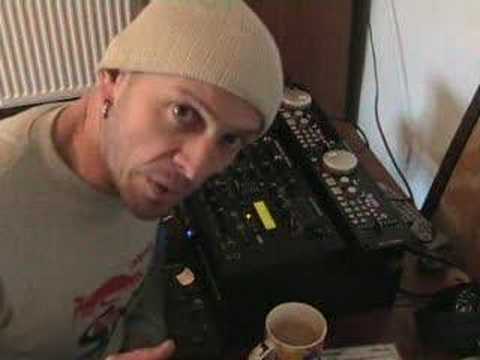
Video 1 , A look at the American Audio MCD 710 and Q-FX PRO
Contents of the video
0:00 The reason being is because this guy here Here's the mixer
Alright folks, Jonathan here. A whole bunch of people have asked me to do some demonstrations and tutorials with American Audio Kit, so here's a couple of items for you. What we've got here, the actual CD unit is the MCD-710, the mixer is the Q-FX Pro. What we've got, even though we've just got a CD player and mixer, we've got three separate entities. The reason being is because this guy here Here's the mixer. First of all, it's known as a 19-inch rack mount unit, or both of them. The reason being is because guess what? 19 inches long and yes, it fits in a rack mount. If ever you've been to any concerts or anything like that, or you've seen bands and you look behind the band and there's boxes full of loads of kit,
1:22 One lead from the actual control panel into the back of the CD tray
Well, 99.9% of the time those are known as 19-inch flight cases and they come in all shapes and sizes. You know, you can put CD players in, you can put mixers in, you can put amplifiers in, you can put effects in, etc. So it's an industry standard 19-inch. And also, very quickly and very briefly hopefully, loads of people have asked me, I've just bought some new DJ kit, how do I plug it in? Here's the deal. Now first of all, this is how this guy works here. One lead from the actual control panel into the back of the CD tray. Then what you've got, you've got an RCA lead from the right-hand CD tray. You've got plugs, but everything, nine times out of ten, they will always come with RCA cables anyway. And those are the cables with a red and a white plug on one end and a red and white plug on the other end. So what you'll do, you'll fit that plug into the back of one side of your CD tray.
The right hand side, and then that will go into the right hand side of your mixer. Very important for it to go in the right hand side, not the left hand side, otherwise it's crossed over, very confusing. And then the same applies to the left hand side. It comes out of the left hand side of the CD tray and goes into the left hand side of the mixer. Like I said earlier, a very brief description about what this kit is all about. Over the next couple of weeks I'll be doing a whole bunch more videos on what these guys can do and maybe can't do. And by the way, first impressions, I don't think there's much they probably can't do actually. So what we've got, we've got this guy here, he's got loads of effects, we've got trans, we've got a manual filter, we've got automatic filter, flanger, reverb and pitch shifter which should be quite interesting to mess around with.
3:07 Start, beginning, press
The actual CD unit does play MP3s. There's one thing I do like, which is a button called BOP. Now, I haven't read the manual properly yet, which I should do. Slight rest. But the one thing I do like about this bot... Now, normally with any CD player, you press Q. If you keep your finger on Q, the music will carry on playing. If you take your finger off Q, it'll stop, but it will go back to its original position. So if I show you, like so. If I press Q and while my fingers on Q, I press play pause, the music will carry on playing. Now what? If I want now the music to go right back to the beginning again, I press Q, Q again, and it will stop but it will start, stop, start, stop, start. Now there's a button here with BOP on it. Now check this out. I've had a mess around and the actual sound quality is exceptional simply because what it does
It will go right back to the beginning and you've only got to press it once and it will just play continually from the beginning again. Have a listen. So, you know, you can have a bit of fun with that. So let's say all of a sudden you think about it. You want to mix a track and you want it to start or you want to mix one track into the one that's playing but the one that's playing you want to start it off again because maybe you haven't got that mix correct and you need to start that track off again. Well, all you've got to do is this. There you go. Started right back at the beginning again. Alright, a very, very brief introductory video into these guys. We'll be doing a load more in the near future. Practice and enjoy. Thank you.
This transcript was produced automatically from the audio of the video and may contain mistakes.





