 2:31
video 1, Small look at the headphone function, DJM-600 MIXER
Contents of the video
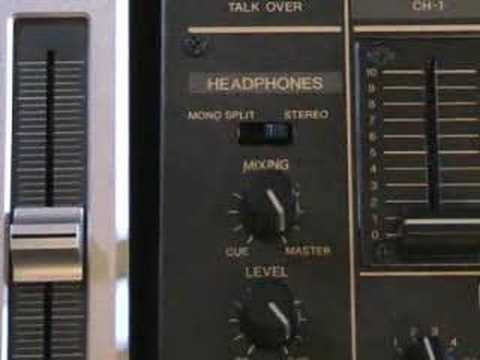
Alright folks, Jonathan here. This is video number one in a selection I'm going to be doing over a period of time looking at this guy here. It's the DJM600 mixer. In this video we're going to be looking at the headphone function which is bottom left hand side of this particular mixer. Okay, first thing we need to look at here is just below the wording headphones we've got mono, split and stereo. When that is set to mono split, it basically means that you will only hear the music through one side of your headphones. Put it to stereo and you'll hear through both sides of your headphones.
Now this guy here for mixing, what that basically does is when it's actually set to cue, you will only hear whatever you're listening to through the individual channels. In other words, when you press channel 1, you will hear totally and utterly what's coming through channel 1 and nothing else at all. You will slowly start to hear what's coming through the main PA system. In other words, you're actually having a mix from, at this point here, what you can actually hear through your headphones is basically, like I said, what's being listened to through the individual channel.
Now as you move this dial around, you're starting to hear, yes, this particular channel or this one, depending of course on which one is actually pressed, but you will also actually hear As this dial is moved towards master, you will actually hear what's coming through the main PA. So you will actually hear as well, yes, what's through the main PA, but also you will actually hear what you're cueing up as well. So you'll be getting a mix of both sounds, of the sound you're listening to through the individual channel and also the sound you're listening to, and that is the master output, which is this guy here.
So that is this dial here, and that's the function.
This transcript was produced automatically from the audio of the video and may contain mistakes.





