 14:00
WHY Buy the Pioneer XDJ-RR a Review BY Ellaskins the DJ Tutor
Contents of the video
0:00 I'm going to give you a sort of in-depth review on the difference
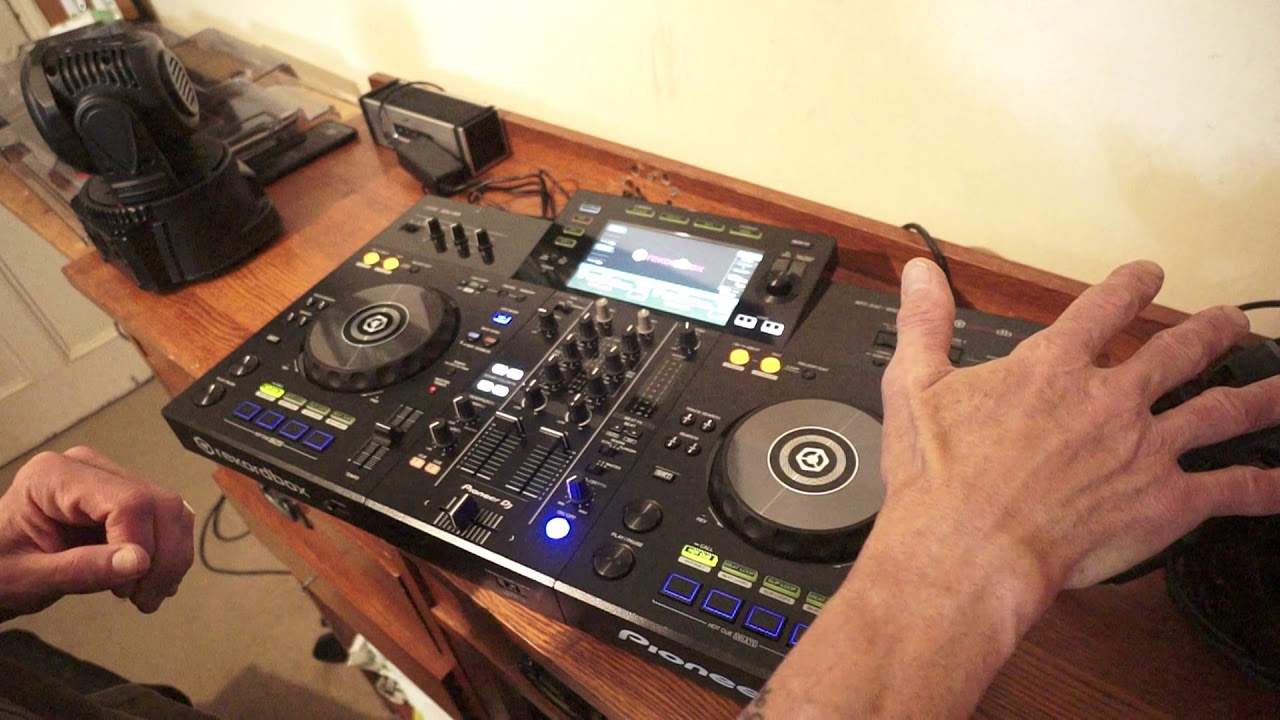
Alright guys, this is the Pioneer X DJ RR. Yes it's been out for quite a while. Yes I have used it before but this is the first time that I've got it to keep now so I can do what I want with it really. Don't particularly want to throw it outside or drag it from behind the car, it's not a good idea. On the other hand what is a great idea is to use it in demos tutorials and also this video... is about the difference between this and the XDJ-RX2, which I've used quite a bit. So, I'm going to give you a sort of in-depth review on the difference. Now, of course, firstly, the RR is slightly smaller. Yes, it's still two channel with a third auxiliary channel, which is exactly like the RR. Sorry, the RX, I beg your pardon. Forget that bit. But let me just get off my seat, which is a speaker. Okay.
So, yeah, every DJ has a seat for a speaker. Let's have a bit of a closer look. OK, so very similar layout to the RX. We have the USB ports top right hand corner, mic on the left. We have our virtual turntables, jog wheels, pitch and so on. But there are quite big differences. Let's start at the mixing area. Now, what we don't have is we don't have the switch above the crossfade to change from through to using the crossfade. That is on the front plate. That's really only the only sort of big difference there. The cue buttons are just below the microphone volume whereas in the RX they are above the channels. The filter dials or the colour dials are the same as, very similar to the low mid and high, just a different kind of plastic. Whereas on the RX they're silver, bit bigger. Now above the trim on the RX2 you have switches to go from the channel you're using to line in, also to phono. You don't have this with the RR.
2:12 All you have is the option of using, of course, the USB
All you have is the option of using, of course, the USB. Alternatively, if you press MIDI, then you can go and use MIDI. You do have, though, on the back of the RR, you have the auxiliary in, which is, of course, for your third channel there. On the RR, you only have one microphone input, whereas on the RX2 you have two. What else? The pitches are a lot smaller, but you can still go from 6, 10, 16 or wide. We have master tempo, you have 4 hot cues instead of 8 on the RX2. And a difference with the effects. Now, the beat effects, you have echo, reverb and flanger, whereas on the RX2 you have a lot more. You have the dial, so... To choose the effects, very similar to the DJM mixer series, you have your colour effects which is dub echo, pitch, noise and filter. Now if anything, the one effect that in my mind every single controller or mixer should have is the filter. It is by anything that it's the best effect of all time. But what is a very good effect...
A very good effect without being an effect is the master tempo because it's not new technology, it's been around for quite a while but what master tempo has achieved is giving people the option of having smooth long transitions. Without changing the key of a track. So, for example, if you had a track at 120 BPM, another one at 140, and you didn't have master tempo, also known as key lock, engaged, you brought them up to speed, whether it be both of them 130 or slowed one all the way down to the slower one or vice versa, they may now be in beat, but it's very likely they might be out of key. Master tempo means that by that being engaged, the tracks keep the same sound. Now on the RX2, same as the RR, we have our loop in, out, we have loop exit, we can also cue the loop, we can delete, we can go to memory based on what we're doing in the likes of rekordbox. Now this is rekordbox ready, so what that means...
4:43 Rekordbox DJ, you download the rekordbox
If you do buy brand new out of the box, the XDJ-RR, you will have documentation in there. Also, you'll have a small card with a key on it. What you do, you go to rekordbox DJ, you download the rekordbox software. If you don't do anything else, I'm pretty sure you might get like a 30 day trial. But because you have bought a new item, you should be able to put that key into a box. I think you can use that on two or three laptops as well. So the screen itself, the load feature, the menu is very similar to the RX2 and again like the CDJs. You have the dial here on the right hand side of the screen, very similar to the CDJ where you can scroll through folders, files, press down and then load according to which side, right or left.
So very quickly as well, the beat effects, echo, reverb and flanger, master volume, trim again, top, mid and bass, also known as high, mid and low. And your colour effects. Now with the auxiliary in you have off, you have line in and portable. This dial here is known as a trim, which is exactly the same as on the two channels, channel one and two. And the trim is a volume control. That's pretty much it. It's a volume control. But just to clarify something here, why you have a trim on every single channel is very simple. Let's imagine you're using all different... types of format and maybe there is one file that's of a lower quality volume or lower volume than another one and you're used to having both volumes up on your up faders to the maximum well if that's the case and you set the trim at the top at exactly the same position the one that's a lower volume as it's been recorded and made will then in turn be a lower volume
7:22 It's the same really, for example, if you're using vinyl
On the mixer itself and the other one will be higher. So by moving the trim according to whether you want it to increase or decrease means that the audio level of the two files will be the same if the volumes are up at the same position and going out through the master. It's the same really, for example, if you're using vinyl. You could find that a vinyl turntable, for example, a good way of explaining it, you've got two vinyl turntables. On the one on the right-hand side, you've got an LP, a long playing record. On the left-hand side, you've got a 12 inch. Now, what you'll find is the 12-inch single will have a higher volume output than the LP. So, of course, you can do one of two things. You can turn the 12-inch trim down or you can turn the LP up. Alright, so to be quite honest, there aren't many more differences. Now, for use at gigs, the RR will suffice.
There's no harm in using it. And again, very quickly, the same with the RR as the XDJ-RX1 and XDJ-RX2. You can download a whole bunch of regular MP3s, load them onto a thumb drive and play them happily all night. But to get the full features... All of the three units, the XDJ-RX1, RX2 and the RR, highly recommend use the rekordbox software. Everything comes to life, you get to use quantize then, you can form loops and if your quantize engaged, you'll know that loop is snapping in time instead of it being slightly off. Also what you can do, which is a great feature, is you can record on USB 2. So let's imagine you've got one thumb drive and it's a 32 gig and you've got 16 gig of free memory. You can still record on that thumb drive whilst you're playing tracks off that thumb drive, but make sure you're in USB 2. So all you need to do...
9:16 Sorry I beg your pardon, I was just thinking then can you?
No, yes that's right you can. Sorry I beg your pardon, I was just thinking then can you? Yes you can. So all you need to do is press the master record and that will start to record your set. And let's say for example you're doing a long mix and you're half an hour through the mix and you've formed a great transition. If you want to snap to that transition straight away without having to listen all the way through Press track mark at that point and that will make a marker. Also, it's the equivalent of doing track 1, 2, 3 and 4. When you've finished, I believe all you do then is press the master record again and that will stop your recording. Now, hope that's been helpful. Also very quickly as well, you can go from jog mode to vinyl mode. Very simply what that means is jog mode, the jog wheel is used to jog the track forward and back.
If, for example, and this does happen, I have the odd question, you know, why is my controller making strange noises? It's going da-da-da-da-da-da-da when I cue up a track. It's very possibly because you're in jog mode and you accidentally maybe move the jog wheel slightly. So what happens in jog mode, the track will cue up and then as you move the jog wheel, you tend to start to go through the track. And what happens? You don't hear a whine or some kind of... You don't hear that part of the track playing just by itself. In other words, for example, if it's one, you don't hear one, you'll hear a... That sort of sound. And as you move that jog wheel, you can hit... And so on. Yeah, all right, sounds a bit dodgy, but that's actually how it is.
11:27 Time mode and make sure you
So if you don't want to have that, go to vinyl mode and then what happens is when you cue the track up it should queue up at the beginning of that track. But if it's not doing that and you're finding when you load a track it automatically plays, which is so bloody annoying believe me... Go to time mode and make sure you are on AQ, auto cue. That means then when you load up the next track it will queue up at the beginning of that track and the only way of playing it is for you to press play. Okay small point there I hope this has been a help if you want any more information oh yeah also as well we have the headphone in which is quarter inch jack and mini jack and pretty much every single Mixer and controller does that. Now, the one final great feature, the best, it is undisputedly the best feature of the XDJ-RR is this. You can of course use a laptop, no problem, USB in the back, laptop and away you go, happy for the rest of the night with rekordbox. But, prior to your gig...
If you're a little bit concerned about your laptop maybe updating or something going wrong, just think on pure logic here. If you know roughly, no, if you know what you're going to play during that evening, for example, if you know it's going to be a party set, it's going to be a house set, a trip hop, drum and bass, R&B, soul, whatever. Even if you're a wedding DJ and you know what you're going to be playing on that night, why don't you open up rekordbox on your laptop? Download all of the tracks you know you're going to play and including loads more, put them on to two thumb drives in rekordbox and then put them into the player. And now with them in the player, rekordbox friendly, there is no need for a laptop. So you can, not pretty much you can or maybe, yes you can turn up to a gig, you plug from the back your...
If you're looking at a screen, it's smaller. But it will have enough information on there for you to carry on for the rest of the evening. I hope that's been a help. Practice and enjoy. Thank you very much.
This transcript was produced automatically from the audio of the video and may contain mistakes.





