 10:07
WHY You Should or Should Not Buy the Pioneer DJ DJM-V10 6 Channel DJ Mixer
Contents of the video
0:00 Here's a quick look at the DJM V10
Alright, so here's a quick look at the DJM V10. Now, there are loads of videos online but I haven't done mine yet. What do I think about it? Now, I don't know everything about the mixer but what I will explain is what I know about. And I'll also explain in this video why you should definitely get the V10 and possibly why you should definitely not get it. But the why you should definitely not get it is not a bad thing. Alright, so don't panic. DJM-V10, six channel mixer, Pioneer's like just monstrous top of the tree mixer. Amazing. Now I don't know but logic tells me if this is out then there's going to be something to complement it in the near future so if you are watching this in a year, six months time and you're thinking well hold on a minute what's he on about? When I made this video I had no idea. So
One of the best features by far I think on this mixer, which is strange really a lot of people think that but it's the fact that you can plug two sets of headphones in. Now I personally think that any mixer that's four channel should have the capability of doing just that so what does that mean? So on the front of the V10 right hand side you've got an input quarter inch and mini jack for one set headphones Top, sorry, bottom left hand corner, you have another input for another set of headphones, quarter inch and mini jack. Not only that, you can plug in four sets of headphones at the same time. Yeah, so if you think about it, you could potentially have four DJs working this mixer. You can. Not only that, but what the V10 has given us is complete separate control
2:19 Headphones A here and headphones B over there
Over the volume and your mix of the sound on the headphones you're using. So what does that mean? Well, basically a normal set, a normal mixer, even if you've got two sets of headphones in and there are two DJs, you will be listening to what the other DJ is doing with the V10. You don't have to because you have your own separate level and mix. And you can hear what you're doing separately to the other DJ. But then you can, if you want to, you can listen to them and just stop. So, for example, you can press the cue and you can link in to, I presume, what they're listening to. Press that again and then you can carry on listening to what you're listening to. Small feature, but to be quite honest, I think that is one of the key features here of the V10. OK, six channels.
Headphones A here and headphones B over there. Above headphones A we have our effects similar to where the colour effects are on the 900, so we've got short delay, long delay, dub echo and reverb and we've got two buttons there for external effects, size feedback, time, tone of the effect and master mix level. Above that, we've got the resonance dial for our filter effects, low and high pass filters. So using the filter dials, we can have either low or high pass. So it's slightly different to the 900. The 900, you had filter and you turn the colour effect dial. Here, it's very similar to the DJM 2000 with similar sort of... The DJ Tutor allows you to choose between low and high pass instead of low and high in one go. Above that we've got mic and then here we can plug in two laptops so again at the same time you can use vinyl, you can use CD, you can use your laptop. Usual low mid and high trim and here this small little dial here comp.
Short foot compression I believe and this is stunning. I love it because what it does, for example if you're playing a really good techie sort of track, a banging techno tune, you can whop that compression up and it'll just give that track just balls. It will give it some just, it's almost like sticking a piece of dynamite inside that tune and giving it some spunk. It's amazing. Love it. Alright, so be wary with that though because if you start using that too much, you'll end up just turning it all the way to the full which is 5 o'clock and just leaving it there. In fact, I'd probably do that. I'd probably just leave it there. Anyway, right, but I can't. I've got to give this back. Such a shame. Never mind. Right, so booth output as well. Another great feature. We have low and high EQ on the booth output.
5:04 This is a great feature here and they've made them big and bulky
Beat effects, what we've got is we have like the 900, we have low, mid and high kill. So if you want to, you can just have the mid, just have the low, just have the high or have the low and the mid or have the mid and the high. But above there, we've got these three rather large knobs. Amazing. So what those are for is instead of just a kill, Separate the sound how you want it. So this is a great feature here and they've made them big and bulky. You know, you can't miss these damn things and I'm sure you could give those a really good twist and get away with it. So we've got low, mid and high. So what that means is that instead of having a complete kill, you know, if you just want to have a really nice bassy kind of echo, you can really hype up the low, take away the mid a little bit, completely kill.
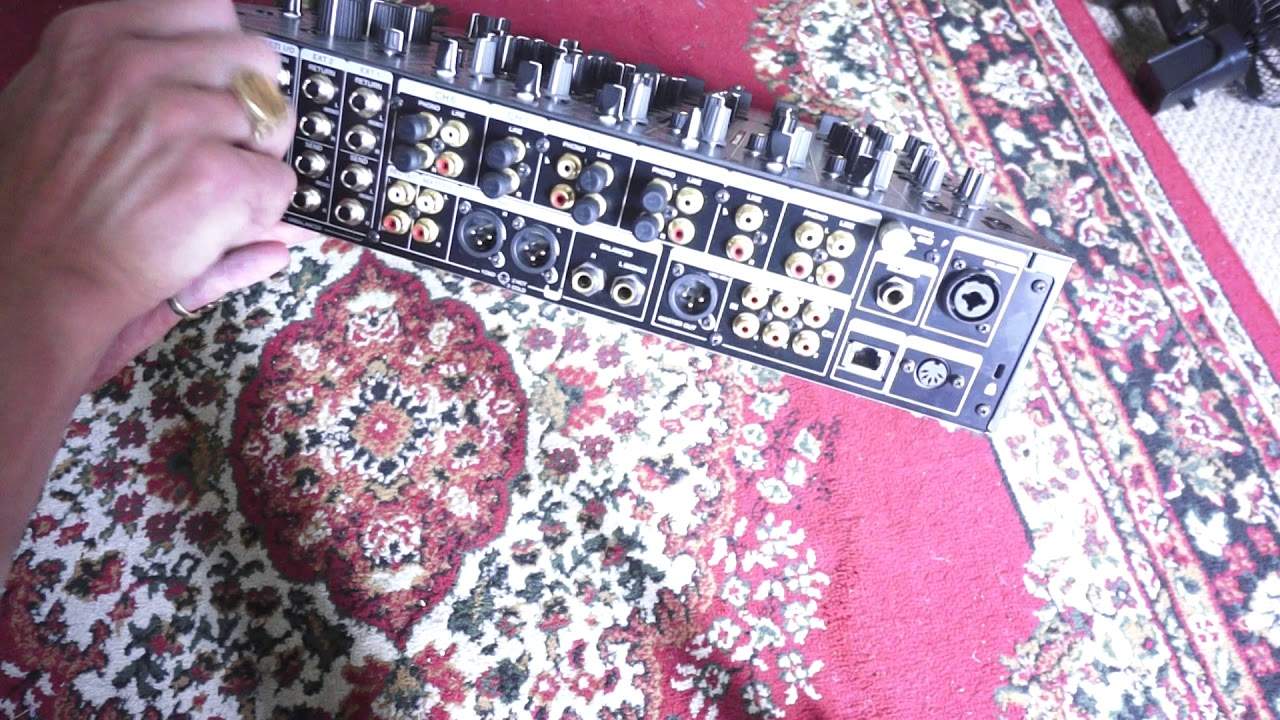
The high with the dial, alternatively press the button and you've got one wicked, wicked sound. So again, you can make it your own. Now I'm going to turn the mixer around and we'll have a look at the back. There's 6,000 million inputs here. Just put it like that. Okay, so power on, power in, big chunky things here for your vinyl. Loads of send and return for effects. So again, if you think about it here, you know, you don't have to just have one external effects unit. You can have a multitude of them. Channel 6 is for phono and line. Channel 5, line only. Channel 4, phono and line. Channel 3, phono and line. Channel 2, line. And channel 1, phono and line. Digital in as well. Master out, we've got booth out which is balanced, master out here and record out and master out which is RCA. And MIDI out here and of course link input. So the link input is quite important especially if you want everything all yet.
7:41 You really are wasting your time
So, why would you buy this? Alright, so again... If you are a professional DJ nightclub and you're always having DJs falling over each other, wanting to play a track and waiting desperately for the headphones, then there it is. It's all yours. Why wouldn't you want to buy it? Why do you not want to buy this? Well, let's be honest. You've got loads of money, money's no object, and you just want to impress your neighbours. You really are wasting your time. You know, you're better off getting the DJM-900 Nexus Mark II or the Nexus Mark I or the 900 because it's going to work. It's going to serve a purpose. Whereas I would hazard a guess to say that for every 10 DJs who buy this, there'd be a fraction of them who will be using the six channels.
Most of them will buy it just so their friends can come around and think they're amazing when they just want to impress. But you see also with the V10, what you have to remember is you can plug in external sources like effects. So you could have two or three channels with different external effects units and have two or three channels with your CDJs. Or vinyl. Now again, if you think about it, if you have got two vinyl turntables and four CD players but you're always switching from one to the other, well, you don't have to with this because you can plug all of them in at the same time and use them all. So there are a lot of key features here. I can see this really, yeah, it's for a nightclub. It's meant for a nightclub. Anyone using this on the road as a mobile DJ, then you must be like the young version of Arnold Schwarzenegger because it is really, really heavy. You get this in a flight case with a couple of CD players and yeah, you're going to have to be very, very strong to carry it in. Well anyway, a small take here on the DJM-V10 and I would say that yeah, we've got this out now.
It's very likely soon-ish there's going to be players to match, but time will tell. Practice and enjoy. Thank you.
This transcript was produced automatically from the audio of the video and may contain mistakes.





