 9:21
Wing Stand from DJStandz
Contents of the video
0:05 Now in this video we're looking at the Wing Stand from DJ Stands
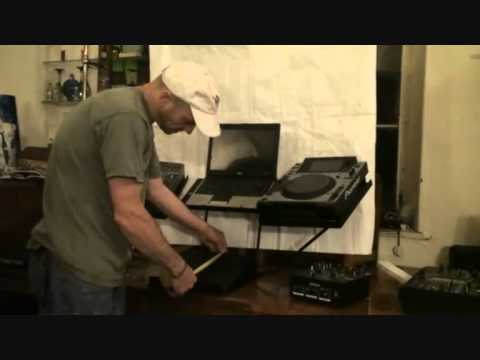
Alright guys, now in this video we're looking at the Wing Stand from DJ Stands. Now it's called the Wing Stand because, if you can't work that one out you're a bit of a muppet. Right, so there it is. What we're doing, we're looking at it now let's say from the crowd's point of view. And turn it around like that. There you go. Now first things first, in the United Kingdom you can get this from quite a few of the more well-known retailers. So, alright what have we got? We've got spongy bits there. CD players, and whatever you do, there's two of these, don't give them to your missus because she'll use them for cushions. She'll probably put stuff around them, so hide them. There are some holes in the top of here which I will explain what they're for very shortly. So, one, two, three, four platforms. Now, again, what you've got to do is sort of think outside the box. What can you use it for? Well, stereotypically I suppose you would put your mixer there, laptop, CD players, but no reason at all why you couldn't put your mixer there.
And your CD players there. Your laptop down here. I don't know. It's entirely up to you. So, where's my laptop? My God, it's gone. Oh, there it is. Right. Now, just like to show you my laptop. Top of the range laptop here. Look at that. Look at that quality. Look at that. Marvellous. Completely knackered. Right, so I'm going to put that... Right, laptop there. And let's say, for example, we'll put a 2000 there. Or we've got the likes of the Stanton C.324, put it there like so. Now the bottom part here you can put virtually any mixer. I will give you an example. We've got Denon, it's DNX120. Now it's a small mixer but this guy has got a knobbly bit, switchy on off bits etc. Now here you've got a small thin plate.
2:09 Like the DJM2000 as well, that will fit quite snugly on there
That's to stop your mixer from sliding off. But the trouble is, knobbly-pokey out bits there, of course, you can't have that against there, so you can have that in the middle, so it's quite fine, no worries. Like the DJM2000 as well, that will fit quite snugly on there. Even though the plate itself is a lot shorter than the 2000, it doesn't wobble about, so it's quite secure. Now also as well, if you do have any controllers, I've got here the Traktor Kontrol S4. Now this guy here again has got some pokey out bits there. You've got cue mix, cue volume and mic volume and headphones. Now again, the beauty about what I'm doing at Web2, I will put a link in the description to DJStands.com. So if you are interested, and let's say you have got a controller like this,
Just to let you know, there is, like I said earlier on, a thin plate there. So of course when you fit that against there, you're going to have cue mix dial against the plate. You can't go in fact, you can't move it over. Ah, never mind. But what you can do is you can contact people and ask them just to cut away a tiny bit of that plate. Simple. That's all you've got to do. Right, people are always asking about sizes. So that's further ado-doos, I will tell you exactly how big it is. It's a bit rude that. So from right to left on the areas where you put your CD players, you are looking at roughly 13 inches which is 33 centimetres across and then from top to bottom you're looking at 14 and a half inches which is roughly 36 and a half centimetres. Bottom plate
4:29 I've got to be careful with this laptop
This is a rough estimate, so don't take this as precise measurements. And then you're looking at top to bottom, 27 and a half centimetres, which is about 11 inches. And then from side to side, it's big. There you go. Thank you very much. Right, now then, I'm going to take these off because there's more to this than eyes the meat, which is really good. Right, I'm going to put that down there. I've got to be careful with this laptop. Oh, damn! There. Right. No, modern day age, everyone likes to accessorise. You know, there's no point in having a set of earrings. You've got to have earrings, studs, eyes, nose and things in your mouth as well. What you can do with this is you can accessorise. Now what I'm going to do is I'm going to turn it around like this. You'll like that. I just felt that turning it around. Now I've got to be careful because the camera wasn't secured on the stand. Okay. Can you see some holes?
One, two, three, four, five. And we have some in the centre as well. Now this is cool. This is very cool. Don't drop it. First of all, hopefully the camera will stop going bleary bleary. Stop going bleary bleary. There it is. Right, I don't know if you can see that strip. That is an LED strip. We'll get that working in a second. There you go, DJ stands. I'm pretty sure normally that will be polka dot, but what you can do is you can accessorise and you can get these if you go to DJ stands and it's just a question of screwing those in. So what I'll do very shortly, I'll pause the camera and I'll fix that in for you. Now also, you can get two of those, one either side. Also what you can get is this guy. And that is for your iPad. And that will fit like so. There you go. And again, you can see you have the... Trouble is when it's dark, the camera does tend to go a bit blurred. So we'll zoom out. There you go. One, two, three, four.
7:12 Here we go, fitted and working
This on the right or on the left and that will fit like so. So what I'm going to do now is just pause the camera and get these fitted up for you. Okay, so here we go, fitted and working. Now you'll notice that at the top there. Don't worry, you won't have anything like that sort of dangling all over the place but that is a small control unit for the LED strip on the underside of here and if we press that we can pause it. The DJ Tutor allows you to change the color of your iPads. The holes are identical so you can put an iPad on either side. Okay, Wing Scratch, Wing Scratch, Wing Stand from DJ Stands. Like I said, I'll put all the information in the description, the link to DJStands.com as well. Any more info you need, then like I've said, don't forget you can contact these people. They will talk to you, alright? Nice one, practice and enjoy. Right, just thought I'd show you as well. See, I love the way the web works. This is the website.
And last but not least, let's go here and big shout out to all these people. Once again, practice and enjoy.
This transcript was produced automatically from the audio of the video and may contain mistakes.





