 20:32
XDJ-AZ Side BY Side with the Opus Quad Are You a Mobile or Club DJ What to Buy
Contents of the video
0:01 Welcome to the bedroom and welcome to my studio
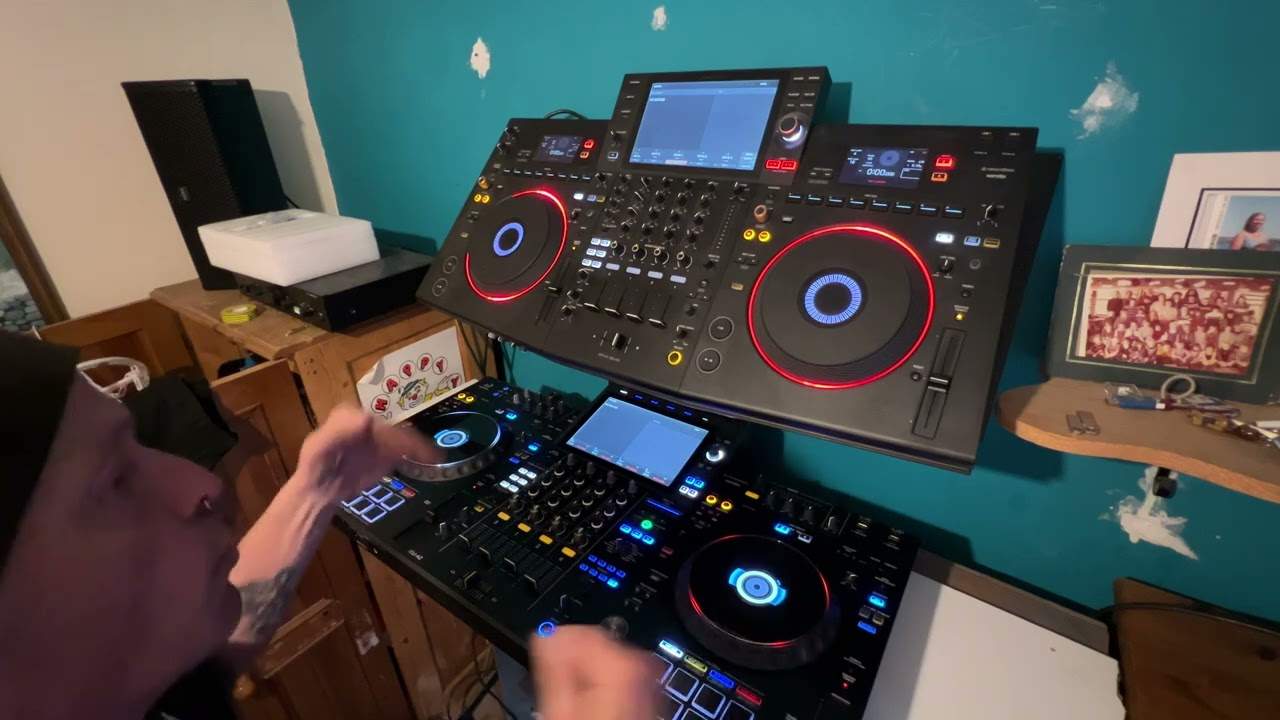
Right, ladies and gentlemen, welcome to the bedroom and welcome to my studio. Now, of course, if you know me, you know it's Punk TV, I've always said from year one, and I've been doing sort of YouTube videos for, crikey, since 2007. Don't like to change, rough ready, but hopefully I inspire, teach, motivate and give you videos without the CRAP just as it is. First of all, my disclaimer. The controllers were given to me free gratis and for nothing, but I will be giving the Opus Quad back because in return they've let me have the XDJ-AZ. And also you'll notice we have the covers on. They were given to me by a really good company called Decksaver. Now you may notice, hopefully in the video, that they're a bit dusty. You know, I haven't cleaned them off.
There's good reason for that, because I would like any professional or anyone out there who has kit like this would more so want the dust to land on a cover instead of the controller. Hence why they're dusty, because what would you prefer? Having layers of dust? On a nice bit of a hardened plastic that you can take off to reveal a clear undisturbed controller or the controller full of dust. So I'm going to take that off, the Opus Quad which is at the top and the XDJ-AZ which is underneath. Now I'm not going to be physically using them. and playing because there's probably not much point uh again a lot of people what they do is they'll play a track and say listen to the audio well of course you've got to remember that you know most people now will be using like i'm using the microphone from the camera and it's pointless playing the audio because you're just going to be picking it up from a dodgy microphone from an iphone not saying that they're dodgy but you get what i mean
2:36 The XDJ-AZ really is sort of the XDJ-XZ on steroids
So in this video what I'm going to try and do is give you an overview of both of them, and then maybe you can make up your own mind as to which one you want. Now the first thing that's very apparent to me is that the XDJ-AZ down here is a lot more like the industry club standard CDJ and A9 mixer you would expect to see in a nightclub. Whereas the Opus Quad above it is more akin, let's say, to your professional DJ sort of person like myself who still wants the usability functionality of an all-in-one console but then isn't really akin to the CDJs, the Nexus 2000s, 3000s and so on. The XDJ-AZ really is sort of the XDJ-XZ on steroids. Now, very quickly, not quickly, so I'm going to run over key features. Now, first of all, the Opus Quad. What you have is you have a microphone input on the front.
And one on the back. So for ease of access for the mobile DJ, you've got your trim, you've got your bass, mid and treble, you've got a small switch here which you can turn the microphone on and off. Whereas with the X, sorry the AZ, you have very similar to the XZ top left-hand corner, you have your two channels, I'm spitting as well now, two channels for your For your microphones, the AZ you can use what's known as, let me get this right, the Sonic Link. So what you can do is you can plug in your Bluetooth speakers. Now I haven't done that yet but allegedly there is very very minimal latency. Now if like me you're a keen mixing DJ and you mix solely by ear then I've yet to try that because I'm the sort of DJ, like I'm sure a few people watching me, where you can sense exactly if it's a fraction out, too fast, too slow. So I've yet to use the Sonic Link and see how accurate that is. Alright, so the Opus Quad, you've got two load buttons for 1 and 3, 2 and 4, whereas the AZ, you've got four separate buttons.
4:51 I prefer that so you can see exactly what you're loading on to
I prefer that so you can see exactly what you're loading on to. Above, there you go, it's gone to sleep. Above the jog wheel we have two buttons here for channel 2 and 4 on the right and on the left we have for channel 3 and 1. Similarly with the Opus Quad but it's next to the small screens 2 and 4, 1 and 3. Now with the Opus Quad You have three screens. You've got your touchscreen in the middle and above the jog wheels you have got designated small screens for that designated side, whereas of course the AZ you've just got the one big touchscreen in front. Now also as well with the Opus Quad you have two USBs on the top, you've got two USBs on the AZ but then at the back of the opus quad you've got another usb plug as well now the one downside i personally think that again i don't like is that the output for your laptop if you want to plug in your laptop is usbc now with the normal usb plugs that you would normally have you know the square block that you click in the back for me that was more like
Push in and you felt as though it was solid. It sort of clicked, almost clicked into place. Whereas the USB-C tends to slide in and I just have this feeling always in the back of my mind, is it going to pull out? Same with the Opus Quad. USB-C in the back to your computer, same thing. But this is the key here and this is what you need to wrap your head around. Once you have put all of your tracks through the appropriate software, there's actually no need really for you to plug in a laptop. But there is, of course, if you're like me and you tend to do quite a few video DJ setups. So of course you will need a laptop for MP4. Now I'm looking forward to the time when we have, and I'm sure we will...
7:34 What else have we got?
When we have a controller like this, and hopefully someone from the company is watching this, where you can have an all-in-one controller, and this to me is what is missing in the likes of the AZ. An all-in-one controller that's suitable by itself to play MP4s, and small screens with the small tiny window. The DJ Tutor allows you to mix the MP4 on the screen, which would alleviate the fact that you have a laptop. The Opus Quad or the AZ in front of you on a suitable DJ setup. You know, people aren't going to look and think, oh, I don't like the look of that. You know, 99% of the public out there are interested in having a good night listening to good music and they wouldn't know the difference between an Opus Quad and a DDJ-400 so long as the DJ is doing a good job playing good music.
They don't care. All right, what else have we got? Now with the AZ, we've got a few more effects. So on the right hand side here, we've got a lot more interesting effects. You know, we can go split through the channels again, low, mid and high, similarly to the standalone mixes themselves. And what I do like, one effect is the triplet roll. So that's when you have an accent. So instead of it being bam, bam, bam, bam, bam, it's almost like a ba-ba-ba-ba-bam. So you get a roll inside the roll. Again, I could show you, but why not check out a load more videos that are out there? Now the jog wheels are practically, I'm pretty sure they're the same size. The Opus Quad, a slight variation in the look of the outside of the jog wheel, yet the AZ, the jog wheels are very similar to your club standard separate CDJs. Okay, so again what we've got, we've got a really nice touch screen on both of them. We have the usual dial here where we can scroll through, hopefully you can see that, if you can't do apologise.
9:53 The settings, press down, load up
The settings, press down, load up. Again, we've got no device on both of them. What we can do with both... Hold on. No, we can't with that. Again, sorry. Just remember, this is Punk TV. With the Opus Quad, what we can do is we can press on the screen and we can select what we want on the channels. Now, with channel one and two, the centre ones, exactly the same with one and two, On the AZ are the designated channels for, of course, the right and left. So if you're just a usual DJ, and let's be honest, most are, I will talk a little bit about what I'm explaining now very soon, we mix from one side to the other. So on the AZ, you'll go from channel 1 to 2, 2 back to 1. Opus quad, exactly the same, from 1 to 2, 2 to 1. And on the opus quad...
We can hit through, so that of course will disengage the crossfade. You can go to B, so you can go, the channel 2 then is on the right, got a deck 1A, now deck 1 is on the left, so now you've engaged your crossfade. So again, just on the off chance if you think something's going wrong with the Opus Quad and you can't understand why the crossfade's working, just make sure you're on the correct channel. If we go to Deck 4, there what we can do is we can select Deck 4 Line, Phono or Bluetooth. Now on the back of the Opus Quad is very similar to the back of the AZ. You've just got two RCA inputs and you can plug into those RCA inputs either the likes of a CDJ or a vinyl turntable. For channel 4 and channel 3. And then you select here, so for example if I'm using a vinyl turntable on channel 4, we hit phono, press down, deck 3, hit line, press down. Pretty much exactly the same with the AZ. One very good difference with the Opus Quad, and this is where it stands above the AZ.
12:40 Same with the Opus Quad, quarter-inch jack
For, especially for a mobile DJ. Now this wouldn't really apply to a club DJ because if you're a club DJ, you're going to be playing theoretically in one room for one crowd. So AZ, you're playing for one crowd and there's one master output. Whereas the Opus Quad, you've actually got another output. So what you can do, you can utilise the Opus Quad to play tracks in another room. Because there's a separate XLR output for the other room while you're playing to another crowd in the room that you're in, which is a really nice feature. And that is excellent if you're a mobile DJ and you've, let's say, got a lounge where people are just walking in, having canapes, having drinks, you know, before they come into the main event. Whereas with the AZ, you've got your master out, you've of course got your booth.
Which is quarter-inch jack. Same with the Opus Quad, quarter-inch jack. And you've got RCA out as well. And RCA out as well on the Opus Quad. I mean, overall, they're pretty much kind of the same. Now again, the AZ is like... The XZ, as I said earlier, on steroids. You know, similar kind of layout. You've got your hot cues, beat loop, slip loop and your beat jump right in front of the turntables themselves, the jog wheels, whereas on the Opus Quad they're above. So you have eight of them. One, two, three, four, five, six, seven, eight. Nearly said nine then. Exactly the same. On the AZ. I'll be honest with you again, I haven't really used the AZ that much yet because I've been really busy. One of the features I do like is there's a small wheel here which is mixer settings. So you normally have, you know that little, it's like a cog and you find that on practically every single software out there. Press that and you can go into the software settings. Very similar.
15:16 Exactly the same deck, line, phono or Bluetooth
With the AZ, we can go into the software settings now for the whole unit. So we can set channel fader curve, we can set the curve on the crossfade, we can set the deck for line, phono or of course Bluetooth, which is quite interesting. I personally, I am not saying I like or dislike Bluetooth, but I prefer to have hard... In other words, you know, an actual physical input instead of a kind of a Bluetooth. But let's imagine, you know, for example, you've forgotten an RCA in or you've forgotten a separate deck. Someone comes along, you know, you're doing a birthday and they really want you to play a track. But you don't have it. If they have their phone, then you should be able to Bluetooth it in. Okay, so when we go into the mixer settings here, now we can set the deck input. So we can set the deck input for channel 4 on the right and we can set the deck input for channel 3 on the left. Exactly the same deck, line, phono or Bluetooth. We can set the EQ, we can set the headphones.
The level of the headphones, we can set mic settings and also record settings as well. Press that back and we go to the screen. Now you'll notice on the screen here on the AZ, we can see four channels on the bottom. So if you go into the settings, you can set that to have the four channels showing or just the two. Now back to what I said earlier on about... Deck one and two. Now I'm old school, I like to use my ears. And that means that if I do a mix, I'm 99% of the time, I'm just doing two channels. But there are DJs out there who would of course like to mix four channels. There's nothing wrong with that. So if you're fantastic at mixing by ear, then of course go for it. Not many people can. But if you can't do that, of course, that's when you will use
The sync function. And if you've got sync function engaged, then you can clearly see where your tracks are. And then of course it's up to you to form some kind of wicked mix. My only advice there is don't overdo it. You don't want too much. So a great way is maybe downloading some tracks that maybe one track is just a bass line with a slight beat in the background for tempo and then the next track maybe is A good solid beat. The third track could be, say, an acapella and the fourth one could be a melody. Again, quote me here please in a comment if you've got the likes of stems, then of course you can separate on the full channels. Really nice touch to both of the mixers and the AZ, the feature here on the colour sound effects dials is more akin to
18:33 I hope this has been a help
The separate mixer that you would have in a nightclub, whereas what they've done with the Opus Quad, they've given it that kind of gold feel. The top is slightly gold. It looks a little bit more professional, but then the AZ looks more sort of industry standard. Not much more I want to say at the moment because as I said earlier, I need to really Have a lot more of a go with the AZ. Again, exactly the same with the XZ top right-hand corner. We have a master output dial and also we have bass, mid and treble. I think I'm going to finish off lastly with explaining that if you're a mobile DJ and you're after something that does the job, that's not too all over the place. And you want to look professional, you want your kit to look professional and you want to do a great job without too much going on in front of you, then the Opus Quad is for you. On the other hand, if you're more a mixing DJ who wants tactile functionality, you want to be seen moving, touching, turning, pressing and so on, then 100% the AZ is for you. Alright, now I hope this has been a help. Please...
Give me some feedback in some comments. I'd love to hear your reactions. Have you got the Opus Quad? Do you like it? Do you regret having it? Have you got the AZ? Do you prefer that? Did you have the Opus Quad and you're glad you got the AZ? Or did you have the Opus Quad, you got the AZ and you wished you hadn't got rid of the Opus Quad? Because believe me, by leaving comments like that, you not only help me... To get some kind of feedback, but you also help other people making the right choice. And once again, I would like to say a big thank you to Decksaver. Now, I can't stress this enough. If you're going to spend a lot of money on the likes of a controller like this and you just leave it out in the open, then fair enough. You know, stick a cloth, stick a blanket over it.
But, like me, if you've got a house full of cats, well I've got two, and they tend to sort of jump on things, the last thing you want is dirty footprints. And we don't want that. And you won't get that if you cover it over. So, a big shout out to Decksaver, thank you very much. A big shout out to Alpha Theta, formerly known as Pioneer DJ. I will put a link in the description to Decksaver and to Alpha Theta, to the AZ... Thank you for watching. Don't forget, please leave a comment. Thank you. Practice and enjoy.
This transcript was produced automatically from the audio of the video and may contain mistakes.





