 8:36
Xvive U45D Stereo IN-EAR Monitor Wireless System Is It Any Good for a DJ?
Contents of the video
0:01 The reason being is because they make good quality products with top m
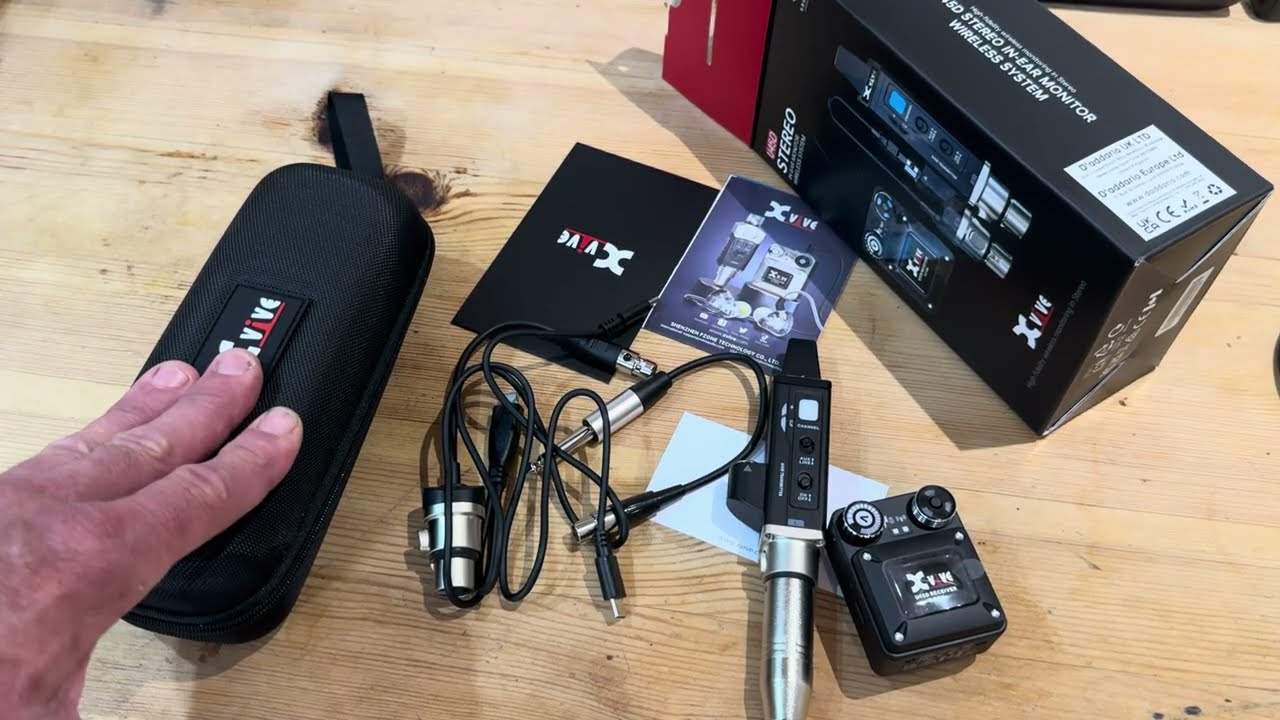
Alright ladies and gentlemen, in front of you we have the U45D stereo in-ear monitor wireless system from XVIVE. Now you may have noticed in my previous videos I have used XVIVE in the past. The reason being is because they make good quality products with top materials. Nothing flimsy and plasticky about it. Also... My disclaimer, the product you see in front of you was sent to me for free but the company are not paying me. They basically sent me the product and just said just do your thing which is what I'm doing. The other reason, the main reason I wanted to review this product is because a lot of modern day controllers and mixers are having Bluetooth connectivity. So in other words you have a set of Bluetooth speakers, you plug them into your mixer and you connect and away you go. So if you haven't got that the pleasure of having Bluetooth and you've got yourself an old controller or an old mixer, this is potentially, potentially the next best thing.
This here is the transmitter and this here is the receiver. So I can explain now how you would use this if you're a mobile DJ and you haven't got any Bluetooth at all. So if I just unplug that, so it comes with the connector into XLR there and then also you've got these two here. The mini XLR fits in the top here, so you've got a quarter inch jack there and you've got a connector for a quarter inch jack. Also, if you are using this for, let's say, an act band purposes, then you're more than likely going to use that XLR. But either either, you may be asking, and I'm going to answer that question now that's jumping around in your head. All right, Jonathan, well... I'm a DJ, how on earth do I plug that into my mixer? So here we go. So this is what I would be doing. I'd plug the other quarter inch jack into here. So I've got two quarter inch jacks, but how on earth are you going to plug those into your headphone socket? Well, take a look on eBay and I guarantee you they will have a female-to-male plug. So what am I on about?
2:54 We've got 5.8 gigahertz
Twin right and left quarter inch jack into a stereo quarter inch jack. So you can either go quarter inch or micro jack. So that's what you would need to plug in to your mixer. And then, of course, we have the receiver, a micro jack at the top, stereo, and then you just plug your headphones into that. So what this does, it eliminates that stretch and pull cable on your headphones. Right, that's done and dusted. So what have we got? We've got 5.8 gigahertz. It's six channels. So again, 5.8 basically eliminates the problems. I think it was like 2.2 gigahertz where a lot of phones are being used. So 5.8 technically is a lot clearer. Also... 5 hour, that's right, it's a 5 hour battery life. Now I believe it's about 2 and a half hours to charge but if you're say a solo act or in a band generally it's 45 minutes to an hour and if you're playing two sets you can always plug it back in but I mean 5 hours is pretty good. Okay so on the side here now this is really more for the likes of
Someone who's in a band so we have stereo so that's where you would be if you were a dj and you wanted to have a stereo mix we can flick this over and we can go to the mix so basically there what you're going to be listening to is the overall mix of the entire band or you can do left and right in the middle so again six channels you can choose your channels here and this i believe is your volume control And you've got on-off at the top. What else can I tell you about it? USB-C, that's it. All right, something now that everyone should do. And if you're not doing this, if you're a company and you're not using USB-C, where have you been for the past however long? Micro USB is okay, but if you're anything like me, you twist it one way, it doesn't...
You twist it the other way, it doesn't plug in. And then you twist it the first way and it plugs in. Don't ask me why that happens. It always does. It's just a bit of a nightmare. I've mentioned about five millisecond latency, I believe. So being a DJ, if you're worried about having that perfect beat mix, to be quite honest, five milliseconds is practically nothing. You're looking roughly 100 feet. From the transmitter to the receiver. Now again, being a DJ, if you're 100 feet away from your DJ kit, then you're either in the toilet or someone's booted you out of the building. It does come with its own little pouch. Again, it shows the quality. They haven't just... Thought, let's just make a product and the user can put it in the original box so it falls apart and you've got gaffer tape all around it and then it ends up being in a plastic bag with all your XLR cables. No! It's got your own little pouch. There you go. So...
5:38 It's like a lot of people are saying vinyl's dead and CDs are dead
I've mentioned about the applications, I've mentioned why I think it's a great product, but also now a lot of people are going back to just a basic mixer and maybe turntables or a mixer and CD players. It's like a lot of people are saying vinyl's dead and CDs are dead. I don't think they are. I think they're all coming back in because people like... I like to have touchy feely things. Again, it's all well and good having Bluetooth, but something like this is a bit more like in your face. You can hold it, you can touch it. And again, being the likes of six channels, what that means is that if you do get two of them... So for example, you have the one transmitter and let's say you have two receivers, then you can do a back-to-back because the other DJ can have another receiver. And don't quote me here, I'm not sure if you can buy them separate. Go online, find out. But then you can do a back-to-back mix using this. Alternatively though, and this is sadly where we get back to the cables thing,
I hope this is a help. Don't forget, there will be information in the description. So this is sort of a video number one. I'm going to be using this, I'm sure, in the future. Again, it's known as the U45D. And it's from X-Vive. Information in the description and leave a comment. Let me know what you think. Have you used something like this in the past? Have you used X-Vive? What do you think? Very quickly as well, let's have a look. Warranty card, info on other products and what's that? That is... What to do and how to use it. So again, six channels, very simple. It shows you the colours for the channels, how to turn on, how to turn off, what to do with it, what not to do with it. Again, like I showed you earlier on, there's your plug for your headphones. They've got in-ear headphones here.
But as I said earlier in this video, from a DJ's perspective, if you're sick and tired of pulling the cables from your headphones, then potentially, possibly, this is something that you could look into. All right? Thank you for watching. Don't forget, leave a comment. Let me know what you think and practice and enjoy.
This transcript was produced automatically from the audio of the video and may contain mistakes.





