 4:30
A look at kill switches on a dj mixer. The KAM KCM 450 MK 2
Contents of the video
0:00 In this video we're going to be looking at some things called kill swi
Alright folks, in this video we're going to be looking at some things called kill switches. Now first of all on your DJ mixer you should have those little EQ dials. Maybe you've got two bass and treble, maybe you've got three bass, mid and treble. When they're set to 12 o'clock they're theoretically at flat position which is an optimum place to actually have them. As you increase them, turn them clockwise, those particular frequencies will start to get louder. As you decrease them, two things could happen. If you turn those individual frequencies all the way as far as they will go, two things, one, either all of that frequency will completely disappear. Alternatively, maybe some or most of it will disappear. Now the difference between turning the actual dial and using the kill switch is the kill switch will get rid of the entire frequency. That's the difference.
1:18 It doesn't seem to be working properly
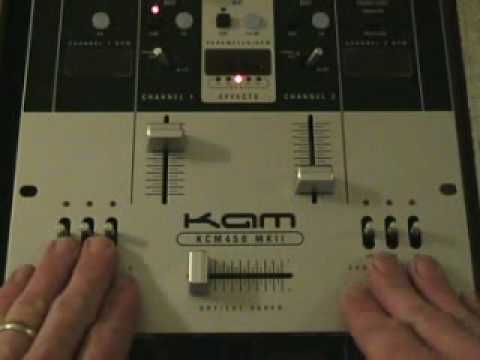
And again, it's not a dial, it's an actual switch. So I'll pause the camera and we'll have a look at this particular mixer that's got kill switches. Right, here we go. Here are the actual kill switches. These three are for this channel and these three are for this channel. Now at the moment, I've got that turntable set to this channel. And there's something wrong with this side. It doesn't seem to be working properly. So I think it's possibly the actual turntable, so I need to get that fixed. So what we'll do to be on the safe side, we'll just concentrate on this side here. By the way, the track you're going to be listening to is on Champion Records. It's Christine W. It's entitled Land of the Living and it's the Rolo and Sister Bliss remix. What I'm going to do first, I'm going to play the track.
And I'm going to leave these kill switches and not touch them at all. Here we go. Okay, basically what you were listening to there was the entire frequency range. Now what I'm going to do, I'm going to play the track again. This time I'm going to move these switches to the down position towards me. Here we go. First of all we'll do the low. Now we'll do the mid. Now we'll do the high. Okay, did you notice? Hopefully you did. If you didn't, I do apologise. It's the actual microphone on the particular camera. But when I brought the low down, all of a sudden, the bass, the low frequencies disappeared. As soon as I took my finger off, they came back in. Same with the mid, mid disappeared, back in. High disappeared, back in. But also what actually happened is when I brought these forward, they all of a sudden sprung back as soon as I took my finger off them.
2:56 Same with the mid, same with the high
Same with the mid, same with the high. Now what I'll do, play the music again, this time we'll push them up. Here we go. So there you go. The difference being when you push them up, they'll actually stay off. You can do either 1, 2 or 3. So, what's the deal? OK, these, like I said, are the kill switches. Exactly the same near enough as using the bass, the mid and the treble. The difference being, instead of having to twist and twist and turn and goodness knows what, what you can do is you can press this down like so or up. Now there's one slight difference with the bass, mid and treble. You can adjust the bass, adjust the mid and adjust the treble but if you want to let's say hypothetically in the mix and you want to
At the flick of a switch, completely get rid of the bass. Instead of having to do that, you can actually just do that. That's the beauty about kill switches. Alright, this is video number one. This particular mixer is the KCM 450 Mark II. Now hopefully video number two and three that I should be doing very shortly, I'll be using the kill switches in the mix. Practice and enjoy.
This transcript was produced automatically from the audio of the video and may contain mistakes.











