 3:51
Ableton Live 10 Video 2 for the Complete Beginner Like Me
Contents of the video
0:00 Welcome to my second video on Ableton Live 10 Suite
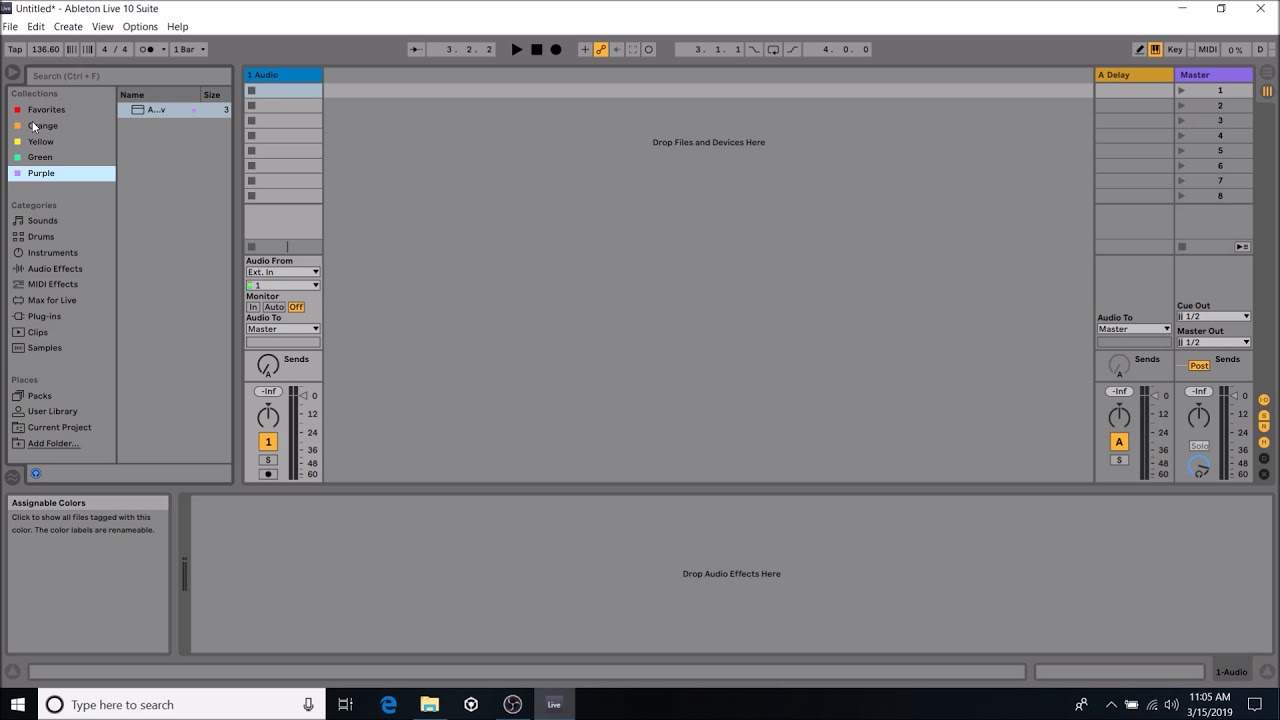
Alright guys, welcome to my second video on Ableton Live 10 Suite. Now, I am a complete novice in music production, so if you're going to start watching these videos and you're a complete novice, you'll be on the same journey as me, learning how to start music production. Now, I don't intend to become the best music producer at all. In fact, if I can muster some sort of basic beat with a bit of a drum, with a bit of a bass line on top of it, I'll be very happy. So, in this video, what I'm going to do is concentrate on something called collections and also the categories, and then here we have the sounds, we also have drum patterns, so, and effects and so on. Now, at the moment, I am in sounds. If I click drums, we go to the drums, but for this demonstration, we'll just go to sounds.
Now, you should see that it's highlighted in green, we've also got purple and we've also got orange. And underneath collections, we have red, orange, that's my favourite, orange, green, purple. So, what this will let you do is, let's say, for example, we click on a sound, have a listen.
Alright, can't hear that very well.
1:19 Favourites, that was something I favourited
That's a bit more in your face, like that. So, if you like that sound and you want to get to it quickly, what I'm going to do now is right click and I am going to, let's say, highlight that in yellow. There we go. Now, all of a sudden, underneath the collections, we now have something there in yellow, so, or we have yellow highlighted. So, we go to favourites, that was something I favourited earlier on, which is clarinet, I think that's a clarinet. We have orange, we have green, purple. Every time I click on one of these, it will go directly to that sound that I liked and its appropriate colour. So, let's go back to our yellow, have a listen.
2:03 Earlier on green, orange
Earlier on green, orange.
Okay, I'm going to leave this video at that because I don't want to destroy your brain with so much information, nor do I want to destroy my brain because Ableton Live 10 Suite is something that does take months and months to even just about get used to, but once you start understanding Ableton, you can become this producer that can make great music. Very quickly as well, if you are having difficulties playing music on YouTube and Facebook due to copyright reasons, then why don't you start making your own tracks? Because if you think about it, if you use the likes of Ableton... And if you get Ableton Live 10 Suite, it will come with sounds and drum patterns that are royalty free. So, you can spend a little bit of your time learning like me how to use Ableton Live 10 Suite.
You can then also start making your own music, upload that to YouTube, make two or three tracks, do some great kind of mix, and you will not get blocked in any way. Because you are going to be able to get away from the things that have been cut out for you by the people who love you. That's what this is all about. So, let's go back to our yellow. You have made the track. OK, this is the key. This is why a lot of DJs today get work in big super nightclubs is because they turn up with music that they've made and no one else has got. And believe me, it all started from programs like this. All right. Hope that's been a help. And please follow, like and subscribe, practice and enjoy. Thank you very much.
This transcript was produced automatically from the audio of the video and may contain mistakes.











