 12:51
Ableton Live Tutorial video 5 with Danny Lewis
Contents of the video
0:02 Free courses at pointblankonline
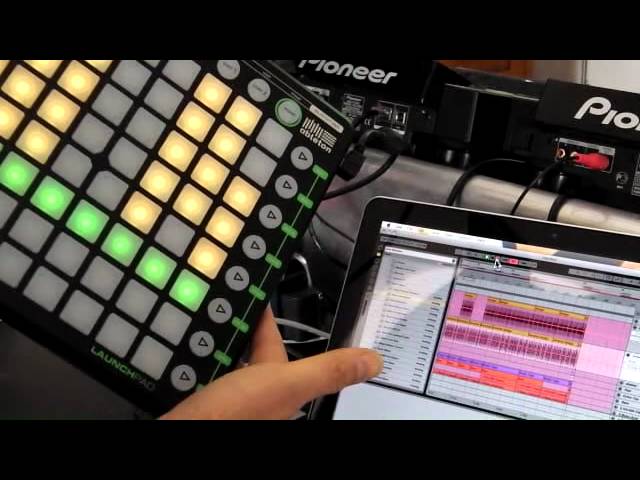
Hi, it's Danny Lewis from Pointblank Online and this is part 5 of the series of videos. If you want to find out more about this kind of stuff that we're covering, if you go to the free courses at pointblankonline.net. So we've got basically an idea and what I'm going to do here is I'm going to structure and just going to show you, you know, I said about the whole unique aspect of live is the fact that we've got the session view is where we can actually try ideas out and then we can transfer these into the arrange view. And what I'm going to do is I'm going to record this as a little bit of a thing on the launch pad. You know, we're going to get this going so we're going to flip between the different sections. But firstly what I want to do is to just set it up for that. At the moment I've just got two scenes at the moment. So I've got this one here because I was trying my ideas out. What I want to do is move my bass down and you know I've got a section here where you can see
This has got the pads, it's got all of the beats, it's got the bass line. So what I'm going to do is really I want to move that down a little bit because that's going to be sort of the main section. So if I come over here, I'm going to rename that, so I'm going to say main. The intro is probably a little bit too busy. I'm going to strip that down a little bit. So what we can do is we could just basically pick all of these, go to this section here, I'm going to come in here and I'm going to say insert scene. So that's going to create a space where we can put different textures in. I'm going to do that a couple of times. So we've got some room and I'm going to pick some elements that I'm going to bring down onto these. So we want to keep probably the percussive stuff that we had at the very beginning. I think what we'll do is we'll take these elements here, I'm going to select these. And I don't know if this is definitely going to work just yet. We'll try it out in a minute. We'll see how it vibes.
2:29 Alt plus drag is copying these elements
But I know that this is going to be necessary over here. It's, just having a look at this, the 808 beat I'm going to take away on the first one. And also whatever Danny's doing there is now being simulated on the launchpad. Yeah, it's being replicated onto the launchpad over here. So I think also I'll take away that shaker. Let's bring these over as well. So let me just... Copy these down. So alt plus drag is copying these elements. Just trying to think about what I don't want to have on this second intro. So taking these away. Let's have a listen. So that's the first one. That's the same. So really, I think... Let me take away the bongos. So that's how we'll start off. And then the next one. So we've got a real progression occurring there. And then we'd have...
Maybe to strip down before we get to it, but I'm going to bring the bass back over here and try that. So that feels like it's working as a nice little progression there. And then we could move on to this one. What I feel we need to do before we do that is we need to have some kind of sort of like a breakdown-y section where the main beat isn't happening. So maybe let's have a look. Let's do something like this. If we have these elements except for what's going on with the beat here, maybe we could have the bass on its own, maybe the 808 sounds, maybe the extra tops, the percussive flavours here. Let's bring these down. Let's have a listen to that and see how that feels. So we can think about maybe adding some kind of atmospheres and then dropping in.
4:23 Basically, we've got a little bit of an idea there
So basically, we've got a little bit of an idea there. We're going to record that into the Arrange View. So what we'll do is just reset the transport at the top. I just double-clicked on the stop there. Push record. And then what I'm going to do is I'm going to trigger these on the fly. I'm going to flip into the Arrange View so we can see this. Here we go. You can see now the structure is being created over here. And I can flip into that one. And what I'm going to do is I'm going to switch back again, just as a contrast. So just before the next bar cycle I'm pushing there, and I'm going to turn it back on again. So here we go. So what we'll do is flip on to the next one here. You get a sense of the development of the track. If you touch any of these now, can you get rid of those certain elements of the track that you put in? Yeah, you can do, yeah. I mean if we were to click into an empty space, we could like turn them off. That's what we could do.
So let's come down onto this one. And what I would do is, when I'm doing this, I'd start thinking, well, what else could I have added? I think maybe some crash cymbals or atmospheres or reverse cymbals could have helped some of those transitions. Yeah. So if we just imagine that they're happening, we'll add them later. And we're flipping down into a little breakdown section. So we'd probably be thinking about other atmospheres that we can add. So it helps you with the whole idea about refining the structure, the fact that we can play around with it. So we're going to come in now, maybe some effects. And then into the main section. The only thing really missing now is a bit of vocals or something, isn't it? You've got a track, it's amazing. The thing is that the launch pad in combination with the session in line is the inspiration. That's where you get new ideas and then you just drop it into this view here. And this is before we even thought about some of the other effects and the other things that we could do as well.
All right, from a scale of 1 to 100, percentage-wise, what have we covered in these five videos? Percentage-wise? Yeah. Oh my gosh, I mean it's such a... Half a percent. So much possibilities. Yeah. I mean and the launch pad as well. I think in terms of, you know, from 1 to 100, I think we've maybe done about 5% or so. Okay, which is still a minuscule amount, isn't it? Yeah, yeah. Again, I would say being a complete novice, the only thing stopping a person is their imagination. Yeah, totally. I mean, we've got a lot of free content on the Point Blank Online site as well. There's some free courses covering a wide variety of different subjects to do with Ableton and other substances as well, you know. Alright. Well, what we haven't done yet, I haven't done sort of like an interview with you, so how did you actually get involved with Point Blank? What's the score there? Well, you know, I've been teaching for basically a long time ago.
7:34 It's about nine, ten years
It's about nine, ten years. It's that long? I can't believe it. Yeah, yeah. I mean, I started off as a teacher. So I was teaching classes full of 10, 15 students. Basically, the whole online thing started happening for me about three or four years ago, I think, when the online school started building. So for me, it's been something that's really caught my imagination. The whole ability to sort of reach out to a bigger audience with the whole teaching side is really interesting. And you're like me as well. You like to use, still like to use something real like a CD. If you go out and play, you do like to use CDs? Oh yeah, I mean as a DJ, it was the same with vinyl. When CDs came along, I wanted to carry on using the vinyl first and then I was slow to move on to CDs. But I was saying this to you earlier, the Launchpad and Ableton has really shown me the potential of what you can do. The sessions we did last night with the whole kind of live vibe.
Building a track on the fly, interacting with the DJ, all this kind of stuff I find very exciting. So I think for me now, I'm looking at maybe doing this sort of stuff on gigs myself now. Tomorrow we've got a masterclass. That's a good point. Tomorrow we've got Steve Travell. And to the point blank, he's going to be doing a demonstration using not just a launchpad, but I think he's going to be using like an iPad or something, isn't he? Or Wii controller as well. Which is stuff that people can just get from like a local shop, store, kind of, yeah. It's on the livestream channel at one o'clock, I think. Livestream.com slash pointblankonline or something. Okay, it may be too late. Today's the 14th of July 2011, so...
Bearing in mind whatever's said today, if you're watching this video in a year's time, will have happened. And it was good, wasn't it? It was excellent! It was brilliant! A couple of questions for you, right. Forget the money, no object, but if you could get any items of kit, in other words, you're going to go out live on the road and someone said to you, right, what kit do you need? What would you get? A round table and you place physical cubes on items and you rotate them and you create synthesizers and it's like an LCD screen underneath and you can build your own synths. I've seen it in Music Messy, they had it, it's amazing. Yeah, and of course what you do, you've got a cube, you've got a cube there, a cube here, and as you turn them you get different sounds and you put one on top of the other. One of the things that I've taught at Point Blank is Reactor, and Reactor is a system for building your own synths.
10:17 You're building together the oscillators, filters, envelopes, all that
So you're building together the oscillators, filters, envelopes, all that stuff. So that for me is like a physical manifestation of that whole thing with the visuals, the lights. That's it, yeah. So again, the producer stroke remixer is there doing a mix on the fly and doing a mix as in CD to CD and then all of a sudden you can incorporate your own tune. Not only that now, you can incorporate your own synthesising kind of sounds into the construction of making a tune. I think the whole controller thing is where this technology thing, electronic music, is really going to come alive in the next few years. I think it's a very exciting area. So where's it going to go? Do you think the likes of... Because people say vinyl's dead. I don't think vinyl will ever die because you have virtual vinyl for the likes of...
Serato, Traktor. But can you see possibly it dwindling and the likes of PC taking over? Where can you see this sort of technology going? Where's it going to be 10 years from now? I think actually the audience are going to be getting involved. The DJ performer is going to be doing stuff but the audience will go along and they will be participating. So you'll have people in the audience probably by their gesture and their movement. Well, alright, we'll wrap this up. So Danny and you are Rob, sir, from Point Blank in London. This is video number five. There are, believe it or not, four, three, two and one. They're all linked and they're all for, like me, the beginner for Ableton. So the whole idea, the whole concept of these particular string of videos is to give you an insight, a small, tiny, squintsy, insy-wintsy amount of knowledge into what can be done on this particular program. We've got the launchpad there as well. Launchpad from Novation, Ableton enabled. And if you want any more information on this,
Go and check out youtube.com forward slash pointblankonline. Also, your website? Yeah, www.pointblankonline.net And gentlemen, thank you very much. It's been very inspiring. Practice and enjoy.
This transcript was produced automatically from the audio of the video and may contain mistakes.











