 17:25
Ableton Live Video 1 Creating a Basic House Beat at the Dubai DJ Academy
Contents of the video
0:00 You see, Lewis is a bloody good name, isn't it?
All right, ladies and gentlemen, here we are at the Dubai DJ Academy with a good friend of mine called Ed Lewis. You see, Lewis is a bloody good name, isn't it? And if you want to know what the Dubai DJ Academy is all about, it's anything and everything singing and dancing for the DJ. Also production as well. If you want to know more information about the DJ Academy, check out the link in the description. It will take you to the Facebook page. I'm in Dubai at the moment. I'm here for quite a few, well, three weeks. So if you'd like some lessons on, you want to be a DJ, then contact the DJ Academy. And also, if you would like to get into production, because part of the Academy is about production. And that's where this very intelligent guy comes in, Mr. Ed Lewis.
4:20 Next step on is going to be a clap
So hello, sir. How are you? Good morning. Good morning. So I'm very good. So production, what program are we using at the moment? We're using Ableton Live. To produce music, which is used by hundreds of dance music producers out there. It's very, very quick. Fairly easy to use program to use both for music production and also stage performance and DJing as well. Okay. And we, prior to doing this video, we just had a, I mean, we spent a great deal of time sort of organizing this video, didn't we? Yes. Literally two minutes. But what Ed and I, what I asked Ed to do, this is last time I was here. It'd be great to do a video where, or set videos, where we could almost start getting a track together from scratch, completely from scratch.
So we'll class this as video number one. And what you're going to show is how we can get a very basic house beat using Ableton. So if I put the camera now on the stand like so, and I do apologize it can't get any closer, but you can. You should be able to see pretty reasonably. All right, if you could run through the very basics and show how we can start to make some form of, say, house beat. Sure. So Ableton comes with a bunch of different drum sounds of it, with it. Some of these are kind of classic dance music drum machines. When you get into music production, you'll start hearing about these old drum machines called 909, the 808. Which you use, you know, they came out in the 80s and they're still used in dance music today.
I'm going to use a nice 909 kit. So all I need to do is just drag this onto a track.
2:44 Down here it's created an instrument for me
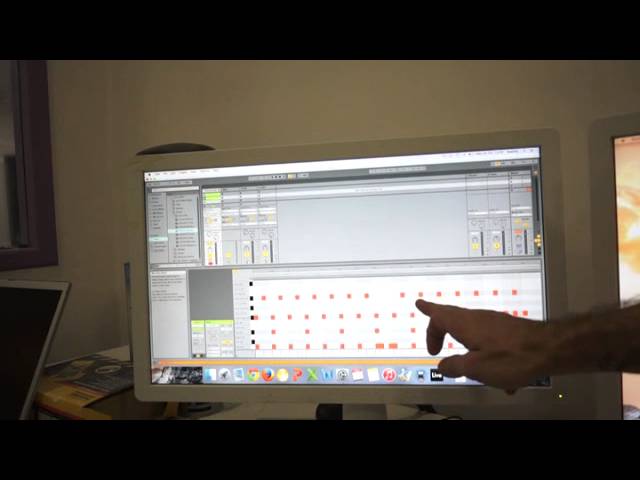
And there we go. Down here it's created an instrument for me. And it breaks down each of the individual drum sounds. So here I've got my kick drum, my bass drum. Got a rim shot. Snare drum. Drum. Clap. And we'll go in some hi-hats as well there. So we're just going to make a very, very basic beat straight off the bat. I'm going to create up here. I'm just going to right click and say insert MIDI clip. Which then gives me a view so that I can see all of those drums broken down. If I click on any of them, you can hear the different drums. So if I go down. Now dance music is usually between about 120 and 130, well 140 beats per minute. If you're getting into kind of trance on the fast side of it. Yeah. I'm going to set this to 124.
Okay. And first thing I need to do is create the kick drum. Just the standard 4-4 boom, boom, boom, boom. Very easy to do. I've got a timeline up at the top here, which breaks down my loop, my bar into different cells. So I can see 1, 2, 3 and 4 with my boom, boom, boom, boom. So I'll just double click here.
Okay. And if I start this clip playing. There we go. And it is as easy as that. Yep. That's crazy. Easy. So while I'm watching this as well, or while you're explaining, I'm learning as well because I've got Ableton, but I've just never had the time to do anything. I'm actually going to be looking back at this video to get reference. Fair enough. My own vids sometimes to get reference on how I years ago managed to work out how to work things crazy, but there you go. Another story. Okay, cool. So next step on is going to be a clap. Okay, which will go on the second and the fourth beat. So again, just looking at where my timeline is at the top. I will go number two clap and number four. So again, start that playing dead easy.
Then going on from there, we need some high information, which is going to be our hi hats. So I've got a closed hi hat here, which again, I'm just going to put on every beat of the bar. Mm hmm. And then. I'm going to put in an open hat, okay? Which will go on the offbeat of every single beat of the loop. So then I just have the very easy, very straightforward bog standard house beat. Yeah. And it's as simple as that. That is a one bar house loop in about two minutes. Yeah. Okay. Now to move on a little bit further than that. The next stage would then be to extend that out. Mm hmm. Because if you have that going on and on and on, it's going to get very, very repetitive very quickly. Yes. Okay? So what I'll do, I'm going to duplicate this loop.
Mind you not for minimalistic house freaks. Minimal house, yeah. Okay. And I can change down here the length of that loop. It's just down there. Right. Down here, yep. Um. So I'm going to make this into a four bar loop. Just type in four. Okay, so you can see that view's slightly changed. Yeah. So now I've got bar one, bar two, bar three and bar four. So thinking in advance, just copy and paste it, yeah? Exactly right. Copy and paste or drag it down the timeline. Right. So can you click on any of those and drag it or do you have to click bottom left? Because I noticed you went to bottom left there. I went to, yeah, mostly because of kind of force of habit. But you could drag any of those. You just need to make sure you're lining them up in exactly the right place.
So that kick drum has to line up with the first beat of the bar. But yeah, I can drag any of those and it will take it. Just carry on, I just need to get some tissue for my nose. Okay. Sorry. So at the moment it's just those bars looping round and round, doing exactly the same thing, okay? So first thing I'll do is on the second bar, I'm just going to duplicate the kick drum. Okay. So that instead of going boom, boom, boom, boom, it's going to go boom, boom, boom, boom, boom, okay? So again, I'll just copy that kick drum to there, okay? And at the end, I'm going to take out the kick drum and I'm also going to remove the open. Okay. The open hat as well, let's see how that sounds.
8:25 Do you need to put that kick drum in the box there instead?
So there I've just got a little bit of variation at the end of every other bar. Do you need to put that kick drum in the box there instead? Okay. Try it there. Diddum, ah, hold on. No, diddum, can you make it so it goes diddum-dum? Yep, which is basically that rhythm. That's better, I like that, that's good. And then chh-chh, no, just before, that's it, yeah. What are you going for? Try that, yeah. There you go, easy. Um, okay, so without going in, what's, yeah, sometimes I like to keep it very simple and straight but sometimes it's great to go into even greater detail. Now, I've seen that at the moment, the kick, snare, the high hat, they're very similar, aren't they? They're all similar, every, no not the same, everyone is the same.
10:02 To make it a little bit less machine sound
Yeah. But, I think I'm correct in saying that you can go to individual kicks and any individual one of these and you can change the whole parameter and the feel of it as well, can't you? To make it a little bit less machine sound. Sure, um, there's kind of different ways of doing it, um, what, what you're talking about is what we refer to as humanising it. Okay, good, yeah. Um, and there's a few different ways of doing it. Um... Now, generally, because it's dance music you would actually leave your kick drum alone. You probably wouldn't play around with the kick drum because that is the solid core of your track. Yeah. So, you wouldn't want, um, sorry I should take a step back, um, what, the ways of doing it can be lowering and raising the volume a little bit, just tiny amounts because if you're a drummer
And you're physically hitting something... Yeah. ...you don't exactly hit it the same, uh, with the same... Force, no. ...force every single time. Yes, of course. It's going to be slightly different. Um, and the other way is going to be timing as well. Yeah. So shifting timing out. Um, but for dance music you would leave the kick drum as it is, you wouldn't make it sound more human because it is the absolute rock solid core of your track. Got ya. Um, claps maybe a little bit so what I would do... So what I would do is, uh, you actually do it using these, um, uh, little sliders down at the bottom and these are called velocity sliders and I think this is just going to slightly control the volume. Now, I'm only going to make some really, um...
12:30 ...but it does slightly lean into the last clap
So you brought that down very slightly, yeah? Brought that down very slightly. You can see it's doubled up. Yeah. Um, let me do it here to make it a bit more visual. There we go. Just bring that down a little bit. And I'm going to bring this one up a tiny bit. Now, individually, this isn't necessarily the most noticeable thing in the world. Um, but when it's combined, uh, it's more about feel than anything so when it's kind of stacked up then it becomes a little bit more noticeable. Mm-hmm. Two. Very subtly, I don't know how much you can make it out... Mm-hmm. ...but it does slightly lean into the last clap. And you can see as well, um, when I raise and lower these, if I just pull this one down as well, you can see that it becomes a lighter shade of red...
Yes. ...fading into, to, um... Tinkle-less, yeah, white, yeah. ...to white, um, just to indicate the different kind of, uh, the different loudness or, uh, velocity levels on there. So the darker red it is, the harder it's hitting on there. Okay. Okay. So the other way of, of doing this as well, maybe I'll, I'll do this with, um, the hi-hats, I want to make those a bit more human, is Ableton has got a little plug-in in there so... Oh, where, where did you just click then to get to that page? Okay, sorry, yeah, I just switched back, there's a button here, um, which switches between this, which is the editing view... Yeah. ...and the instrument view. That one there. Right, okay. Okay, so now I've just switched back to the instrument view.
Mm-hmm. And if I go to MIDI effects on the side, um, I've got a little plug-in... Mm-hmm. ...or, uh, an effect called velocity. Mm-hmm. So if I drop an instance of this on my, ah, that's what I want, closed hat, okay? Okay, you can see this velocity device has appeared on here. Yeah. So what this is going to do is instead of going through all of this and drawing in, um, these different levels, which can take quite a long time... Mm-hmm. ...um, it's going to add an element of randomness. Yeah. Okay? So if I start this playing and, oops, one mistake here, solo this off, and I'm just gonna increase the randomness here. Okay, so you can hear now that's quite extreme. Yes. The different loudness of those hats. Yeah.
14:52 ...so you can hear those high hats operating at different volume level
And presume, yeah, again you've got the line... Yep. ...you've got dark and light patches. So the randomness is in this light area I presume? That's right, yes. So it's going either up or it's going down from whatever the velocity position is. Okay? Um, probably wouldn't go quite that extreme with it, just bring it down a bit, and let's duplicate it onto the open hat. That one I think I've got it. There we go, so it's on the open hat as well. Yep. Just gonna un-solo this... Yeah. ...so you can hear those high hats operating at different volume levels now. Yeah. Okay? Yeah. Well, all right, I'll tell you what, we'll class this as video one. I'd like you to do more and how about we take this very basic beat... Mm-hmm.
...and then in video two, three and so on we change it, maybe make it into like a hip hop beat, maybe into drum and bass beat. Yep. What do you reckon? No, definitely. Okay. Okay, so you are the tutor for production. How can people get hold of you? You know, let's say for example there are people watching now who would like to get into production. They live in or around Dubai. How can they get hold of you? The best way is still through the Dubai DJ account. Yeah. You can find me on my own academy... Yeah. ...Facebook or my own Facebook as well. You can find me on facebook.com forward slash Edward John Lewis... Mm-hmm. ...and drop me a message and I will give you some more details, ask me some questions... Yeah.
...and we'll go from there. And then yeah, potentially you can get people who've always thought about production, you can get them making their own tracks. Absolutely, yeah. You know the one key, let me just turn that around, people are always asking me, they're saying, you know, how can I get into production? Yeah. They're saying, you know, how can I get into nightclubs? How can I forward my career? The fact is now that if you do want to get into nightclubs, you're more likely to get into them if you do your own production. Yes, that's right. That's what nightclub managers want to see. They, you know, the days of just turning up with your CDs and music from like big artists isn't gone. It's still here if you have the technical skills but you're more likely to get a job if you can do your own production because you're playing music.
You're playing music that's new and exciting. So, have a word with this guy. Check out the link for the Dubai DJ Academy. And Ed, video number one, thank you very much. And look out guys for video number two and girls. Thank you very much. Practice and enjoy. Practice and enjoy. Yes.
This transcript was produced automatically from the audio of the video and may contain mistakes.











