 5:09
Beginner DJ Lesson 5 over View of a CD Turntable
Contents of the video
0:00 This is another DJ lesson for complete beginners
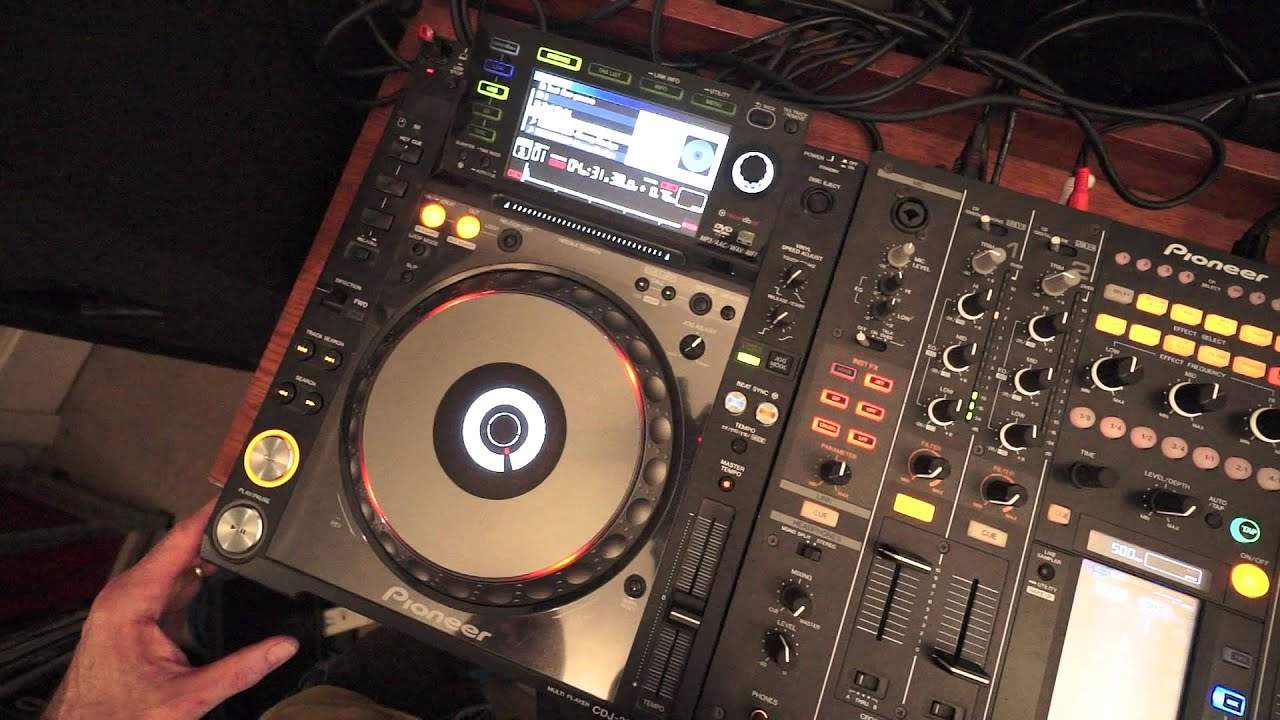
Alright ladies and gentlemen, this is another DJ lesson for complete beginners. In this one we're looking, we've got an overview of a CD player. The CD player we're looking at is the CDJ-2000 Nexus. We'll give you an overview of the parts of the player. By the way, the track you're listening to is Mr. Kenny Hectic, a track entitled Get Up. This part here is known as the platter. What this can do is this will allow the DJ to manipulate the sound if he or she wants to in many ways. One way of course is to use it like a vinyl turntable. Have a listen and watch. Put my hand on. Stops. Hand back and forwards. I'm moving the track. Take my hand. Hand off. Carries on playing. On.
That's known as vinyl mode. Press over there to CDJ mode and now I can't stop the track. What I can do though is by moving the jog wheel anti-clockwise, I can start to reduce the speed of the track. By moving the jog wheel clockwise, I can now start to increase the speed of the track.
Over to the right is the pitch control. This will increase or decrease the speed of the track. The BPM at the moment, center position. The track is 122 BPM or 120, yeah 122. That means in every minute we will hear 122 beats. If I move the pitch away from me, the BPM will slow down. Now we're at 109. So now in every minute or 109.7, we'll get 109.7 beats per minute. Pull it towards me. We'll now get 134. It's going a lot faster.
Cue is for cueing the track. So if I want, I can hit cue. Keep my finger on cue. Take it off. The track goes right back to the beginning. Press cue again. Take my finger off. Goes back to the beginning again
And so on. If I press play pause, the track will carry on playing.
2:21 We have track search
Okay we have track search. Again for this demonstration, it's the same track. If I press the arrows facing to the right, we will go forward through the tracks. If I press the arrows facing to the left, I will go back through the tracks. Below there we have search. So we have track search to search through the tracks. Below that we have search to search through the track that's playing. Have a listen. Okay what I've shown you is pretty much generic with virtually every single tabletop style CD player. There are a lot more features on this player but I'm giving you an overview of what you will expect to find on pretty much every CD player you have out there. We've also got master tempo. Disengage that. Now have a listen to the key sound,
The feel of the track. It dips back to the center. Bring it forward so we speed up the track.
3:33 Increase it by six percent
So what happens is with master tempo disengaged, not only will I be able to slow the track down, I'll also be able to almost dip the key of the track. If I bring the pitch towards me, not only will I be able to increase the speed of the track, I will also be able to increase the key of the track as well. Have another listen. Also what we've got here is tempo select. We can have plus or minus six percent which means whatever the BPM of the track is if I reduce it all the way it will decrease the speed by six percent of the original speed forward. Increase it by six percent. The next one is ten percent so it will do exactly the same but increase or decrease the original speed by minus or plus ten percent. Sixteen percent and then also we have wide which is one hundred
Percent. So if I move this pitch now all the way to the minus position, if we decrease the speed by 100% it will stop. That's it. If I then bring the pitch all the way up to as far as it will go to the plus position increase the speed by 100%. So for example if it's 120 it goes to 240.
Okay thank you very much Mr Kenny Hectic. Track entitled Get Up. Any more info from myself or the tune you're listening to have a look in the description, practice and enjoy. Thank you.
This transcript was produced automatically from the audio of the video and may contain mistakes.
Related videos
-
Complete Beginner DJ Lessons Tags Key BPM Etc
A more advanced lesson folded in early, and worth doing once rather than putting off, because everything it sets up gets used for years…
-
Complete Beginner DJ Mixing Lessons Video 19 Getting Your Kit Ready for an Easy Mix
A whole lesson on getting ready, which is the right call - the exercise in the next video only teaches anything if the two decks are…











