2:56
Getting your kit ready for an easy mix
On YouTube this video is called Complete Beginner DJ Mixing Lessons Video 19 Getting Your Kit Ready for an Easy Mix
What this lesson teaches
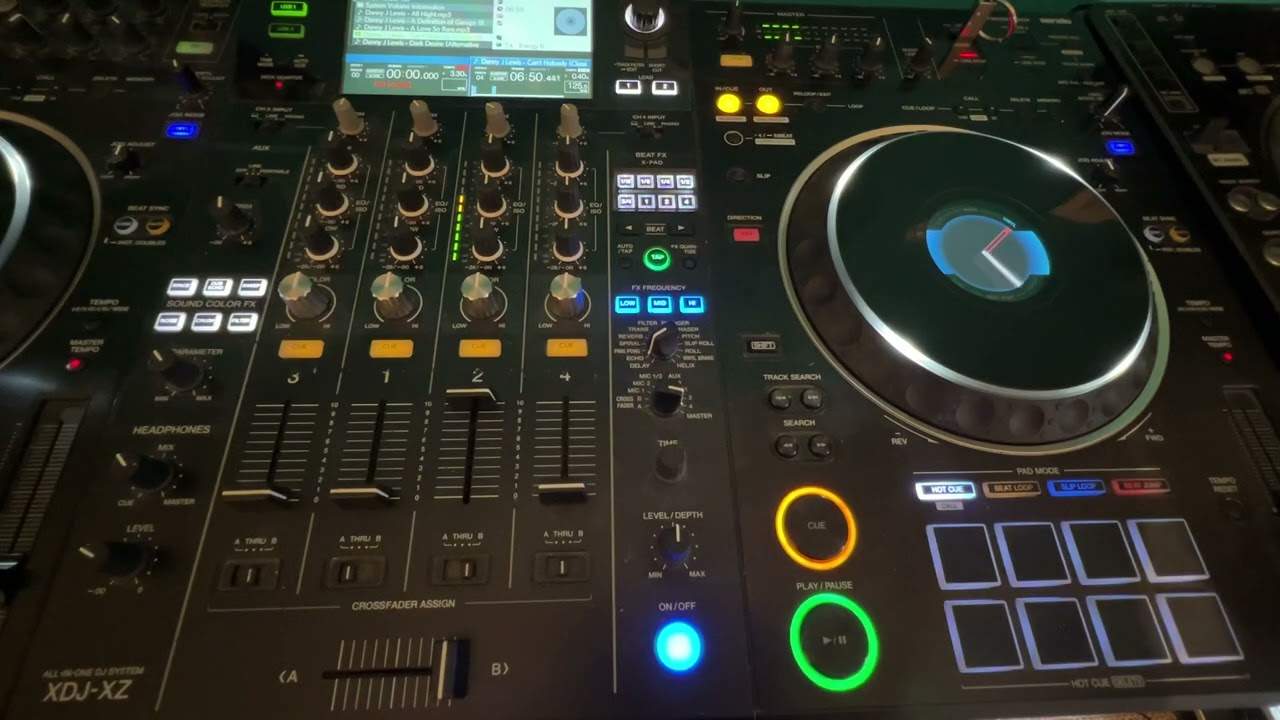
A whole lesson on getting ready, which is the right call - the exercise in the next video only teaches anything if the two decks are genuinely identical.
The mirror image
The same track on both sides. It does not matter which, but his advice is worth taking: find a plain house track. Simple structure, an obvious kick, easy bars.
Then match everything:
- Crossfader dead centre, so both sides are audible. He suggests this specifically for controllers where you cannot disengage the crossfader - park it in the middle and use the channel faders instead.
- EQs at twelve o'clock on both channels. Bass, mid and high, untouched.
- Trim around ten or eleven o'clock, with the meters lit and out of the red.
- Tempo reset engaged on both decks, which locks each to the track's own BPM and takes the pitch fader out of the equation entirely.
If you have no tempo reset
Most controllers do not have that button, so the manual version: look at the display and move the pitch fader very slowly until it reads 0.00%.
That is the centre, and it is the track's native tempo. Check both decks show the same BPM - if one says 125 and the other 126, something is not matched.
The honest aside
His right-hand deck shows no BPM at all, and he explains why rather than editing round it: he is playing plain MP3 files that the software has never analysed.
Analyse them in rekordbox - or any program's batch analysis - and the BPM appears. Until then the software genuinely does not know, and neither do you.
Why all this matters
Because of what it removes. With identical tracks at identical settings and identical tempos, there is exactly one thing that can be different between the two decks: where each one is in the music.
Everything you are about to hear is position. That is what makes the next lesson teachable.
Contents of the video
Video 19 for the complete and utter beginner. Yes, we're going to start forming a mix. In this video I'm going to show you the setup needed for this and then the next video will go right ahead. So basically what I've done, I have the same track on both sides. You can do the same, doesn't have to be this one, just needs to be the same track. Now ideally try and find a very basic house track. Because it's very simple to listen to, to understand the bars and phrases and so on. So if I press play or I'm just going to press cue and keep my finger on the cue, we can hear kicks off straight with that one first beat in a bar. One, two, three, four. One, two, three, four. What I've done is I've got my crossfade dead center. The only reason I'm doing that is if you do have a controller where you can't engage or disengage the crossfade, I highly recommend you just put it in the center and then you can use your up-faders. Now also, you'll notice the LEDs aren't going in the red and my low, bass, mid and high, also known as treble, are set to 12 o'clock. My trim is around about 10, 11 o'clock.
And also the tempo resets are exactly the same on both sides. So theoretically, what I've got is I have a mirror image on both sides. So the right hand side deck is exactly the same as the left hand side deck. Also what I've done, I have set plus and minus 6% on the pitch but that doesn't really matter because I've got tempo reset. Now if you don't have tempo reset all you need to do is just look at your screen whether it be on the controller or on your laptop and very slowly move your pitch to dead center and you'll know when it is because if you look at your screen you will see 0.00 percent very close to where it says the bpm of the track and also if the bpm of the track on the one side is 125 or 126 it should be the same on the other side you may be looking at my screen here
I'm thinking, well, how come there's no BPM on the right-hand side? Well, I'm using basic MP3 files. If I had, if I'd have used the rekordbox software, then of course the tracks would have been analysed and it would be exactly the same. But again, this is just demonstration. All right, so check out the next video and let's do a mix. Practice and enjoy. Thank you.
This transcript was produced automatically from the audio of the video and may contain mistakes.
This video is part of
Related videos
-
Complete Beginner DJ Lessons Tags Key BPM Etc
A more advanced lesson folded in early, and worth doing once rather than putting off, because everything it sets up gets used for years…
-
Complete Beginner DJ Lessons Video 9 Setting up a Cue Point and Using the Play Button
Short, and it covers a piece of behaviour that will confuse you exactly once if nobody explains it. The normal case Load a track and the…