 6:57
Beginner DJ Lesson How to Extend Your Transition in Hip Hop RnB or Soul Music
Contents of the video
0:00 We've got Will Smith getting jiggy with it on the right-hand side
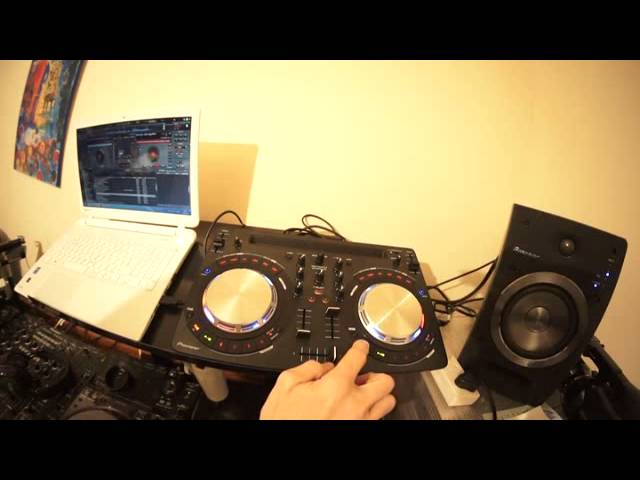
All right, ladies and gentlemen, always getting people asking me for more demos, tutorials on mixing hip-hop, especially how to get longer transitions. OK, so two tracks. We've got Will Smith getting jiggy with it on the right-hand side. On the left-hand side, Rob Bass, DJ Easy Rock. It takes two. It's hip-hop. If you're not familiar with the genre hip-hop, Google H-I-P dash H-O-P. OK, imagine we have a track playing on the right-hand side. What I'm about to do on the left is what you'd be doing on your headphones. I'm using VirtualDJ 8, and the controller is the Pioneer WeGo 3. So let's press play.
3:47 One, two, three, four
What I'm going to do is I'm going to set a cue point, a hot cue there. What I've also done is I pressed loop. Now you should see that the button here that's got loop on it. I know, yeah, wide angle, but hopefully you should be able to see that we've got that flashing. Now that's telling me that we're in loop mode. And also, if you have a listen, we have a one-bar loop. One, two, three, four. One, two, three, four. One, two, three, four. All right, that's all right, but what I want to do is I want to make that longer. So I press the two times, and now we should have two bars of a loop. Let's have a listen again. One, two, three, four. From the beginning of the loop, sorry. Right, one, two, three, four. One, two, three, four. One, two, three, four. One, two, three, four.
Okay, so that, to begin with, is pretty much all I need to do. So, again, that track is playing. So all I've got to do now is press loop mode again, or the loop button. Now, that is not flashing anymore. What that tells me is that... The loop mode is now disengaged. So, if I press play here, it's just Q. If I press Q, it's pretty much exactly the same as a CDJ. If you press Q, keep your finger on Q, the track will carry on playing until such time as you take your finger off Q. As soon as you do take your finger off the Q, the track will go back to the point of where the Q was to begin with. So it'll go back to the beginning where the Q was set.
2:44 Some people have said it's a toy
And by the way, the WeGo 3 is not a toy, all right? So some people have said it's a toy. It isn't. It's a good quality piece of kit. Okay, so let's go back to what I was saying, which was this track's playing, and all of a sudden we want to do our mix. So there we go. So press play.
Track's playing. And there you go. All right, so I'm going to put the volume down now, all right? So that track is now playing to the public. And now what you're listening to on the right-hand side will be what you're listening to on the headphones. Let's have a listen to Will Smith getting jiggy with it. That's gone really slow, hasn't it?
Let's just speed that up a bit. Right, so if you are very good at timing, you could bring this track in right at the beginning of where it starts. Let's just have a listen.
One, two, three, four. Two, three, four. So what you could do is you could bring this one in on the count of three before one, keeping it in time with Rob Bass. Two, three, four. One, two, three, four. One, two, three, four. One, two, three, four. One, two. But if you're a beginner, it's advisable to bring it in on the count of one. Let's find the count of one. Bring it. There. What I did there was I pressed play. I then found the count of one, held down the platter and then pressed play pause again and then pressed cue so I would have set, which I have done, a new cue point.
All right. Let's just have a listen to it. It's heads two, still playing, it's happily playing away. Let's just skip this forward a bit now, all right? So we're going to come towards the end of the track. Now, this is where it gets a bit more important. We'll come to the end of the track. You ready now? One, two, three, get loose now. So what I'm going to do is hit my cue point in time with the track back to the beginning. One, two, three, four. One, two, hit loop. Four, hit loop and now we're in that loop mode.
Bring Will in. OK, so what I've pretty much done is taken a part of one track and I've added it to the mix. Sorry, I've elongated it. I've used the loop function. All right, what we'll do as well, just to prove a point, let's just go out of that loop and see how long it was. So let's just go to the beginning of that track and go one, two, three, four. That's the finish of the loop. There you go. So again, two tracks we're using, It Takes Two, Rob Bass, DJ Easy Rock and Will Smith getting jiggy with it. Practice and enjoy, thank you.
This transcript was produced automatically from the audio of the video and may contain mistakes.











