 9:30
Beginner Mixing DJ Lesson on a Transition Mix Using the EQ and LED's in a Mix Denon DN-X1600
Contents of the video
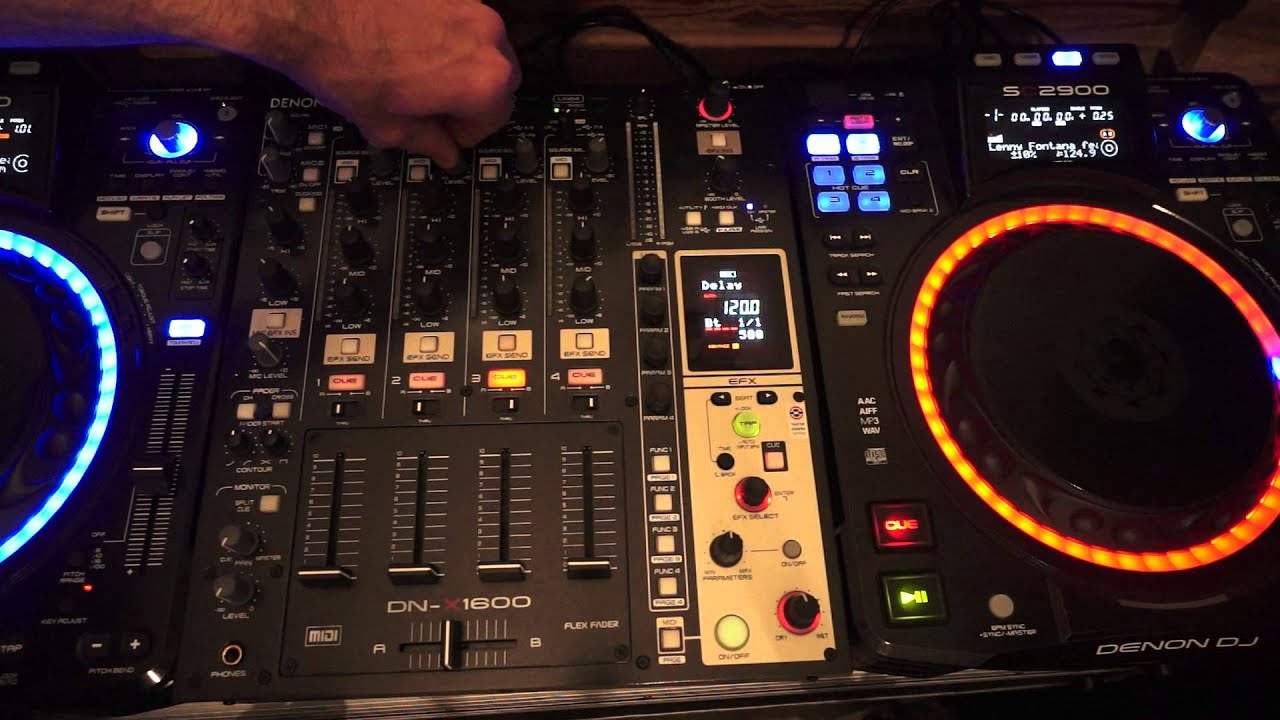
Alright ladies and gentlemen, this is a beginner DJ lesson on using the bass, mid and treble and the LEDs on your channels correctly. The kit I'm using is by Denon, it's known as the DNX1600. That's the mixer in front of you, it's a 4 channel mixer with some great effects. To the right and the left of the DNX1600 we have players, the CD players, they're known as the SC2900. They play CDs as well as USB and you can also use them as controllers for your PC programs. OK, at the moment you should be able to see the LEDs flashing at this point here. We have green and then we have amber. They're just kicking into 0 dB which is the ideal place for them to work from. I will explain the reason why very shortly.
OK, on the right hand side I've got a loop of a trackpad. It's a track by Mr. Lenny Fontana featuring D-Train, it's entitled Raise Your Hands. It's just a very basic kick. On the left hand side I have the radio version of D-Train. You won't be able to see me start or stop the track, that's not important. The important part here is you're able to see the EQs here, the low, the mid and the high. Now first of all, why have I got this track here only hitting the 0 dB mark? Well, if you imagine this is the level of this one track. Now, if all of a sudden we have the other level come in at the same or the other track, sorry, coming at the same level what we're doing then, we're adding two audio sources. So by having one, the ear is able to hear one audio source.
By adding another, we're now adding something else to the equation. The analogy I will give you is, let's say for example you're in a room listening to one person talking you can hear that person talking and you can understand what they're saying when you then invite someone else to come into that room and just start talking to you again or have two conversations going on at the same time and they're different conversations it's going to be slightly more difficult to work out who's saying what more so if those two people start talking even louder then it gets even more difficult so by default by turning the volume up on the one channel and then inviting another channel into the mix the sound becomes too much too intense so by turning the volume down on
The one channel means that the sound is number one is better quality but number two is far more audible now at the moment the volume is down on the up fader i'm going to turn that up
And we can now see the master volume is tapping around about the same position if i start turning if i start turning the volume up here on the channel itself we can see the master volume also turning up now i don't want that to happen i want to keep everything at a constant a flat signal i'm going to leave it at that okay
Just going to pause that up all right what i'm going to do now is i'm now going to start the lenny fontana track on the right hand side and i'm going to reduce the bass on the left-hand turntable and then i'm going to turn the volume down and i'm going to turn the volume up and i'm going to increase the mid very very slightly i'm going to put the crossfade in the center position press play
Right we can see here that the leds are tapping in zero sorry minus one db if i start to increase the bass and bring the mid back to 12 o'clock
The level of the leds is roughly the same as the level on the right hand side so what i'm going to do i'm going to now reduce the trim this one here is the way of describing this is it is the master volume for that one channel the trim on this channel channel 2 will not affect any of the other channels it will only affect channel 1 and channel 2 will not affect any of the other channels it will only affect channel 2 so i'm able to increase or decrease the overall volume of that channel by moving the trim if i turn it all the way to seven o'clock then that's it no volume at all if i start moving it clockwise to five o'clock then we're completely in the red you can see the leds aren't even moving
Now that may sound loud but that's not true because the leds are not moving at all so i'm going to move them up and down believe me what you're doing is you're putting a very dirty signal into the system which in turn will come across as a very distorted or highly likely it will come across there's a very distorted sound in or should i say through the main pa so again we're going to put that the trim so the trim is set so the leds are pretty much identical on both sides so let's have a look with no volume at all i'm going to now turn the trim up very slightly on the right hand side
Turn the trim down maybe no i'd say they're roughly the same there okay so by doing that and having the bass mid and treble set at 12 o'clock i know that once they are set at 12 o'clock the levels of those two tracks are going to be identical so long as the levels or the position of the two up faders is the same now what i have found with my own personal experience is it's always a good idea if you can in the mix to have the two levels of the up faders up to their maximum simply because if you start having them halfway or one slightly higher than the other then you're more likely to tap one maybe accidentally therefore increasing the volume of that one or alternatively decreasing it the volume of that channel if they're both up as high as they can go then you're less likely to tap
Accidentally the trims in turn which will do exactly the same as you moving the volumes up and down so again with the volumes both upper as far as they can go press play on both of them just turn the master volume down now because we don't really want to hear that at the moment we can see that both of the leds are flashing identically at the same position all right one's peaking slightly more than the other sometimes vice versa that's just the nature of the track that's playing okay so let's formulate our mix now so turn the volume up here on the right hand side
Bass down on the left so what i'm going to do now is in time i'm going to bring in the left-hand deck
I'm now going to bring the bass up on the left-hand side bring the bass down on the right
Hand side and i'm going to turn the volume up here on the right hand side so that's just a little bit of a mix there apart from the beats going slightly off very slightly off of course i didn't have any headphones the mix was very smooth from an audio level because there were no peaks in the mix you didn't all of a sudden have one track over power the other and you didn't have another track dip that is simply because i made sure the levels on the eqs levels on the leds stayed at a constant all right now i hope that's been a help there will be more videos like this but believe me when you look at a simple act of let's say just doing a mix it can be simple but then the more you look at it it is very intricate if done correctly
All right i hope that's been a help practice and enjoy thank you very much
This transcript was produced automatically from the audio of the video and may contain mistakes.











