 17:27
Beginner Mixing Lesson How to Not Get Vocals over Vocals in a Mix Dance February CD Pool
Contents of the video
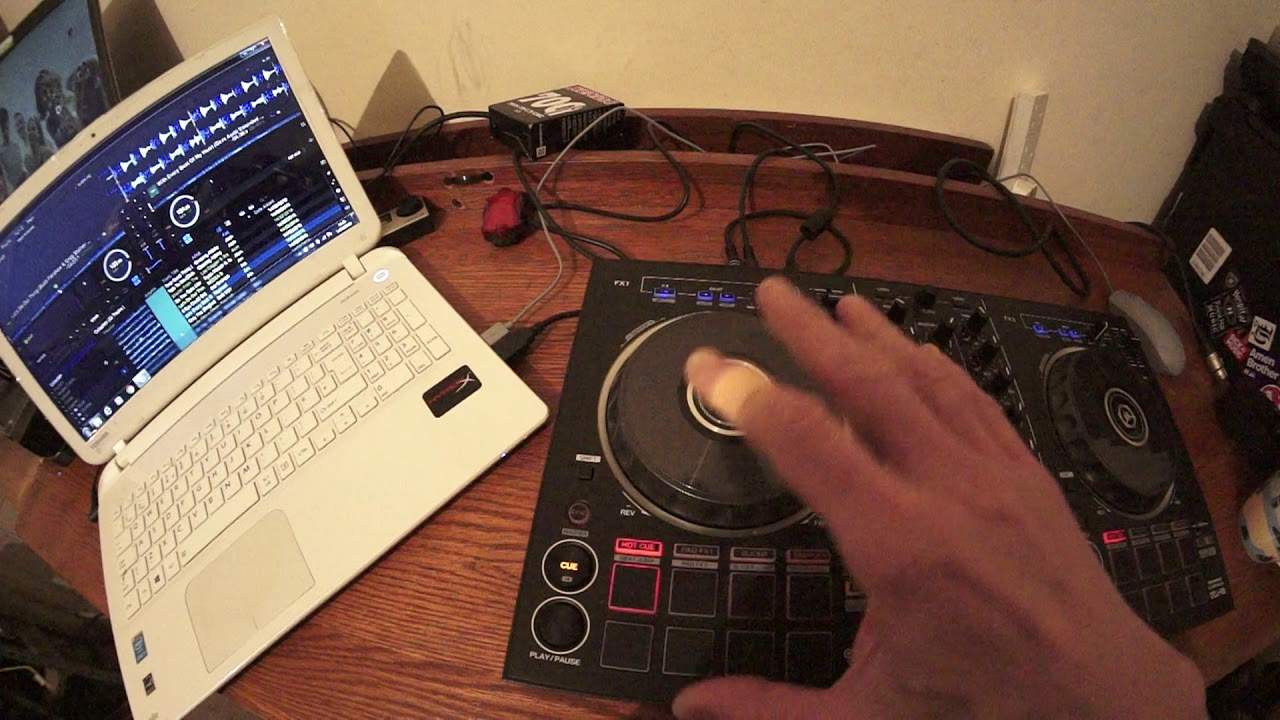
0:00 You've got in front of you the DDJ-RB from Pioneer
Right, you've got in front of you the DDJ-RB from Pioneer. It's at the moment one of their entry-level controllers. We also have the rekordbox software that comes free with the RB. Right, so this video is targeted especially for the new DJ. Now very quickly before I carry on, let's imagine you have never DJed in your life and you live in a huge mansion and you drive, I don't know, you drive a Sherman tank. I would still not, if I were you, invest in the high-end kit and just randomly spend £6,000 because the analogy is very simple. If you've got a swimming pool right in front of you and you haven't been in there for a long time because it's your own swimming pool, you're not going to jump in possibly thinking that it could be freezing cold.
You're going to dip your big toe in to check the temperature of the water first or at least put your hand in there. The same applies here. Please test the water with DJing first, alright? Do not go out and buy expensive kits straight away. You need to try your hand with maybe the likes of the RB. Now, alright, it's not all singing and dancing but it will let you DJ. You can DJ in front of a thousand people with this or with a couple of your mates while they're smoking pot in your house and drinking brandy. It doesn't matter. Also, if you're not used to the likes of the RB after a while and you don't like DJing, you can either throw it away or get a relatively good second-hand price. Also, once you know how to use it...
...you like it, you enjoy it and you start making money from it, then you can either throw it away or you can give it to your next-door neighbour's cat or you can sell it and buy yourself some high-end kit. Enough of that. Let's play a few tunes from CDPool from the dance releases from February 2018. Now in this video what we're doing is looking at forming a mix where we don't get vocals over vocals. Now I've got two tunes here. One on the left which is Let's Do Our Thing from Becca B. The one on the right... ...from Raphael, a track entitled With Every Beat of My Heart. Now I'm just going to move the laptop there and I'm going to move the controller so it's pretty much directly in front of me. Now this is how you should have your setup all the time.
2:40 Let's say you're in a working environment
Please stick away, keep away from having the laptop directly in front of your controller. It's a really, really bad bloody, bloody habit. Don't do it, you idiot! Because what you're doing is... Let's say you're in a working environment. You are pretty much saying to the public, sod off, I don't want to see you because I'm on Facebook or I'm emailing my mates. On the other hand, if your laptop is to the side of you then you have full view of the crowd dancing. They can see you and you've got more interaction with them. That's just a bit of a tip there. Right, so what I'm going to do is let's skip these two tracks right back to the beginning. And I'm just going to cue that up there and let's have a listen.
Now what you can do as well, I don't know if you're familiar with the Rekordbox software but I'm going to start counting bars. Now I want to see how many bars there are before vocals start in both tracks first of all so let's do that. So that's pretty much my first kick. So I'm going to start counting as follows. One, one, two, three, two. One, two, three, three. Four, one, two, three, five and so on. Now I'm not interested really in the one, two, three, one, two, three, one, two, three. I'm interested in the one, two, three, four, five, six and so on. So when I get to a certain number and we have a definite change in the track that's when A, I will know it's a new phrase in the track and also depending on what number I get to that will be the number that I'm going
4:41 One, two, three, thirteen, fourteen
To concentrate on to make sure I get a good mix in with the other track. Everything will be as clear as mud in about 10 years time. Right, here we go. Ready? One, one, two, three, two, two, three, three, one, two, three, four, one, two, three, five, one, two, three, six, seven, one, two, three, eight, one, two, three, nine, one, two, three, ten, one, two, three, eleven, one, two, three, twelve. One, two, three, thirteen, fourteen. One, two, three, fifteen. One, two, three, sixteen. One, two, three, what? Ah, right. OK, so 16. We had 16 and then we had the vocals come in. All right. What I've done there is I've just set myself a hot cue now on the RB just below the little virtual turntable, we have Hot Cue, Pad Effect, Slicer and
Sampler, just make sure that the Hot Cue icon is shining in red. And then what you can do is you compress one of the pads and that will form a cue point at that point there. OK, let's do exactly the same thing now with the other side with every beat of my heart. One, one, two, three, two, one, two, three, three, one, two, three, four, five, one, two, three, six, one, two, three, seven, eight. One, two, three, nine, ten. One, two, three, eleven. One, two, three, twelve, thirteen, fourteen, fifteen. OK, 16, 16, another 16. Now there, I don't know if you noticed, but the vocals seem to start not on exactly the end of phrase. Now that can happen where you will find vocals may start inside the phrase that's playing or the
Vocals may start slightly after the beginning of the next phrase. But it doesn't matter because, you know, sometimes producers, sometimes artists will make that happen and it happens for a reason. It just adds another little dimension to the track. But again, I don't want to start going into the realms of production, right? So what I'm going to do, I'm going to mix in with every beat of my heart into Let's Do Our Thing. But what I'm going to do is play Let's Do Our Thing and maybe have that track sort of halfway through, not at the beginning. So I'm just going to randomly select a point using the mouse on the wave format. So what I did there for the partially sighted, I use my mouse and we've got large wave formats at the top of the screen
And then directly below it. Below where we have the information on the track, I've just scrolled the mouse around there and just clicked on that some random point in the middle. And now that's where the track will start from when I press play.
Right, let's go back a bit.
7:59 We've always only got the one hot cue
We'll start there. OK, so I'm going to get rid of my first hot cue and I'm going to do another one. Now, I got rid of my first hot cue again, I could have kept that if I wanted to and set a new hot cue on another one of the pads. But so we don't have any confusion here. We've always only got the one hot cue. All I did to basically get rid of that hot cue was pressed shift. And while my fingers on shift, press the hot cue button and that will erase the first hot cue and then repeat the process as I did earlier by pressing the button again to get a new hot cue.
OK, there, so that's where I'm going to start my other track. But of course, what I need to do now is I need to make sure I need to know how many bars we've got of vocals there. OK, the last thing I want is maybe say eight bars of vocals in a gap or even maybe 24 or 32 bars of vocals, because if that happens, I'm going to get an overlap of with every beat of my heart with that vocals from that track over the other one. So let's count how many bars we've got with. Let's do our thing from this point and let's see if the vocals finish after, say, eight, 16, 24, 32. All right. So from here, one, one, two, three, two, three, one, two, four, one, two, five, one, two, six, one, two, seven, eight, one, two, three, nine, one, two, three, ten.
9:58 This this is pretty simple
All right. Now this is quite interesting because we had vocals finish after eight bars. So right now, this this is pretty simple. This is very basic math. OK, right hand side 16 left hand side eight. So why don't we count eight bars first on the right hand? Side and then pause it after eight bars. Eight and eight work together as soon as vocals come in, vocals finish here. Let's give it a go. So one, one, two, three, two, three, one, two, three, four, one, two, three, five, six, one, two, seven, one, two, three, eight, one, two, three, paused it now something that is I would say maybe confusing for the beginner to be familiar with, but eventually you'll get used to it. Now notice where I set that cue point.
Let me just do that again from the beginning. One, one, two, three, two, three, one, two, three, four, one, two, three, five, one, two, six, one, two, three, seven, one, two, three, eight. Now, I did not. This is really important. I did not queue it up there on the eight. OK, I queued it up on the next bar because from here that is actually my last bar before the end of the eight bars. That was my cue point there. OK, now so we understand where we're coming from here. Let's just have a listen before that cue point.
12:01 Can you hear a difference?
Now, can you hear a difference? There is a definite difference there. Now, these are subtle differences with tracks that will help you as you become a little bit more, let's say, knowledgeable in understanding phrasing. Now, you've got another element to that track. You've got it with arborio, arborio. You've got that kind of sound, but you didn't have that before the cue point. Have a listen here. Now, OK, so we have got a definite slight difference, which, again, as you start getting more and more into DJing, you'll pick up on these things. This is the ninja hearing style, OK? So all I'm going to do is from this cue point here, I'm going to start the with every beat of my heart there and I'm going to start it from this point here.
Let's give myself a little bit of accounting. And I've rewound. Let's do our thing a little bit now visually. Now, I can see where my cue point comes in. So if you're not, you know, bang on the money and you're not sure about where to bring it in, if you're just looking at your controller. Of course, this is the time to actually have a look at the laptop and you will slowly see the way format move. You'll see your cue point come in as soon as the cue point comes into the centre position. That's when you will bring in the next track. But of course, all you need to do is press the hot cue because that's now ready to go. Now, again, this video isn't about beat matching it perfectly. This is about making sure we're
In phrase and one vocals doesn't go over the other. Here we go.
OK, so transition in time, pretty much in phrase and also in key. In time beat matching. There are other videos I've been doing. And of course, in key, there are other videos on that as well. OK, so with every beat to my heart, let's have a listen to another tune. OK, I'm going to bring the volume down. This one here is no good for me.
This is a Noxa remix. Now again, with the dance releases from CDPool, a lot of them are big room, you know, hands in the air, a lot going on.
I don't know whether to play Kylie Minogue just in case it's banned in all countries, so this one looks interesting. 99 Red Balloons, the extended mix
Getting over the hill. I'm sure you'll remember this tune from many, many years ago. And if you're quite young and wet behind the ears and you think, wow, this is good, it's a new track. It's one of those remixes.
OK, this one here is a track entitled Say It To My Face. This is Madison Beer. OK, skip it forward a bit. Wide Voice Remix. We'll do one more. OK, got one on the right hand side. This is Let Me Be Your Fantasy 2018.
Again, another remix. If you were in or around the 90s, then you'll know where this one's coming from. This is one of those old school sort of rave tunes from many years ago. But it seems to have been more like given that more kind of a dancey, uplifting clubby feel. I like it. All right. Once again, these tracks are from CDPool from the dance releases February 2018. If you want any info on the tracks, go down there into the description. There will be a hyperlink take you directly to CDPool.com Thank you for watching. Many more tutorials from me. Practice and enjoy.
This transcript was produced automatically from the audio of the video and may contain mistakes.











