 14:18
Controller DJ Advise on How to Never Be Without Audio
Contents of the video
0:00 Let's imagine I was going to do some video mixing
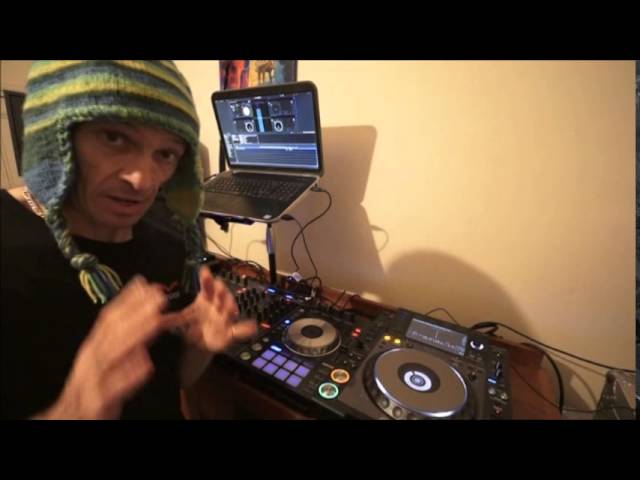
Alright ladies and gentlemen, it's very rarely I'll edit a video but I'm going to edit this one because there are certain points that need to be highlighted in great detail. Now I have the Pioneer DDJ-SX in front of me, I've got a couple of Pioneer 2000 Nexus, got my laptop, got a couple of screen, well I've got a screen over there using the laptop screen as well. I've got Serato DJ, good to go, and I'm going to do a bit of video mixing. Well let's imagine I was going to do some video mixing.
Let's imagine as well that I'm halfway through the set in the evening and all of a sudden a computer crashes. You're going to have serious issues aren't you? You're going to have a lot of problems so what can you do? Now you may not be able to get more videos on straight away, but what you can do is you can have audio. Now I don't care what people say, some people say light, some people say the video, some people say the audio, but when you're entertaining a crowd, the last thing you want to have stop is the audio. So if you can keep the audio going then you're pretty much sorted. So, what's this video all about? Well, the SX has the capabilities of plugging in audio from different sources. So what I'm going to do is run through exactly how it's plugged in,
What to do, what you can do, what you can't do. I'm even going to show you all of a sudden computer crashes, what happens. I'm going to show you cables, I'm going to show you other ways of using audio without having to have a CD player, even just a phone. That may sound really bizarre and stupid but if you know what you're doing you can still do the night mix on your phone. It sounds absolutely crazy but we're talking of the worst case here. We're talking as though your computer all of a sudden has just maybe made your laser show look fantastic. Scratching your head aren't you? That's because all of a sudden it's just gone up in smoke and hooray! We've got a bit of smoke in the room so people can see the laser light.
But it's not hooray for you, but you don't want to tell them that. You have still got to be very professional and make sure that you are giving them the service they require which is at least music. Okay, so SX, couple of CD players, got me a laptop. I'm going to pause the camera and we'll get Serato going. I'll just warn you as well, if you can hear any noises in the background it is family life and there are children about so sometimes it's quiet other times all hell can break loose but it's normally over a toy. Okay, so we're looking at the DDJ-SX. You can see we have the sampler volume in the middle but then either side we have four up faders. Now at the moment this is set so channel one and channel two are being used with the program itself.
Channel three and channel four are for the CDJs and for this demonstration I've got a very basic loop on four and exactly the same with one and of course that is on the program so we can see that.
4:02 The setup or how this is set up is very simple
So the setup or how this is set up is very simple. This channel here, one and two I can use with the software, Serato software Channel three and channel four I can use with my internal music sources Now I use that loosely because you don't have to have top of the range CD players You could pretty much have an iPod You could have two iPods And that really is also the key because if the proverbial did hit the fan I know it's a bit of a pain You can't really beat mix it using two players unless you've got appropriate software but you can pretty much do a very basic function if the worst scenario happened. Alright, so let's just turn that down Turn that up Okay, so you can see that you can have audio there from an external source
Audio here from an external source and then you've got these two channels here which are good to go for your software So I'll just pause the camera again Same goes with a lot of controllers You may have switches that you will need to switch to make sure that the designated channel is assigned to the audio source you want it to be assigned to For this instance here I've set channel three to CD Next to that is mic and then PC We don't want that Of course here we need to make sure that's set to PC That's channel one, channel two PC and channel four again to CD Now that is very important So if you do plug in at the back of the controller which I'll show you shortly your external sources but you're not getting any audio at all
Through channel three or four or for that matter channel two or channel one because you can plug in to these two as well then it could be because you haven't set these correctly Now you've also got to bear in mind that the SX can be used just as a mixer as well so you can turn up to a function just with the SX with a couple of players and away you go Also, you'll notice here phono So you can plug in vinyl turntables as well So I'll pause the camera and let's have a look at the back of the SX Actually before I do that I want to show you this No OK Imagination is the key here You're in your gig You're playing happily and all of a sudden Ah, battery's running low Pause the camera
6:43 Ready, play audio, track
Right Sorry about that OK Start again So Halfway through your event and all of a sudden the software stops or your computer freezes Now I'll demonstrate that So If you look I have some track I have a track ready There, it's ready OK Now this is the first and foremost vitally important thing Make sure you have a track ready Now it doesn't have to be on pause continually You could have a CD You could have something ready The only thing I would recommend is that the other audio system you're using to play an audio file or CD or whatever or record has got something ready to play It doesn't have to be playing Just make sure it's ready to play And there's a very big difference there So Right Let's imagine now Here we go We're playing the loop
And everyone's buzzing and we're happily sort of running around and everyone's picking up whatever and everyone's happy Now I'm just going to stop this here So Exit Yes OK So now that's it Imagine the music stopped What's going on? All right Now of course I'm waiting for that to finish but you wouldn't be doing that You wouldn't be spending seconds here are vital The ship's going down You're not going to be going Hmm Should I take that raft or the other one You would just be running and finding the first thing which is exactly what you're going to do Turn up And press play And that's it So you can see that the program has stopped and we're still able to play audio for a second I've got here
8:45 Stops working, play music, phone plug
My phone All right I'm just going to turn this on Well not turn it on Just get it ready Good to go And we have this app called DJ There it is Two turntables Now if you're familiar with this app You'll know exactly what it is Done If you're not familiar with this app This will play music that of course you don't want to play the music through the phone And it'll play through the speakers Now that's not really that good There's no point having a microphone there and trying to say Excuse me ladies and gentlemen Like Don't do that again Like that with a mic But what you can do is this And again I'll show you very shortly What I would recommend is that you take with you to events Bits of cable Well not bits Four inches of that cable And three inches
Of the other one Leave the edges rough I don't mind Bits of You need cables OK So This Is an RCA to RCA Now That there Is An RCA To Mini jack And you'll notice Red and white So I'm going to put red in there And white in there And then I can plug that into My phone And I can plug this in To the back Of The SX Giving me Audio Now you'll notice As you turn it You can go from One deck To two So Just imagine The possibilities If you had One of these Either side Think Alright Just think There you go You've got Your turntable On your phone You plug this in The back Of your SX If You do have A very Very bad Night PC Stops working Your software Stops working You still Can DJ So I'll show you now How to plug All of this In Now just As A little bit Of an extra Another few items
11:55 Vinyl turntable
I'd recommend You take with You Is RCA To RCA This is sort Of The female To Female There you go These are great These are Quarter inch Mono jack To RCA Great little plugs To have I've always got About six million Of them Because I end up Half the time Just Losing them So there you go There's loads of those Right So pause the camera Again We'll have a look At the back Of the SX And I'll show You how To plug Things in Don't Go away Right to left So here we have Master out This is XLR And this is Known as Balanced It's always a good idea To go balanced Out Let's say If You're in A nightclub And the Amplifiers Are quite A distance Away Master Out 2 Is RCA Which is Pretty much Exactly The same As the Master Out Which is Quarter inch Jack Now then You'll notice here CD Channel 4
Now remember The switches So You can go CD player In here But that Isn't Just A CD Player CD Can be Line Also old school Known as AUX Or auxiliary Also here Is The Vinyl Turntable In there This Here Is To Plug in Your Earth Cable For your Vinyl Turntable And Pretty much Exactly The same Here Phono Line CD Mic Out Here Now This Will Not Be A Vinyl XS If You Want To If You're Scared About It Being Walked Away With If You're Doing Some Sort Of Seminar Or Show USB On Off I Can Plug That In There Into The CD Or I Can Actually Plug This Into Any One Of The Four Channels I've Just Got To Make Sure That If You Want To Get One Then I Suggest You Go And Get One Because You Could Save Yourself A Lot Of Heartache So Many Gigs I've Been To People
This transcript was produced automatically from the audio of the video and may contain mistakes.











