 12:41
DDJ-1000 Best Way of Using the Loops with rekordbox DJ Software
Contents of the video
0:00 You've got in front of you the Pioneer DDJ-1000
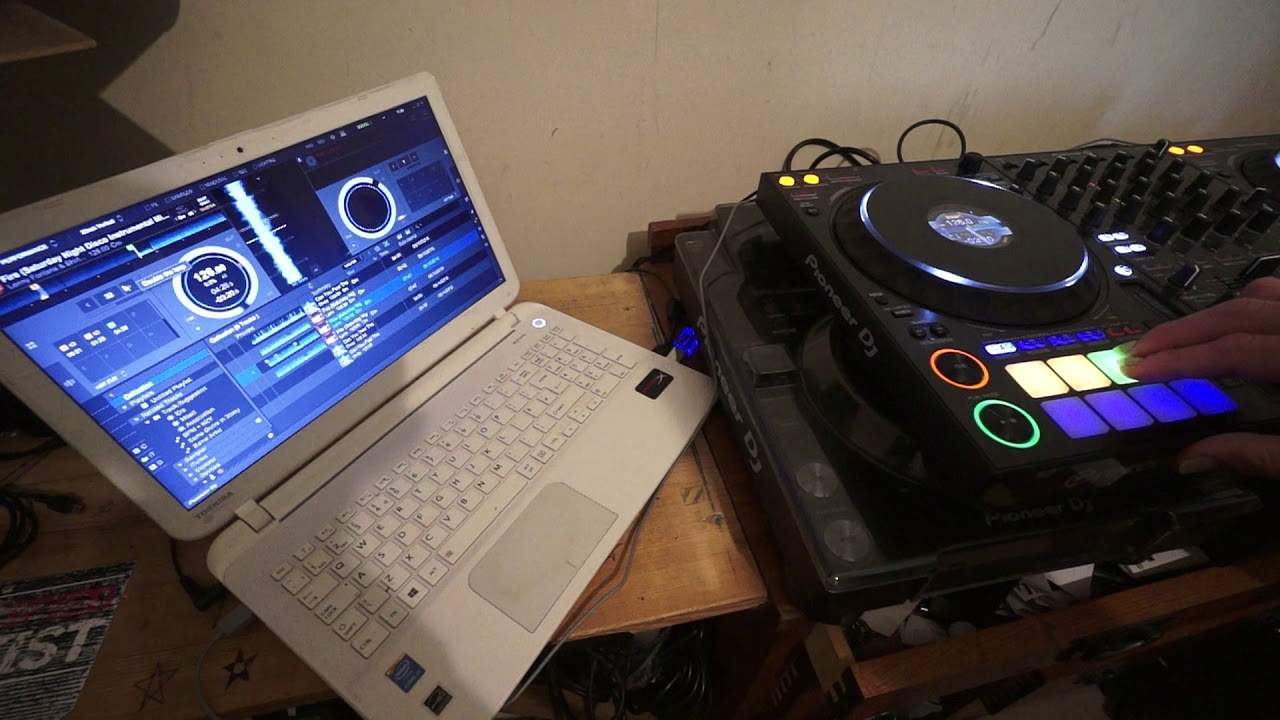
You've got in front of you the Pioneer DDJ-1000. I'm also using Pioneer's rekordbox software. Now, to get the benefit of using the DDJ-1000, do it. Use rekordbox software because the two are made for each other. In this video, we're looking at forming some loops. Now, there are a couple of ways of making loops using the DDJ-1000 and also using the software as well. You can, of course, press the in and the out top left hand corner of the DDJ-1000 on the left hand deck. And if you take a look at the turntable on the right hand deck, it's about the 11 o'clock position in and out. So, exactly the same. What I'm about to show you on the left deck is exactly the same. Sorry, I was at a camera there. On the right deck, which is sort of that direction there.
Okay, so let's have a look at the software and also the controller. Now, we're only really going to concentrate on this area anyway. The track I'm using is, by the way, it's called Fire. It's Lenny Fontana and it's a track in time. Sorry, I beg your pardon. It's the Saturday Night Disco Instrumental. So, if you're into your sort of disco instrumentals. You know, house. This quite potentially could be up your street. There will be a link to the Karmic Power Records site. Okay, so here we go. Now what I can do if I want to, I can randomly make a loop. Now straight away, we can hear there's an issue there. It's not a correct loop. To come out of that, press the four beat loop exit and now we're out of that loop.
2:29 For example, have a listen to this
Alternatively, I can form a loop, four beat loop. By pressing the four beat loop. To come out of that loop, press that button again. All right, now that loop sounded okay. It was in time and it was a perfect loop. But it sounded very, very, very repetitive because the loop I made wasn't using the track correctly. Because when you hear a track and you start getting, excuse me, a melody, a bassline and so on. The melody and bassline have a certain amount of noise. And if you cut up those notes in that kind of melody and if you cut up that melody, what happens is you start getting this repetitive instead of . Yeah, you get what I mean. All right, so by using the four beat loop in the incorrect place, you're going to make that loop sound terrible.
Because the only time I really would use the four beat loop is let's say at the beginning of a track. So for example, have a listen to this. There you go. Now we've got the drum pattern, pretty much nothing else but that to me is not repetitive because that is exactly the same drum pattern that you would have at the beginning of this track anyway. So I'm now going to come out of that loop and you'll hear no difference. There you go. So we've sorted that out. All right, let's just cue the track up. We're at the beginning again. Now let's concentrate mainly on the software. Now below the wave format, we have a number four and we've got two arrows. One arrow to the right and one to the left. Now this will let us form a loop.
So using my mouse I'm now going to click on the number four and I have now formed a one bar loop. But again... Right, that isn't repetitive because it's the beginning of the track. So I formed a one bar loop, I beg your pardon, four beats. I'm now going to put that into one of the pads, press down there and there you go. That is a loop. Now also very quickly as well, you'll notice for the partially sighted, I will explain as well, I've pressed the top left hand pad and that is now highlighted in amber. Now this is exactly the same with the CDJs as well. When you use the hot cues and you put a loop into a hot cue, it will go amber. On the other hand, let's just come out of that loop, press the four beat loop exit
5:00 Let's go back to the screen itself and we can see the number four
And now say I just pressed the hot cue, that is green. So you should know by looking at it, green, hot cue, amber is loop. Okay so we've got two of those. Now very quickly, let's imagine we don't like them, we want to get rid of them. So we're going to shift, press down on both the pads and now they have been deleted. Okay so let's go back to the screen itself and we can see the number four. Now either side we have arrows. If I click on the right arrow, I will double the loop. That's what it says there now. So I'm going to increase that to eight beats which is two bars, 16 which is 4, 32 which is 8. Okay so again and we can minus that as well. So we can go down pretty much to half quarter, eighths, sixteenths
And bearing in mind now these when you start going below one bar then you're getting into more of using the loop as an effect definitely. Let me demonstrate that now by let's say going to just two beats. Alright so we've got two beats, have a listen. Now that in itself sounds okay but I guarantee you after a while that would get very repetitive. And if you go to half and what I'm doing now, I'm actually using my mouse and just clicking on the icon reducing it. So every time I click the left arrow I will reduce that loop by half. Every time I click on the right arrow I will increase the loop, double it.
6:38 We've got a one bar loop
Okay so we've got a one bar loop. Alright let's bring the track forward a bit. Okay what I've done now is I've now got 16 beats. Two, three, four, one, two, three, four, one, two, three, four, one, two, three, four. Put that into my second pad. Let's go further on into the track, hot cue. Now let's get another loop. Let's maybe go back to 16 there. Now also a small point here is that when I made that loop, I put that loop then into one of the pads but I didn't touch the pad as soon as I made the loop. I just touched the pad maybe two or three beats while the loop was being played. Now that will not then, oh sorry that doesn't mean to say that when you press that pad it will start at the point where you pressed it inside the loop.
No, what it will mean is that it will start at the beginning of the loop where you made it to begin with. Now that's quite important. Okay so far I've got one, two, three loops and one hot cue. Now I can if I want to have another four underneath here but don't fret because I can click then the page button to the right and that will put me to a new page where I can start making even more loops and more hot cues. So this is one of the great features of the DDJ-1000. I'm sure there are other controllers out there that will do the same. I do apologise, I'm not privy in the knowledge of every single bloody controller out there. I am no genius by far but let's imagine you've got for example I don't know say five or six hot cues, you've got seven or eight loops
10:11 Make that loop, stick it in a hot cue, bang away you go
And you've got a wicked track like this. You can become the remixer. The defined line from years ago between the DJ and the producer is slowly disappearing because now with the likes of software like this that's got so much to it and controllers like these that can just let you just bring out that artistic bent in you. There is no line anymore. You can be having a mix, using a track, have this moment of inspiration where you go wow I could form a loop there. Make that loop, stick it in a hot cue, bang away you go. You're bringing in that loop inside the track. So for example if I go back here so let's say for example this track it was on its way out. It was starting to leave the mix. There is nothing stopping you forming a loop
Or there is nothing stopping you bringing that same track on one of the other decks, forming the loop, bringing that loop into the mix and then bringing something else in. Now also what some people have been doing Have you heard these mixes where you've got this sort of repetitive beat in the background and yet the DJs are able to bring different tracks into the mix. So it's almost as though they are mixing tracks together but they're joined with this kind of beat that seems to be the same all the way through. Think about it, if you've got the capability which I believe we have here if I click somewhere there I think yeah four deck okay so we can go to four decks if we want to and we can with the DDJ-1000 because you have the deck select.
So deck one can also be deck three and deck two can also be deck four. So on the left we have three if I just move that there so on the left here we have channel three, one, two and four. So potentially what you could be doing is you can have some kind of beat in the background that is quantized in time. It's just that dum, dum, dum, dum that beat and that underlying beat can be the foundation for your mix and that could be the glue that sandwiches that mix together. Alright now I hope that's been a help there will be more videos in the future I'm sure on the DDJ-1000 and also the Rekordbox software as well don't forget there will be a link in the description to the Pioneer website where you can get info on Rekordbox
And of course to Karmic Power Records and a big shout out to Lenny and this tune by the way is still hot like I said if you're into your sort of disco, funky soulful house you'd be stupid not to Google it and just find out a bit more. Thank you, practice and enjoy. Nice one.
This transcript was produced automatically from the audio of the video and may contain mistakes.










