 3:02
Denon DN-S1200 Tutorial on Using the Filter
Contents of the video
0:00 A bit of a demonstration stroke tutorial for you on this guy here
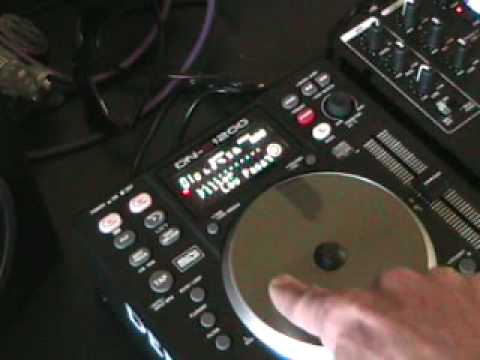
Alright folks, a bit of a demonstration stroke tutorial for you on this guy here. It's from a company called Denon and it's known as the DNS 1200. In this video we're going to be looking at one of the effects. We're going to be looking at this guy here, it's the filter effect. Look to the side of the video for the actual track name. Let's play the music, here we go. Right, first off what you need to make sure is you need to have the light flashing next to the button just below where it says filter. What I'm going to do now is I'm just going to... Make the camera go a little bit closer to that area there. This is where we need to concentrate on now, the actual jog wheel and I'd like you to make note of that small circle there and also you can see there low pass. I'll explain that very shortly. What we can do now, we can now use the jog wheel to increase or decrease this particular effect. Now in this effect we have three different passes. We have low pass,
1:01 I can put my finger on the jog wheel anywhere, it doesn't matter
Mid and high. Let's look at low first. What I'm going to do now, I'm going to put my finger on the jog wheel. I can put my finger on the jog wheel anywhere, it doesn't matter. But just for this demonstration purpose, I'm going to start at 12 o'clock. Finger on, and then I'm going to start to move the jog wheel clockwise. Okay, what's basically happening is we're now just being left with the bass sound. Clockwise, we get lots of bass. Anti-clockwise... We start to come back to the original sound. Now at any time, I can take my finger off the jog wheel and if you notice that small icon there, you've got it half filled. That's basically showing me that we've still got a certain amount of the low-pass filter being used. Finger back on the jog wheel, anti-clockwise, and we come back to the original sound. Now we've got a dial here where it says parameters. If I move this...
2:07 Mid-pass now, exactly the same, I
Clockwise, we go to mid-pass now, exactly the same, I can put my finger on the jog wheel, move it clockwise, anti-clockwise, clockwise, anti-clockwise. Parameters, move it again, high pass, finger on the jog wheel, clockwise, anti-clockwise, clockwise, anti-clockwise. I want to get out of using the filter. Press that button. There you go. One small look at this guy here. More videos to come. Practice and enjoy.
This transcript was produced automatically from the audio of the video and may contain mistakes.











