 5:37
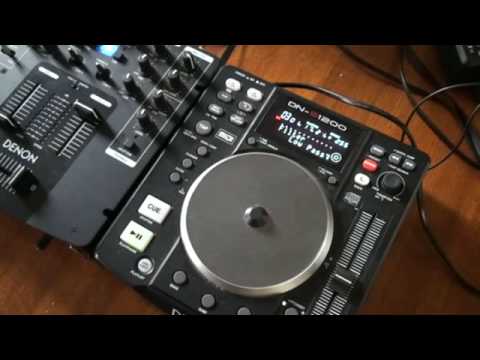
DENON DN-S1200 using the low pass filter effect
Contents of the video
0:00 Not necessarily the best way how
Alright folks, a bit of a demo also tutorial on using the filter effects. Now in this video we're using the Denon DNS1200 and we've got filter, flanger and echo loop. Now in this video I suppose in a sense a bit of a demo also a tutorial. I'll show you not necessarily the best way how to use the filter but how you can use it in a very professional way without going all over the place and just making it not sound necessarily bad. But in a sense, by utilising this sort of method, it could sound a lot better. Now first of all, let's play the track. By the way, the track I'm playing is by a guy by the name of Danny J Lewis, Enzyme Black, and it's entitled Sunrays. I'll put a link in the description. Now what we've got here, don't know if you can see there, we've got high pass, we can also have mid and low pass. So if I use this dial here, the parameters, I can go from high to mid to low.
1:50 Back to the mix level, make this sound a lot better
So in other words, what we can do, we can utilise the filter on the low pass, the mid pass and the high pass. If we have a look at this mixer, it's almost exactly the same as using the low, the mid and the high, but instead we're using it directly from the player itself. Right, what I've got now is I've got low pass. Now just first of all have a listen when I start moving the jog wheel. We're getting rid, if you have a listen, we're getting rid of all the sound. And we're just having the low. Back to the mix level, make this sound a lot better. Bar technique. One, two, three, four, one, like so. So what I'm going to do now, I'm going to use the low pass and I'm going to start to count bars. Now, I'll start the music again. Two, three, four, two, three, four, one, two, three, four, two, three, four, one. Leave it full on. Two, three, four, one, two, three, four, one, two.
3:28 Let's start the music again
Okay, so what I did, I incorporated counting bars in relation to moving this guy here, keeping the low pass full on. So in other words, what we're actually doing, instead of just sounds alright, we're keeping in time with the music as well. Now with this guy, at any time, I can actually hold effect at any point, like so. Now can you see, halfway through the effect, we can stop that effect by just pressing this guy here. And we're still halfway. Let's start the music again. Let's bring that low pass all the way off so it's ready to start. We've got low pass on there. Let's play the music again. 2, 3, 4. 1, 2, 3, 4.
This transcript was produced automatically from the audio of the video and may contain mistakes.











