 9:14
DJ Advise Small Tips for the Mobile DJ, What's It Do, What's if For?
Contents of the video
0:00 This video is a selection of clips explaining a few of those unanswere
Alright guys, this video is a selection of clips explaining a few of those unanswered questions. Why do they do that? How do they do that? What's that for? What does that do? How do I do that? When should I do that? And what time is coffee? Tracks playing, plugged in, headphones plugged in, we're cueing up, we've got LEDs, why can't we hear anything on the headphones? Let's put the headphone volume up. We can hear something now. Guess what? You can turn your headphones up again by moving the trim. Have a listen.
If you can't hear anything, even with your headphones up, cue on. It could be because the trim is all the way down. That's like a second volume for your headphones.
Crossfader select. Cueing by the way is by Lenny Fontana. Crossfader assign, crossfader select, A, A, over to A, B, B. Over to side B, through, through, crossfade, disengaged.
That there is quarter inch jack. And that there is a mini jack, something you'd have in your iPhone and that you'll generally put, generally five will go into a mixer. Quite often more of the modern day controllers will have the mini jack input and the quarter inch jack as well. That there by the way is Jack Irish, a friend of mine on Facebook. You must not associate him with any form of other jack. What's a thumb drive? There you go. Where does it go? Stick drive. What's it for? Well, you can put your music on there and you can put it into a lot of CD players or your laptops. This is the sort of USB lead you'd have from your controller. So that would go into your controller and that would go into your laptop or your PC.
2:06 RCA cable here, and that plug is worth its weight in gold
If you want to have HD, better go for 720 or 1080. Got an R7. RCA cable here, and that plug is worth its weight in gold. That is RCA to mini jack. Also great to have a few of these. That is female RCA to quarter inch jack. Ideal plugs to keep with you. RCA cable to RCA cable colour coded. Always make sure if you've got the red on the right hand side in your CD player, try and make sure you've got the red going into your mixer on the right hand side. White left, white left. Or alternatively you could have red on the left and white on the right. Just make sure they're not swapped over. This is an AKG microphone. More importantly, it's got an XLR input there. That cable is XLR to quarter inch jack. Ideal for a microphone.
3:54 Of the features
Inputs like that on mixers are great because it gives you the option of XLR or in the centre, quarter inch jack. This cable here is your very basic XLR male to XLR female. Another microphone, this one here is wireless. You have the receiver. This is the KWM 1900. That will fit into the input of the mixer. The transmitter is in the microphone itself for wireless microphones. You'll always need the transmitter and the receiver. Pinkiella, the pink flamingo who's been to Las Vegas, Ibiza, France, Germany, all over the UK, many times. Business cards, great way of promoting who you are and what you do. That's an SD card, you'll notice it's got 50 MB-S, that's megabytes per second. It's always good to get 40 or above if you're going to use it for music purposes.
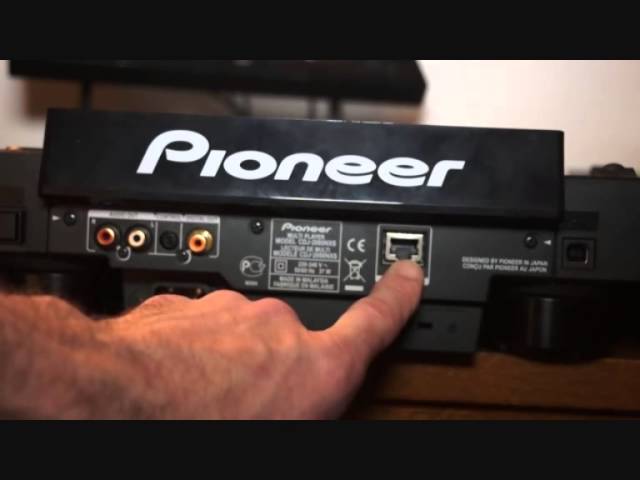
It means you've got a higher transfer speed. Back of CD players now are getting a lot more intricate, so let's have a look at some of the features. This is the Pioneer Nexus. We have our USB out. You can go from out of here into a laptop. Link system here, a LAN cable. This will allow you to go from one player to the other. Alternatively, you can go out of here into, for example, the Pioneer DJM-2000. And you can go up to four players into this. Four players into the 2000, enabling you to play on four players from one CD player. Digital out and right and left out. Don't forget if you go digital out, you need to make sure you've got digital in on your mixer. Don't go digital out into a normal line input. Control, quite often what you'll find on some mixers.
If you go control out on the player into the mixer, that will allow you to start the track by just pushing the up fader up. Audio out, right and left. On off here, power on off, just out of screen. And that's the power input. You're looking at a powered speaker. The easiest way to tell if your speaker is powered or you need to buy powered speakers is that the powered speakers need a power supply to run them because there is an internal amplifier. A non-powered speaker does not need an amplifier. So you'll see here, there's absolutely nowhere to plug in an external power source. Nice little amplifier here from Cam, known as the DJ3 SD USB. Great little amp for home use. Those there are known as binding posts.
6:04 Guy here is a DJ controller from Pioneer
You'll see red and black, sometimes red and white. Red, RCA red. Black is white. So right, for example, and left. Guy here is a DJ controller from Pioneer. It's the WeGo2 and all you need with this is your laptop. You can actually use music from your laptop and you can also use your speakers from your laptop so you don't need any external speakers. It's known as being bus powered. All you need to do is have your USB cable from the WeGo2, as I showed you earlier, into your laptop and you're pretty much good to go. Also need suitable software to run the controller, enabling you to play your music. Headphones. DJs need headphones for monitoring purposes. These are from V-Moda. They're known as the M100's. Headphones are normally measured in milliwatts.
So if you see something, for example 1,000 milliwatts, that's not a thousand watts. One watt is a thousand milliwatts. So three milliwatts is not very loud at all. 3,000 watts is loud against the ears but that's only three watts. But you would not want a thousand watts going through the likes of headphones. Alternatively, you wouldn't really want 3,000 milliwatts running through your main PA. If you do have some form of case for your kit then my recommendation and a lot of other people's is use it because it will look after your items. So headphones, headphones. And you can also and always buy suitable flight cases for the likes of controllers, CDJs, turntables etc. In the UK that is known as a 16 amp plug suitable for large venues.
Always handy to have one of those with you if you are doing very big events. Any good DJ entertainer needs things like this in their life. Missing here is probably a pair of scissors maybe some wire snippers maybe some pliers. But you've got different plugs, you have screwdrivers, phillips etc. It's always handy to have a little bit of a selection just in case you need certain plugs changing into certain plugs. Probably wondering what I mean. Well look at that for example. That there is XLR into quarter inch jack. Never thought of that one did you? Sounds stupid but it's not. A bunch of pens there. Always take pens with you. For requests. Take lots because they get lost. Lighting clamps. You've got your light, you've got your trussing.
You need somehow to fix the light to the trussing. A different selection here of clamps. In the UK and I'm sure around the world it's law to have a safety cable. So it's all well and good having your light attached to the clamp the clamp attached to the trussing rig. You will need one of these cables as well if you go to any professional venue if they haven't got one of those then they could be in trouble. That's pretty much it for this video hope that's been a help there will be loads more hopefully like this small tips for the DJ practice and enjoy thank you very much.
This transcript was produced automatically from the audio of the video and may contain mistakes.











