 7:17
DJ Electronic Dance Music Lesson in Dubai Adding Layers to the Mix BY DJ Tutor
Contents of the video
0:01 I'm going to call this video Layers
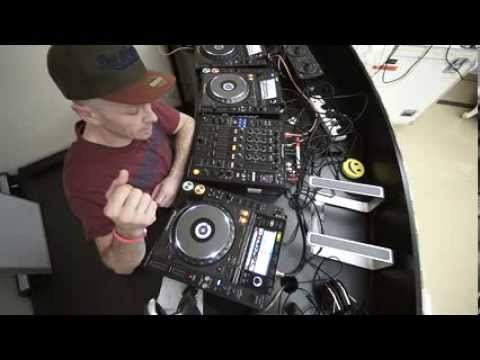
Hi guys, still here in Dubai. I'm going to give you a bit of a demonstration and a tutorial, mainly it's a demonstration. I'm going to call this video Layers. What I'm going to do, I'm going to lay out one track over the other. Some people would class this as a mashup and I agree, it is a mashup but if you listen to a lot of mashups out there, the whole idea of doing a mashup is to have two tracks that are very well known and put them together. These two tracks aren't maybe that well known and there's not much going on. They're not full of vocals, they're not full of like loads of melody bursting all over the place, they're not the sort of, it's not the sort of layer type mix or mashup that you'd hear on the radio. It's something, it's a sort of, this video is about adding two tunes and just giving them a bit of depth, layering one over the other. So the two tracks I'm using is John Tejada which is J-O
H, N and then T, E, J, A, D, E, A, sorry. And it's called Somewhere. This one over here is David Jack, a track entitled Beat Amines, B-E-A-T-A-M-I-N-E-S. Dyslexic, sorry about that. First of all, what I have done, I've set, or I'm going to, I'll show you now, I'm going to set a hot cue at the beginning of this track. Now, when you're using... One of the Pioneer players, the 2000 Nexus, what will happen is when you go to record mode and just so long as the track is at the beginning of the beat of the count of one, as soon as you hit the hot cue A, B or C, not only will you have recorded that first kick of the count of one, the track will automatically start as well. So here we go, I'll show you. Like so, you can hear that.
2:21 Completely off, which is 7 o'clock on most mixers
It's not very loud because there are people asleep and I don't want to annoy the neighbours. The other thing you don't have to do, but in this sort of instance it's advisable, is to set the EQ curve to isolator. What that will do is it will completely take away high, mid or low at any given time, or all of them, or two of them, or a whole lot. I'll give you a demonstration. Volume's up. Put the low, mid and high. Completely off, which is 7 o'clock on most mixers. Press play and we hear bugger all. That's because we set it to isolator. If we set it to just normal EQ, what happens is we reduce the dB, but not all of it. Believe it or not, it is still there. You can hear it. Isolator, it's gone. And again, I can't have it too loud. Right, so I've set my cue point at the beginning of the track.
The reason I've done that as well is because I like the percussion at the beginning of this track. It's got something, so I want to overlay that maybe during the course of this track as well. All the time I'm counting 1, 2, 3, 2, 3, 1, 2, 3, 4, I may have found if I'd have counted correctly at the beginning of this track here, it possibly could have been 32 bars or 16 bars. Another good way of finding out without having to listen to the whole track or a quick The visual way of doing that is count until you get maybe halfway through the break. And if you've counted 8 or 16 and it looks as though you're in the middle, pretty much guaranteed that the other half is going to be the exact amount you counted to when you got to that point. Because, now I've got my ice later on, I'm going to have some fun. Quantised rekordbox. I had engaged master sync function on the players and let's say for example I had
5:39 Sync, acapellas
4 of the Nexus. An arm and a leg, but what you could do potentially is you could have the two tracks going, you could have an acapella and maybe you could have some more percussion on another CDJ. Now a lot of people do not like sync function or anything like that and I can understand, I don't particularly like it because I like to use my ears and if anyone out there is starting DJing I highly advise you use your ears first. Beatmatch using your ears first and then when you're good at that, then by all means use sync. At least you've worked at it first but of course if you have got sync function on your players, by all means use it. If you're going to be doing a mix like this where there's a lot going on, if you're going to be using sync just on two CD players or two PC program going from one deck to the other all the time, then it may sound fantastic.
But you're not really working yourself to the extreme because what could happen, you could end up being in a position where a manager or someone thinks your mixes are brilliant. They didn't know you were using the sync. They book you, they stick you in a nightclub and guess what? You ain't got bugger all sync. So you might as well jump down the drain. Okay, so again this video it's about adding layers. Like I said a few minutes ago... Over here, I could have added an acapella over the top of that. In fact, I could have added two acapellas just so long as they're in the same key. I could have set hot cues on those two acapellas and I could have chopped from one to the other. Bearing in mind as well, very important, acapellas, if you're not familiar with them, first of all, they are a track that's been ripped apart so you've just got the vocals left and you need to be very careful and make sure that you know the count of 1, 2, 3, 4 in the acapella.
So, I hope this has been a help. And again, it's a little bit more information out there. If you've got any, make a video, practice and enjoy. And tomorrow, I'm going to get some sun. Yeah.
This transcript was produced automatically from the audio of the video and may contain mistakes.










