 9:49
DJ Help, How to get Good audio on your video for youtube.
Contents of the video
0:00 Quite a few people have said, how do I actually get good audio?
Alright folks, quite a few people have said, how do I actually get good audio? How come I'm getting better audio and they can't? Maybe using the same cameras, maybe using whatever, it doesn't really matter. But, this is the reason. It's because the actual camera I'm using has got something called a mic input. You'll see it on most, when I say most, not all video cameras, you will see MIC. Now it stands short for mic or microphone. Now, there's lots of ways of using that, okay? Let's say for example, hypothetically, you're not a DJ and all you want to do is you want to record someone, okay? Now let's say you're filming someone and you are here, I'm standing where I am. But the people you're filming are say 10-20 foot away, 20 feet maybe 15 meters away. Now then, if they're talking and you want to capture their voices, the actual microphones on the camera
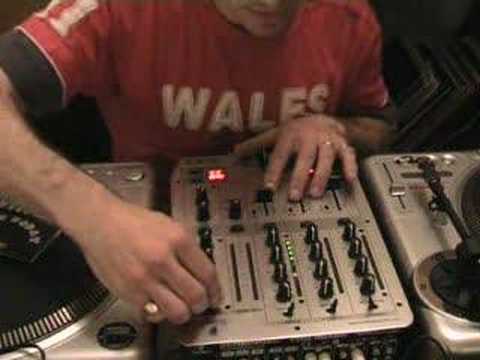
The DJ Tutor offers a wide range of features and features that you may want to know about. It's a DJ mixer and what you will need is either a record out, but ideally with most DJ mixers now you have something called a booth out. A booth out, a booth control dial, which with this one it's just got B on it. Now the booth out is simply for this. It's like a monitor system. Now nine times out of ten, you know what you'll find in a nightclub is they'll have the mixer, they'll have a master output which will go to all the big speakers. The booth out will be there. For the DJ, for his monitors, okay? And he will have his own little dial that he can turn up, turn down, so he can get a good sound either side. But what we're going to do, we're going to use that to stick, to go into the actual camera. So we've got the audio signal directly from here into the camera. Right now then, it's easy for me to say, but how do we do it? First of all, I've got this tune to play and I'm going to just give you a demonstration first.
The audio sound we will get using just the microphones from the camera, okay? So check it out. I mean, I can turn it up really loud, but there you go. I mean, the thing is with this now, if I was talking or you're in a room, you've got lots of sound outside of what you really want to hear, okay? So what you want to try and do is you want to get all the outside sounds out of the way and just try and concentrate on the sound from the mixer, alright?
2:57 This here is a mini jack, okay?
Right, now then. How do you do it? This here is a mini jack, okay? That is the sort of thing you will say put into your iPod, put into a small cassette player, put into a small mini disc player, that sort of thing. That is what you need. And then on the other side, you need some of these. It's very simple. There you go. Phono cables. Right, now then. This is what I'm going to do, okay? And there's also quite a good tip with this, whereby you can automatically get the optimum sound while you're recording so you know exactly what you're doing. I will explain, it's clear as mud at the moment. But now then, here you've got something called Booth, you can just about see it. So again, don't forget, red and white, left and right.
So, just make sure. I mean, at the end of the day, I've seen people, they've put the red up here, white down, and they've gone all over the place. If you put them in the correct plugs, then you'll know that it's always going to be correct. It's always going to be right is right, left is left. Now then, what you can't see at the moment is this here. Sorry, I'm going to have to pan out again. There you go. This now, I'm going to plug this into the back of... The camera, okay. Now then, before I do that, I'm going to show you exactly what I'm going to do. Now this is how we can get good audio. Alright, now then, step by step. First of all, all of your levels down on the mixer. Let me just move it down again so you can see the mixer. Okay? Right, all levels down. We'll turn that off. Now then, this is what I'm going to do. I'm going to play the music and...
4:48 What I'm going to do is just start to increase the volume here
What I'm going to do is just start to increase the volume here. Now, can you see now it's just about... Where are we now? Let's have a look. There we go. That's about right. If you can see, it's just about clipping in the yellow, the amber, and it's not really going in the red. We don't really want it in the red, OK? It can occasionally click in there just a tiny bit, but if you go too much in the red, then straight away maybe you're going to start to get horrible sound through your main speakers. Once you've done that, then what you need to do is this. I'm going to have to explain this now because while I'm moving the dial, I'm going to be recording it. Now here's the tip. This is what you do. You record, you just do a test run. Now think about this logically. You plug the audio, the phono into the back of the mixer. You plug the mini jack
The DJ Tutor offers a wide range of features and features that you can use to create your own sound. You won't be able to hear me, but you will be able to see what I'm doing and hear the audio. I'm going to have the volume up, but I'm going to have the booth volume all the way down. Now, I've done this in the past. What you do is you pan and angle the camera so it can see where the booth dial is. Right, think about it. It's so logical, but it's simple, but it's easy, and it shows you exactly where the right volume should be. Simply like this. As you're increasing the volume, when you play this back what will happen is all of a sudden the volume will increase on your PC. It'll get higher and higher and higher. But because the camera is angled on this dial you can see exactly the right place for the right audio signal. In other words as soon as it starts going too high you'll know it's too much.
7:13 Just carry on watching the camera, watching until there, that's the ri
When it's too low, you'll think it needs to be higher. So just carry on watching the camera, watching until there, that's the right place. But also when you turn it up, don't just do that, like that, do it slowly. Okay? So I'm going to go slowly like this and you will actually hear it as I'm increasing the volume but you won't hear me. Probably a good thing, alright? Alright, so what we'll do, I'll plug it in and I'll show you exactly what I mean. You'll hear a bit of a click, okay? Basically, it's that simple. I've angled the camera on the actual booth control. I've plugged it directly into the camera and then while the music's playing, I've slowly turned the booth up so I'm watching what I'm doing. So in other words, then when I play this particular film back, I can look and I can think, yeah, that is the right point there.
Thanks for watching, practice and enjoy. Because that is the place to be. Sign up because there are a lot of DJs out there like you, new DJs who need lots of information. Thanks for watching.
This transcript was produced automatically from the audio of the video and may contain mistakes.











