 7:26
DJ Lesson. Hot cues, Loops and a re mix
Contents of the video
0:00 Just bear that in mind
All right, ladies and gentlemen, a bit of a demonstration, also a tutorial, but how you can have a little bit of fun. Again, just watch what I do and hopefully you'll do it a lot better, a lot more professional, but you'll be able to take it to the next level. Now imagine as well you are a hip-hop DJ and you're not using one track, you're using three. Just bear that in mind. Right, track I'm using is Hello by Martin Slavik. I beg your pardon, I can't spell, I'm very less Dick Slick. It's a club mix and it sounds a little bit like this.
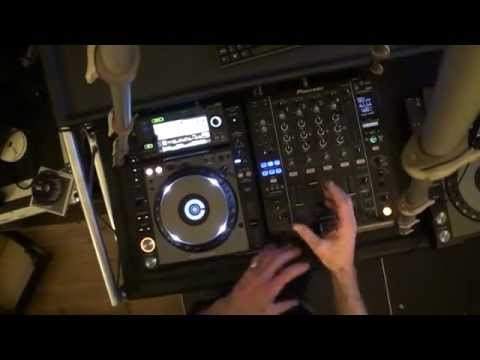
Right, what I'm going to do, first of all, I'm using the CDJ-2000 Nexus, DJM-900 Nexus as well. First of all, I'm going to form three hot cues. I do that by pressing the record call button on the 2000 and you should see... Now the hot cues A, B and C are highlighted in red. So by pressing them while they're in red and the track is playing, I would have almost... What I've done is I've actually recorded the point at which I press those hot cues relevant to where the track was playing at the time at which I pressed the hot cue. Very important. So in fact, let's just have the first beat. So that's C.
So that's D. So we've got C. Go forward a bit.
Let's have that.
One more, okay.
Where she goes hey, that's probably a good one.
2:23 Mixer, I'm going to set
Also there, I've got to remember the timing because the hey is not on the one. It's a eh, one, hey, one, two, three, hey, one, two, three, hey. So the hey is on the count of four. One, two... One, two, three, four. Hey. Always got to remember where you hit the cues. Right, so what I'm going to do now, have a look at the mixer, I'm going to set this dial here which is below the dial which is associated with all of the effects. I'm going to set that dial to number two because that's the channel I'm using and the effects I'm going to set to roll. Now again we have slip roll, we have reverse roll, there is so much we can do here. Reverse roll as well. Try doing that. You're going to be amazed with this and you'll be amazed.
So, maybe you're getting this now. What I'm going to do, first of all I need to get the timing correct so I'm going to do this manual as well. It may be slightly off, bearing in mind this is just demonstration. No, no, no, right. I'm going to tap this button. There you go, we've got some form of timing. What I'm going to do now there's just above the tap button we've got the word beat and to the right and left we've got these buttons with arrows on. We can increase or decrease the tempo. You can increase the roll by pressing the button to the right hand side of beat or decrease it by pressing the button to the left hand side. I want to increase it and I'm going to increase it eight over one which is two bars.
What I'm going to do now is as soon as I press this button here, bottom right hand side which has got on off above it and when you press that starts to flash. That will start the recording of the track that's playing. And it will record to beat. It will record the two bars which in turn once it's recorded the two bars it will then just carry on looping those two bars. But of course I'm not going to let it record the track. I'm going to record, let it record me having a mess around with the hot cues. This is where the fun begins. And again if you are a hip hop DJ and you like to maybe mash up some beats it's a great way of making your own beats on the fly with tunes. Alright? If you're doing it manually it could be a little bit rough.
4:58 I'm going to increase the time too much
It could be a little bit off time. But to be quite honest I do like the idea of it being rough slightly off time because it means it's more real. You are doing it not the machine. Admittedly there are machines involved but it's your timing, it's your ears that are making it work. So let's have a listen. So here we go. Slightly off. I'm going to increase the time too much. Here with the time dial. Is I'm just you know forming the loop as perfect as I can get it. Now again this is a demonstration, this is where practice comes in so you can do this a lot quicker and in real time. If I now switch over this dial here to three. What I've done, I've now taken the loop I made and put it onto channel three. I didn't even have the filter on.
Shows you it's random. Alright? So it's a very rough explanation and a demonstration but again this is how I like it. You know there's no point in me getting everything, well I suppose there is sometimes getting everything perfect. But it's about me showing you and you getting it perfect. Practice and enjoy. Thank you.
This transcript was produced automatically from the audio of the video and may contain mistakes.










