 8:14
DJ Lesson. Mixing Dub Step in to Hip-Hop
Contents of the video
0:00 DJ lesson on learning how to mix
Alright ladies and gentlemen, another tutorial for you. DJ lesson on learning how to mix. In this video I'm going to give you an example. This isn't the way you should do it all the time. This is a good example of how you can mix dubstep into hip hop. Dubstep and hip hop are round about the same sort of speed. Many different types of hip hop. There are many different types and genres of dubstep. This is one example. Now if we say, think about drum and bass. Drum and bass is quite fast. But if you count half time in drum and bass then you won't be getting quite a slow track. And I have delved into this many times before. But again it's always good to bring it up. For example you can count into drum and bass like 1, 2, 3, 4, 5, 6, 7, 8, 9, 10, 11, 12, 13, 14, 15, 16, 17, 18, 19, 20, 21, 22, 23, 24, 25, 26, 27, 28, 29, 30, 31, 32, 33, 34, 35, 36, 37, 38, 39, 40, 41, 42, 43, 44, 45, 46, 47, 48, 49, 50, 51, 52, 53, 54, 55, 56, 57, 58, 59, 51, 52, 53, 56, 57, 58, 59, 51, 52, 53, 56, 57, 58, 59, 51, 52, 53,
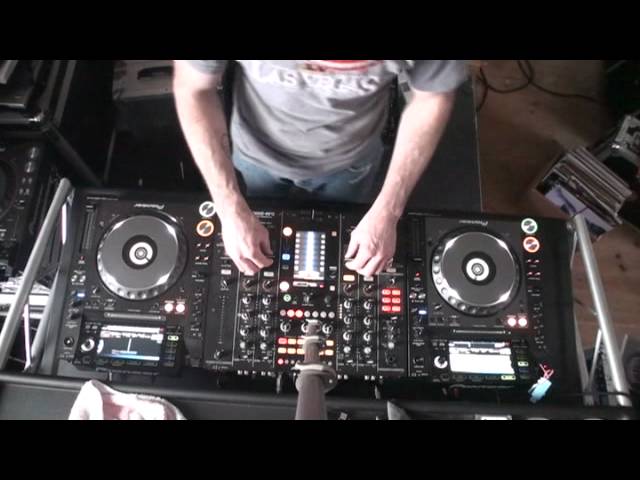
56, 57, 58, 59. So it's 1, 2, do, do, do, do, do, do, do, 1, 2, 3, 4, 5, 6, 7, 8 and so on or 1, 2, 3, 4, 5, 6, 7, 8. Now pretty much the same with hip hop. Even though hip hop is half time you could count double. So you can actually count in between the beats. Now what we've got here, the two tracks is Clockwork. It's the original mix. This is our dubstep tune. And we've got the real Slim Shady over here. I'm going to put the camera down so you can get a good view of the gear. And let's have a listen to the dubstep track. That's that. Slim Shady. OK, so we've got a general idea. I'm not getting the BPM readout on this for some strange reason. If I just go back one and then go back to that again and hopefully we should get a readout. Don't know why but
2:43 I've also set the tempo select to plus and minus 16
Never mind. This one here is 105 BPM. The one over here is a lot faster but then again it's also a lot slower so if we have a listen. It's got 140 on there because it's counting double time. So really it's 70, 70 BPM and we're going to have to try and mix that in or sorry the Slim Shady which is 105 into this one which is 140. Now what I've done is I've set the master tempo on so the keys will not change. I've also set the tempo select to plus and minus 16. So if I reduce the Clockwork track, I can go to around about sort of 118 or so. And if I speed this one up I can go up to 120. In fact I can go to 117.7 or alternatively on the other side I can go to 120.6. Right, so let's imagine now that this track is playing Happily Away and by the way some of this while
I'm explaining it, I'm also going to be explaining that part of this I would be doing with the headphones. So certain parts of this particular tutorial you would only be able to listen to the headphones but I'm going to show you and make sure you have all the audio. So let's imagine now we're playing this track and this is what the public can hear. So this track here is around about four minutes, four and a half minutes or so. So this is happily playing along and I'm thinking how on earth am I going to beat match that one into that? So what I would do is during the latter part of this track I would start to slow this one down. Speed this one up. And again I'm actually now cheating a little bit. I'm looking at
The BPM counter as well to get a general idea. Right, so now we're on 120.5, 120.7, knock that down a bit.
Now I'm just going to pause that. Again this is where we look at time. Now the moment we're on 1 minute 22 seconds. I might want to do this towards, more so towards the latter part of the track. Maybe the last 30 seconds if you're going to do that, you've got to be very quick. The idea for that or the reason is that we don't want the public, the dancers to think my god this track's going really slow and it's slow for a long time. We want to sort of maybe start to slow down. So I'm going to slow it down towards the latter part of the track so that the track here is only going slow for maybe the last quarter or eighth of the track. So bear that in mind. We've got that playing. So bring it on a little bit. So we're up next
To the 52 seconds. Now again I'm going to be thinking about counting, you know 1, 2, 3, 4. So, maybe that's a good time to bring this track in.
5:37 We've got it ready
So we've got it ready.
Now again, the opposite will happen with this track. As soon as we bring this one in, some people out there are going to think that's really, really fast. But don't worry about it because there is a really nice tip and a trick how you can make people go, was it fast? No, it wasn't. They won't know but you do. Here we go. Right, what I want you to do there more importantly is watch the hand on the pitch control. If you missed it, rewind but what I did we had a mix. It was perfectly in time well near enough but I didn't have any headphones and then I brought this one out now just after I brought that one out I then started to reduce the speed of the Slim Shady track to around about the centre position so a couple of things are happening
Here is, firstly we're having this track play by itself then, well actually more than two, a lot we're having this track play by itself then we're slowly going to speed this one up and all this is done in, you know it could be done in like 45 seconds sorry, we're slowing this one down we're watching the BPM then we're bringing this one in and then there's a mix there's a good transition and then when we bring this one out as soon as we've brought it out we start get your teeth in start to slow that one down again it's about timing now I'll do it again here we go, we'll pull that up
And bring this one out
Alright hope that's been a help practice it and I enjoy thank you practice and enjoy
This transcript was produced automatically from the audio of the video and may contain mistakes.











