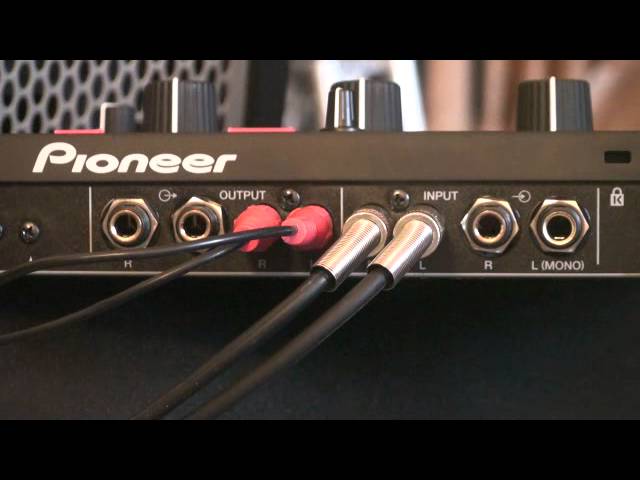
 0:57
Setting up an effects unit
On YouTube this video is called DJ Lesson, Set up Pioneer RMX1000 Video 1
What this lesson teaches
Fifty-seven seconds, one question, and it is the question that stops people using an effects unit they already own.
With send and return
The proper way, and the reason those two sockets exist on a mixer.
Mixer send → unit input. Unit output → mixer return.
The send takes a copy of the signal out to the unit; the return brings the processed version back in and mixes it with the original internally. The unit sits in a loop beside the signal path rather than in it, which is why the mixer keeps working normally when the unit is off.
That is what a send and return pair is for, and if your mixer has them, use them.
Without send and return
If all you have is an output and an input, the unit goes after the mixer: mixer output → unit input, and the unit's output onward.
Where "onward" goes depends on what you want. Into a spare line channel on the same mixer gives you a channel you can fade the effected signal in on. Into your amplifier or powered speakers instead puts the unit permanently in the main path, which works but means everything goes through it all night.
The one thing to avoid is a genuine loop - the unit's output returning to a channel that is itself feeding the output you took the signal from. That will feed back, and it will do so at full volume.
Why the distinction matters
A send-and-return connection is parallel: the dry signal is unaffected and the unit adds to it. An output-to-input connection is in series: everything passes through the unit, so its own level, mix and bypass settings now matter to the whole system.
So with send and return you can leave the unit's mix wherever you like. In series, set its mix carefully and know where its bypass is - because the night is now going through it.
Contents of the video
All right, ladies and gentlemen, short video here on the Pioneer RMX1000 and showing you how to set up the RMX. You'll go from your mixer to the RMX, of course, and then from the RMX back to your mixer. But how do you do it? Now, a lot of mixers have something called send and return. So you'll go from your send from your mixer to the input of the RMX1000, and then you'll go from the output of the RMX1000 to the return of your mixer. Alternatively, if you don't have send and return, you just have input and output, you'll go from the output of your mixer to the input of the RMX1000. And then the output of the RMX1000 is the output of the RMX1000. And then the output of the RMX1000 into the input of your mixer.
Hope that's been a help. Practice and enjoy.
This transcript was produced automatically from the audio of the video and may contain mistakes.











