 8:17
DJ MIXING LESSON. THE CUT N JUMP A Mix with only the use of the cross fade on a DJ Mixer
Contents of the video
0:00 In the morning and it's time
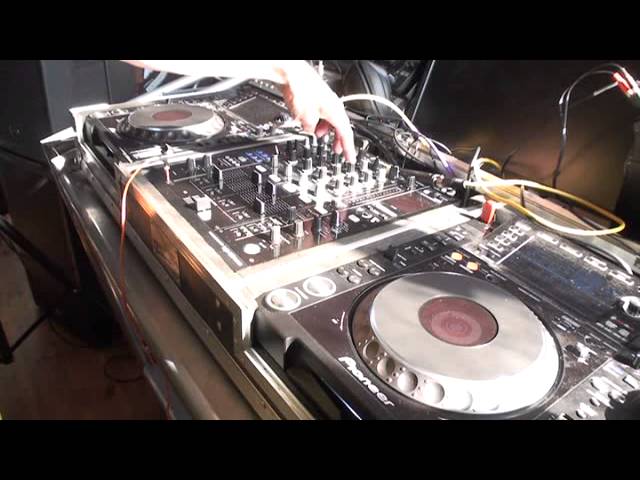
Alright ladies and gentlemen, it's first thing in the morning and it's time for a jump. Right, a jump. A jump in tunes, in music. So we're going to cover quite a few different areas in this particular mix. The two tracks I'm using is Dave Dubs, a track entitled Mindfunk and we have Cape Funk Cartel. This one here. Found Paradise it's called. Now first of all you should be able to notice that this track here is slightly different because it starts off with a melody in the beat. As soon as it starts, straight away we have that melody. And this one here again starts off with something in the background but it's more of a bass line. We've got that. So what I'm going to do in this demonstration, stroke tutorial, I'm just going to move that back there and move the camera back there so we've got a better angle.
And we have sun. For how long? I don't know but it's a lovely day outside. Okay so. First of all what I'm going to do is I'm going to beatmatch the two and the Cape Funk is all round about there so we just, I'll just press that and right, that's about, that's roughly about it. Now what I'm going to do here is something that I would class as the jump where the transition isn't a beat mix. It's just from one straight through to the other. Now there's a lot of things we can do here. Again, please think outside the box. What we can do is we can go from one to the other, same beatmatch, very simply and we carry on near enough at the same beatmatch. So for example if the Dave Dubs was which it is 125.6 and we have the Cape Funk at 125.6 we can cross over straight to the other track.
2:44 Pitch over there, you can see
But let's imagine that. You want to start to increase the tempo of your mix as well. Well here's a good way of being able to do that without having to mess around with the pitch much at all. Now you'll notice if we have a look at the pitch over there, you can see it's in that position and the one there is in that position. And they're near enough beatmatched. So first of all I'm going to do a very basic transition and I'm going to do a jump but also the transition is going to be using the crossfade. So first of all I'm going to do a very basic transition and I'm going to do a jump but also the transition is going to be using the crossfade. And the crossfade only. So we'll press play there. I'm just finding an appropriate timer again.
Don't forget when you're doing a mix it's really important to count bars, phrases every single second of the day when there's music playing you need to be counting. In the back of your mind. 1, 2, 3, 4. 1, 2, 3, 4. 1, 2, 3, 4. 3, 4. Eventually you'll get to the stage where you're not even counting. You always have to count. You automatically know when the count of number 1 comes in or 3 or 4 or 2. It'll happen naturally. Okay there you go. Straight forward jump from one to the other. Just to let you know as well, the EQ was set at 12 o'clock on the treble, mid and the low. And the up faders were all the way up. And all I did, I used the crossfade and went straight over. Now again what I tried to do there, I tried to listen to a point on the Dave Dubs track that was an appropriate point at which I felt it was a good idea to bring the Found Paradise mix in.
5:31 Work, certain tracks, together
And they were near enough beat matched, the same speed because you saw me do that earlier on. Now how do we maybe not so much take this to the next level but how can we get the next track to come in but at a faster speed? At a faster tempo. Very, very simply. So what we'll do, we'll just go back to near enough the point at which we brought the track in. What I'm going to do is very simply that. Increase the speed. Now because... I'll just pause that. Because transition is just one swift movement with the crossfade and we're not beat matching it We can very easily mix these two with just a quick switch from the crossfade and go into the other track. Now if you do this at the right time and correctly, the crowd won't notice the difference that you're maybe going from 126 BPM
Up to what's on this player now, 132 because you're not beat matching. Again very important. You cannot beat match a track that is 125-126 into something that's 132 because they'll be completely off beat. They may be in beat on the first beat but then they'll go off and it'll sound awful and at some point they'll come back in beat but they will go off again. So don't, please don't try and mix two tracks that are different BPM unless of course they're half time or double time for example if that one was over there was 60 BPM and this one here was 120 they would mix alternatively 60 over there and 30 or 60 and 240 which is quadruple time. It's a bit random there but it does work but it's very difficult. So here we go.
I'm going to bring it in there.
Again you can hear the difference in tempo but what we've done is we have very simply very slyly we've lifted the mix. Now also this track that's playing is slightly higher in feel in key as well. Now when you start mixing in key you will find that certain tracks will work together certain tracks won't work together if they're of the wrong key but also if you're mixing tracks that will work together in the same or not in the same key if you're using tracks of keys that will work together sometimes certain tracks of a key that will mix in with another track they will only mix in if you maybe chop them from one to the other. If you do try and mix certain tracks in and you do some form of blend where the music is involved
You may find that the music doesn't work because the keys are too far apart but if you mix like this where you chop from one to the other it will work and this is where you need to be slightly more musically minded alright? So again a very, very quick demonstration even though it's been 8 minutes and 12 seconds and I'll say practice and enjoy thank you very much.
This transcript was produced automatically from the audio of the video and may contain mistakes.











