 16:23
DJ Tutorial and New Releases CDPOOL APRIL CLUB 2012
Contents of the video
0:01 How you can get some effects
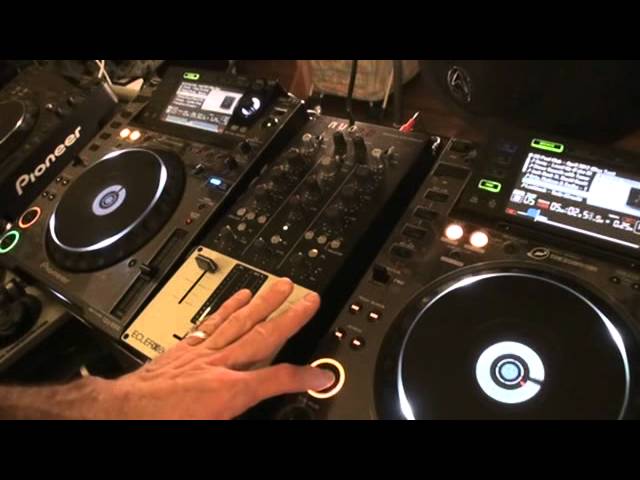
Right guys, more new releases for you. Sequel, in this one we're looking at the club releases. There it is, if you're upside down. From April 2012, kicking off with track 1 from disc number 1. The mixer by the way is from Ekla, it's known as the Nuo 2.0. It's quite skinny. In this video I'm going to show you how you can get some effects with no effects. In other words, how you can get some very simple Thanks for watching, and I'll see you next time. Track number two from disc number two. Don't forget as well, I'll put a hyperlink in the description. It's known as a lickable clink. Take it directly to the CDPool website. Now if we go back five or six steps, in other words, where we are at the moment now, modern day technology, everything's got to be EQ'd and trebled and bassed and reverbed and filtered and flangered. But if we just look at music in its very basic form, low, mid,
2:31 This guy as well, we've got these isolators
What you can do with any mixer that's got low, mid and high is just maybe take away the low, take away the mid, or take away the high, or take away the low or the mid. And if you're clever and you get two tunes that match, you can incorporate just say the mid for one track with the low and the high from the other. So for example, what I want you to do here as well is notice on the LEDs. But alright, I'm tapping into the red there a little bit. But that is because I've increased the mids. Now if I was to put this over the other track, I've almost got not necessarily an effect. What I've got though is I'm highlighting this frequency from this track and I'd be able to highlight the frequency from this track over the other one. Same with the bass. Now this guy as well, we've got these isolators. So what they will do, they will completely isolate.
Either the low, mid or high, or the low or the mid, or the mid or the low or the high or the mid, or the low or the mid or the high or the mid. They'll get rid of the lot if you want to. So to isolate means we're taking it completely away. So for example, just got the mid. Right, you've got that. Excuse me, what I'm going to do is, first of all, I'm just going to go through a little bit of this track so you can hear it. Also in the description, sorry, comments. Leave comments if you like. So what we're going to do now is I'm going to just have the high. Now you've noticed I've turned that up all the way. The only reason I'm doing that is because the mid and the low are off, so what that means is there's lots of headroom for me to just use that one frequency. If I did that with all of the low, the mid and the high then
And have those on there as well. You can see everything's in the red. A way of thinking about it, red is dead. Even some of the top DJs in the world will continually turn these guys up. By the way, big shout out to Playluff in the house, that's in Brittany. You know what I'm talking about. Okay, so let's try track number three here. So we're going to take away the mid and the low. Turn that down a bit. Right, I'm just going to beatmatch it first.
5:00 By the way is track number
What we've done is we've added some vibe, right? Now if you listen to that, what have we got? We've added an effect. Next one by the way is track number three from Diss Number Well, 1LMFAO, sorry for party rocking.
Alright, what I'm going to do now is find another track on this guy. We'll do the same thing with the mid. So, I'm going to bring those all the way up, take off the isolator. You've noticed now the EQ's gone really high on here. The LED, so I need to bring that, sorry not the EQ, the LED has gone really high so I need to bring that back down. Wang this forward a bit. Let's try and find something else on here.
6:40 I'm just going to try and find a place
Alright, I'm just going to try and find a place. Right, what I've got here now, I've almost got like a bit of a melody so I'm going to incorporate that melody over the bassline using the same technique. This time I'm going to take away the high and the low so now I've only got the mid. Spend more time on it and sound much better. Whang this one forward a bit. Also you'll notice, this is one of my trademarks actually, tapping on the cue.
8:50 Next door might explode
Always count bars. 1, 2, 3, 4. 1, 2, 3, 4. 1, 2, 3, 4. 1, 2, 3, 4. 1, 2, 3, 4. Alright, that one there was track number 3 from disc 1. Choose a number on track 2. Go on. Well done, track 9. Okay, so we've got a track 9. That's number 8. And we'll try track number 9. So we'll bring the EQ up to 12 o'clock. We'll disengage the isolator and we'll press play. And you never know. Next door might explode. Wang it forward a bit. What do you think of this one? Now there, if we listen, we've got 1, 2, 3. So that hit is not on the count of 1. Let's add that with something over here. Not that one. Not that one. This one here is track number 7 from disc number 1. What we're going to do now is a little bit of beat juggling. Let's wang this forward a bit so we get an idea of this track.
You see what I'm trying to do with these CD pool videos is not just show you the music and what's on the CDs, but give a few tips and tricks, you know, a tiny bit of more of an insight into what a DJ can do. And you being a DJ, you've always got to remember the only thing stopping you is your own mind. Follow people, see what they do, but you need to do what you want to do as well. Just take it to a new level. In other words... Maybe sometimes it's a good idea to look at your mixer and go, today I'm not going to look at that as a mixer. I'm going to pretend it's a washing machine and wash stuff. That sounds really bizarre but if you can imagine that being not a mixer but something completely different, you will, I promise you, you will be looking at it from a new angle and you will look at your mixing, everything from a completely new angle. Also you'll have very clean socks. Right so, beat juggling.
11:38 Very shortly
Now, what I'm going to do here is... Right, I like that. OK. No, don't like that. OK. Have a listen to what it sounds like when I hit the two cues slightly off-beat. It will be off-beat but it will also be on-beat as well. I'll explain very shortly. Beat, now off-beat. Now off-beat. OK, why is it off-beat but then it is on-beat? If we have a look up here, I've got there 126.3. Over here I've got 126.5, so this one's slightly too fast. Why is it on-beat but off-beat? Because I've hit them at the cues at a different time interval, in other words like this. That means that this one here would have been off-beat with that one because I hit that one first. The reason it's still on-beat is because...
13:49 Of course, I've set them both at 126.3, 126.3
Now, of course, I've set them both at 126.3, 126.3. It means that because they're at the same BPM, if everything works perfectly and the beats are precisely at 126.3, 126.3, it means that the time difference between me hitting that and that, for example, it's half a beat or one beat, theoretically within two or three minutes, We'll finish off over there with track number eight from disc number one, practice and enjoy. Follow the lickable clink to the CD4 website. This one here, It's Dr. Don Don. Good thing, Don Don Don. I wanked forward a little bit. I like this one because it's got that sort of original twisted disco-y vibe. This track reminds me of the sort of Daft Punk kind of feel. Nice. Once again, practice and enjoy it and don't forget the only thing stopping you is you. And by the way, if you're about 75 and you think you can't be a DJ, get alive, you can.
This transcript was produced automatically from the audio of the video and may contain mistakes.










