 8:50
DJ Tutorial, Demonstration on the NEXTBEAT. Sample banks n stuff!
Contents of the video
0:00 A bit of a demonstration stroke tutorial on something called the Nexbe
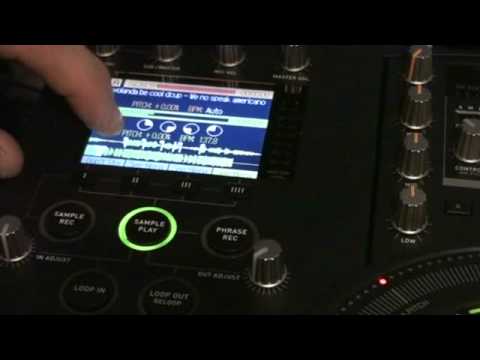
Alright guys, a bit of a demonstration stroke tutorial on something called the Nexbeat. And here it is in its entirety, well I want to say in its entirety, that is the portable bit and the plug-in bit is sort of there. Now first of all I want to play you this tune which is something that I'm going to be using. Now bearing in mind these sort of demonstrations tutorials are pretty rough and ready but hopefully the idea is it will inspire you and make you think, I can do better than that. Which is the whole point! Right, have a listen to this. Right, this one here by the way is this particular tune because people were saying, what's the tune like? What's the tune? Is it that? Is it this? What is it? But thank you very much to all the people who put comments underneath going, well it's this or this or that. Wonderful. This time you don't have to because I'm going to do it for you. It's this. Ah, it's upside down. It's from Daft Punk and it's from their album Homework. Now first of all, very importantly, really important, if you are of course still at school or college and you come home and you have to do your homework,
Probably very advisable not to mess around with your decks and stuff until you've done your homework. Actually, thinking about it, what you could do is you could probably listen to homework while you're doing your homework and then you would be doing homework homework. And your parents would be like, Oi! Do your homework! And you'd be saying, I'm doing my homework homework! Right, okay, it's track number 11 and it's entitled Rock and Roll. What I'm going to do, I'm just going to pause that. Now, right, come here. Ah, sorry, I've got to move. That's quite, if you like Jamara Choir. Virtual insanity. With the fish eyes. Right, sorry. I digress. Right, I'm going to put that there. And there it is. Now you have to bear with me here. Said the bishop to the actress. If I push down there, like that. Now have a listen. Okay, circular touchpad in the centre.
2:10 One, two, three, four
But when you go into sample play, it ends up being four sample pads. One, two, three, four. But you may say, well, it's playing the whole thing. And that's playing the whole thing. And this is playing the whole thing. But it's very, very subtle what's going on. Top one here, if I hit that, it will start off at the beginning of the sample, go right the way through and play it again. This one here... We'll start off at the point at which this sample starts off, but then when it finishes these three, it will just carry on going. Have a listen. Same with this one here. This will start off at this point, but as soon as it's reached the end here, it'll just carry on going. Same with this one. Alright, so we've got 1, 2, 3, 4 samples. Right, let's take this out. But we haven't actually, because if I take it out like that...
You will notice on the side of the unit, 1, 2, 3 and 4. So 4 times 4 is 16. So in other words we can get 16 samples on here. Now this is where it gets quite interesting and also it means you can start having a good old mess around. Now if I take the iFish off the camera, right, you'll have to bear with me here because sometimes the camera does go a little bit blurry. Thank you. A little bit blurry. If I just press that button there, pull that lever and... Do stuff like that, it might explode. Okay, I don't know if you can see there, we've got 1, 2, 3, 4, 5. We've actually got another one in the centre there, but what I want to concentrate on is 1, 2, 3, 4. Now, if you can see that first one, that is where the first sample will start. And then the second one, where the second will start. Third one, and fourth one. What I can do if I want to, if I just press, for example, 2.
4:30 Hopefully you've got the general idea there
What I can do now is I can now move the second beginning of the sample to where I want it to start. Have a listen. Same with this one. OK, so hopefully you've got the general idea there. So what I can do is I can set a beginning time for each sample. But of course, at the end of the day, what we've got is 16 in there. So if I just bring that back again and put the fish wide angle lensy do-free on like that, it's a do-free! Oh yeah, I need to go off there. Hold on, I've got to press that button. Where is it? Hold on, just move that there. Press that. And bingo! Marvellous. Right, so in my wacky demonstrations that never really go to plan and always a bit strange and fun. Fun with a capital P. Ah, I need to do my homework. Right, so I'm going to take that out like that and I'm going to press homework. Of course what we can do as well is we can add some effects.
6:40 We've got low frequency, high frequency pass, flanger, phaser, delay a
We've got low frequency, high frequency pass, flanger, phaser, delay and reverb as well. Alright, so let's put a bit of delay on there. I'm just going to... Stop that. No. Alright, it's to play music. Let's open our minds a little bit. Hold on a second. Sorry, trying to get a bit of brain out there to try and expand my mind. Take it like this. Let's... I don't know. Right, think. Outside the box, not inside the box. Cardboard box. Microphone. Record yourself going, Hi! How are you today? Hello! Welcome! Happy birthday! I don't know, you could say anything. Record it, stick it on the flash drive, the card thingy, and then you could put it on the samples. In fact, what you probably could do, if you took a PC with you to the gig,
The crowd to say, hello, happy birthday Dorothy or congratulations. And guess what? You can walk around the crowd going, hey, listen to this. Hi there, Dorothy, how are you today? Ho, ho, Dorothy, Dorothy, how are you today? And you could be... No, just think about it. It's just like, again, what we're doing here is we're taking something that was made to do one thing and we're going, hmm, I know. Thank you for watching.
This transcript was produced automatically from the audio of the video and may contain mistakes.











