 7:21
DJ Tutorial, Edit a song on the off beat
Contents of the video
0:01 In this demonstration we're going to be doing some editing
Alright guys, in this demonstration we're going to be doing some editing.
Right, okay, we have a demonstration and a tutorial. Now bear in mind as well what you need to do is take these particular demonstrations, tutorials, in a way in which hopefully you will take some bits of information and incorporate them into your own styles. Don't take this as this is what you have to do. So, take these sort of demonstrations and tutorials as a bit like making a cake. You know, this is part of the ingredients and you need loads of other ingredients to make a wonderful cake. But don't follow Chef Petitpoir because he's a bit of a nutter. Right, at the moment I've got the up-faders, both of them up. I've got the small switches at the through position. That will disengage the crossfade.
Now there's a lot of ways we can do this and I'll show you a couple. The two tracks I'm using, one of them is Wiley wearing my Rolex which is on the other side and I'll put the names of the two tracks in the description. Okay, so first of all, foremost, a lot of people they're always counting 1, 2, 3, 4, 1, 2, 3, 4 and as I've always said it's always a very good idea 99.9% of the time to bring in your tune on the count of one in a bar. In other words, 1, 2, 3, 4, 1, 2, 3, 4. Because what you generally find 99.9% of the time, most dance music will tend to have the first beat start at the count of one. In this demonstration though, we're going to be bringing the tune at the count of one but also, believe it or not, there's bags of space in between the count of one,
2:32 In other words, we've got 1, 2, put the volume up
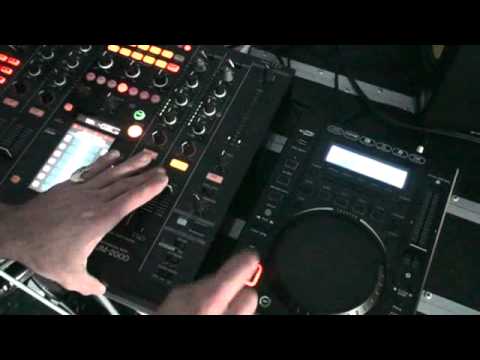
In between the count of two, in between the count of three and in between the count of four. So first of all I'll give you a demonstration. I'll explain what's going on. Here we go. Okay, so what was I doing? Well, we're counting 1, 2, 3, 4, 1, 2, 3, 4. What I was doing, I was hitting the Q button in between one and two, in between two and three and in between three and four. So in other words, we've got 1, 2, put the volume up. 1, 2, 3, 4. 1, 2, 3, 4. 1, 2, 3, 4. 1, 2, 3, 4. Now try it. Now also what we can do is we can do that and we can hit that Q button if we want to on the count of one, two, three, four. So it's almost as though we're hitting it on the beat and we're also hitting it, which is what this particular video is about, hitting it on the offbeat.
So let's do it again.
So remember offbeat and onbeat. Onbeat, offbeat and onbeat. Right. So let's go slightly more in depth with the music of this particular track, Wiley. Let's have a listen to it again. Listen to that ooh, ooh, ooh. Now if I bring this in on that ooh, ooh, ooh, what's happening is the two sounds are overlapping. Right. Let's try that. Now that sounds pretty good. But I'm hitting that on the count of one, two, three, four, which is where Wiley's coming in. One, two, three, four. Now let's listen to it with me hitting that on the offbeat.
4:46 Side A and we have
Now that to me sounds better because we're getting a ooh, ooh, ooh, ooh, ooh, ooh, ooh. They're working in tandem but it sounds good. Now also you noticed earlier on I was using the up fader. We can do exactly the same thing by using the crossfader. So this time I'm going to put the through on this deck over to side B and this guy over to side A. So we go to side A and we have the Wiley tune.
On beat. Right, what's happening there is instead of us hearing the Wiley going ooh, ooh, we're actually using a different track to give that sound. Now this is where we start taking a mix from a basic sort of general you know what I mean one track works well with the other to actually listening to a certain sound from a completely different track and incorporating that sound in. So it's almost as though the other tune all of a sudden in a sense is changing very subtly one sound and we're using a sound from another track instead of that one over there. That one. So let's do that again, here we go.
Alright again the whole idea of these particular tutorial stroke demonstrations is to give you ideas, bit of advice. And hopefully inspire you into just not necessarily changing your style. But at the end of the day things like this will help you and hopefully you'll look at this and go you know what I can incorporate that into my mix and take it to the next level. Don't forget, practice and enjoy. Cheers.
This transcript was produced automatically from the audio of the video and may contain mistakes.










