 3:58
DJ Tutorial. Scratch, turntabalist? Use some FX Video 2
Contents of the video
0:00 In video number two we're still going to use the effect
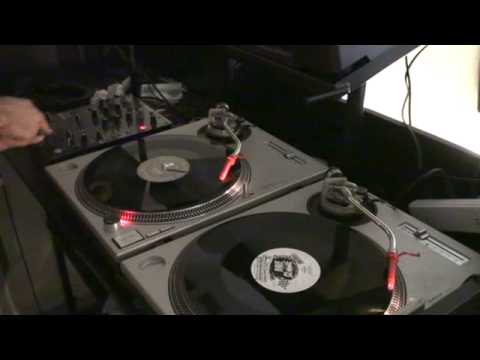
Alright folks, video number two on using effects when, say, scratching or doing a bit of turntablism. Now in video number two we're still going to use the effect. The mixer here is the Pioneer DJM400 mixer. A couple of Technics SL1200 Mark IIs and this guy here is International DJ Gigolo. It's Dave Clark Compass and then this one here is Woody McBride Baseball Heroes. And it's on Communique Records. And this is the one where I've got the scratch sound and this one is a beat. So I'm going to go over using this beat. Now, the reason I'm going to do video number two is in video number one, all I did basically was just showed you a bit of wiki-wiki scratching using the echo effect. In video number two, we're going to incorporate that into a beat as well.
1:29 You may think it's loud, but in essence what's happening
Set, and on this guy here, just below we have the screen here. We have auto, we have tap, and then we have beat pitch, minus and plus. What I'm going to do, bring it up to plus, you can see just about on camera, you can see this red dot here. What I'm going to do, I'm going to hit that so it goes to minus one, just make that, just turn the effect off at the moment, so it's on half, but then I'm going to hit the minus twice again, so two more times, one, two. Right, now then, I'm going to press this guy here which will start off the effect and have a listen. There you go, now that's the effect. What I've got is I'm going to put the crossfade in the centre position, I'm going to put both channels up, again making sure I'm not going to peak too much with the LEDs, looking at the LEDs, try and keep them slightly above the 0 dB position. It's always a good idea not to go in the red because if you go in the red too much...
2:55 It sounds like in conjunction
You're just going to get a distorted sound if you're using a big PA system. You may think it's loud, but in essence what's happening, you're putting out a distorted signal into the entire PA system that could not necessarily knack up the PA system, but it would just sound like slightly off. Better to keep it lower as opposed to higher. Right, so let's start this one off. Here we go. A little bit. Now again, the whole idea, and by the way I'm not a turntablist by far, the whole idea of this video, video number two, is to show you what it sounds like in conjunction with using another track. Now for turntablism, it doesn't have to be hip-hop, R&B or soul, it can be anything. You can scratch to anything. Also people are always asking me what music should I use.
For scratching, we'll just find a tune with something that stands out, maybe a bit of mid, maybe a bit of high. Also, one thing to remember as well, which I didn't do in video number one and I didn't do here in video number two, with the track that you're scratching with, it's always a good idea to reduce the low very slightly. It stops that hum and that slight feedback sound. So video number two, using here the Pioneer DJM400 mixer and also we were using the echo effect. For scratching, turntablist, or not necessarily turntablist because I wasn't going wiki wiki from side to side, but just for scratching purposes, practice and enjoy. Thank you very much.
This transcript was produced automatically from the audio of the video and may contain mistakes.










