 4:29
DJ Tutorial , Use 1/2 beat with reverse loop DJM-800
Contents of the video
0:00 Bit of a demo stroke tutorial here
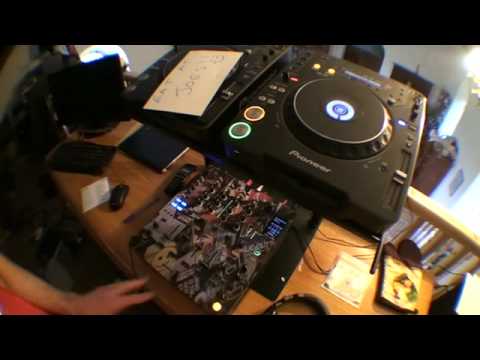
Alright folks, bit of a demo stroke tutorial here. The track I'm using is Lil and Suzy Show Me Heaven. Gear is Pioneer CDJ-1000M3. This guy here is the DJM800 mixer. And that there is a transfer from a company called StyleFlip. People are always asking me. Right, so what I'm going to do is I'm going to record a loop on this guy here, but I'm going to record... A reverse loop. So in other words, play the track. As soon as I hit this guy down here, I'm going to start to record the track going backwards. What I'm going to do then is transfer that from one channel to the other channel. Then what I'm going to do, I'm going to play this track back half speed. Now all of this can be done on the fly. Now again, the reason I've got the wide angle lens on is so you can see the whole thing instead of me moving the camera about all over the place. At the moment the BPM readout here is 128. So of course when I play back this track half speed, I'm going to have to have it exactly at half speed. Now you may have to, if you want to do this, move the jog wheel slightly just to keep it in beat. So we're going to go from 128 to 64 BPM.
1:16 I'll talk through step by step what I'm doing as well
I'll talk through step by step what I'm doing as well. Now this guy here, I'm going to set this to channel 3. I've got the level depth set to maximum and then I've got 4 over 1 there. So what I'm going to do now, I'm going to press play here. 2, 3, 4, 1. And then what I'm going to do, as soon as I hit 1, I'm going to change the direction. As soon as I change the direction, I'm going to hit this guy down here to start the sample. 1, 2, 3, 4. 1, 2, 3, 4. 1, 2, 3, 4. Now we've got a loop, one bar loop. What I'm going to do now is move the crossfade over, make sure I've got channel 2 up and transfer that from channel 3 to channel 2 using this style here. There you go. That now is on channel 2. So I can pause that one there like so. If we just crossfades in the middle, bring the channel up. Listen.
Now what I could do if I wanted to is something like this. But what I'm going to do is half speed it, so it gives it that tiny subtle difference. So what I need to do is make sure I'm on the wide feature here and then I'm going to move the pitch down from 128 to 64. So I'm looking here now, we're getting down to 64. Okay, here we go. It's half speed. Bit of fun there. Let's practice and enjoy.
This transcript was produced automatically from the audio of the video and may contain mistakes.










