 8:20
DJ Tutorial. Using the echo feature on a DJ mixer.
Contents of the video
0:00 There's a damn good reason for that
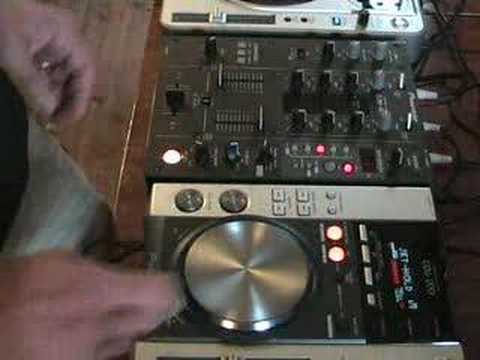
Hi folks, Jonathan here. In this tutorial what we're going to be doing is looking at the CDJ-200 and the effects, and then what we're going to be doing mainly is looking at the effect feature of an echo. Right, an echo, like I've said before, oi, oi, oi, it's that sort of thing. Now again, I'm no expert, but I'm going to give you sort of a demo of what you can do. Very quickly, a lot of people have been saying, Jonathan, you're not using your vinyl turntables anymore. Well, there's a damn good reason for that. Now don't get me wrong, I still love vinyl. Since I've lived in this house, there has always been at least one vinyl turntable in this building. I always use them every single week. But you can't get away from the fact that certain CDJs, where they've got effects etc., and when you've got a little mixer that's got effects...
No longer is a DJ just putting one record on the next one, the next one, the next one. A DJ now is able to manipulate, to move about, to mess around with the sound and to have more fun. I will always love vinyl, believe me. In fact what I hope to do in the near future is start to copy. Some of my classic expensive vinyl onto CD, then bingo! I've got the vinyl that will be there indefinitely, it won't get knackered and I've got the copy on CD that I can mess around with. Right, what we're going to do in this particular tutorial, I'm going to try and talk you through it as well. Now bear with me because I am no expert. I'm going to make some serious mess-ups here but I'm going to give you a general sort of idea. Right, hold tight. Right, if we move this like so, so hopefully you can see what's going on.
If I put it about there, hopefully that'll be okay. Right, what we're going to be doing is we're basically looking now at... I've just got to turn the... so I can see what I'm doing now. Right, what we've got now, we've got this particular mixer set to echo and then we've got this CDJ here now. If we just listen to... Sorry. Right, we'll get rid of all the sound effects and everything and we'll get rid of that as well. Now let's just listen to the beginning with no echo at all.
2:08 This CD player is running through that specific channel
Right, now then, if we turn level depth up, now bearing in mind we're on this channel so we've set the actual channel selector to which basically means anything can now on this feature will be running through this channel. This CD player is running through that specific channel. Now when I press this button that's lit up, that's shining here, when it flashes it means that any effect here that we're on will be working. Okay, so that's working now. Now you watch what happens when I actually press that cue button. Now did you notice there, I pressed it but we didn't have any sound. We had a sound slightly after. What's happening is the sampler in here is sampling that sound and it's leaving an echo. So what we're not getting, we're not getting that true definition bang, hit the actual cue button and we get the music straight in which is what we want. Now then, we can do that by moving the actual level depth
To minimum. Now we've still got that flashing, so that basically means we still have echo. Now watch this. Right, okay, so we've got... What's happening there is I am pressing the cue without any echo, so I'm getting that bang straight in. And then I'm wanging straight over that echo, sorry not the echo, the level depth dial, and then I am getting the echo from that first initial beat. Now then. That's what it sounds like, dry, with no effects on this guy. Now then, let's play it first, no echo, we'll hit the jet sound and we'll play it and we'll see what it sounds like. Right, what we've done now, we've got jet on hold. Right, we've got that ready now. Right, let's press pause again. Now, again, we're back onto here so we've got echo. Here we go. Okay, again, another tiny feature. Let's play this one a little bit more. Here we go.
5:05 How you can almost basically remix
Right guys, what we'll do now, I'll show you how you can almost basically remix a particular track by utilising an echo feature. Now again, what we need to do, we need to take into consideration that we need to echo a certain beat to keep it in beat. Now then, again with this guy here, when it's one over one, whatever you echo will be in time. Bam, bam, bam, bam, like so. So just make sure, for the time being, until you get used to it, try and keep 1 over 1. And then eventually you can go half, which is of course half inside that 1 over 1, and then 4 over 1, which is basically 4 beats you'll actually be echoing. Now then, take a listen first of all to the track before or without me messing about with it. Here we go. Right, now that's without me messing about with it. So what we'll do is we'll...
We'll go back a bit. We'll wait for that riff. Now again, that's flashing so we're ready to use the echo feature. I haven't got any features on here, just echo. That's all we're going to use. At the end of the day, they're not wonderful examples but that's exactly what I'm here for. I'm not a superstar DJ. Hopefully, I will inspire people out there to give it a go and as I've always said, it's about practice and enjoying it. Nice one.
This transcript was produced automatically from the audio of the video and may contain mistakes.










