 2:26
Djay video 3. Gain & EQ Tutorial
Contents of the video
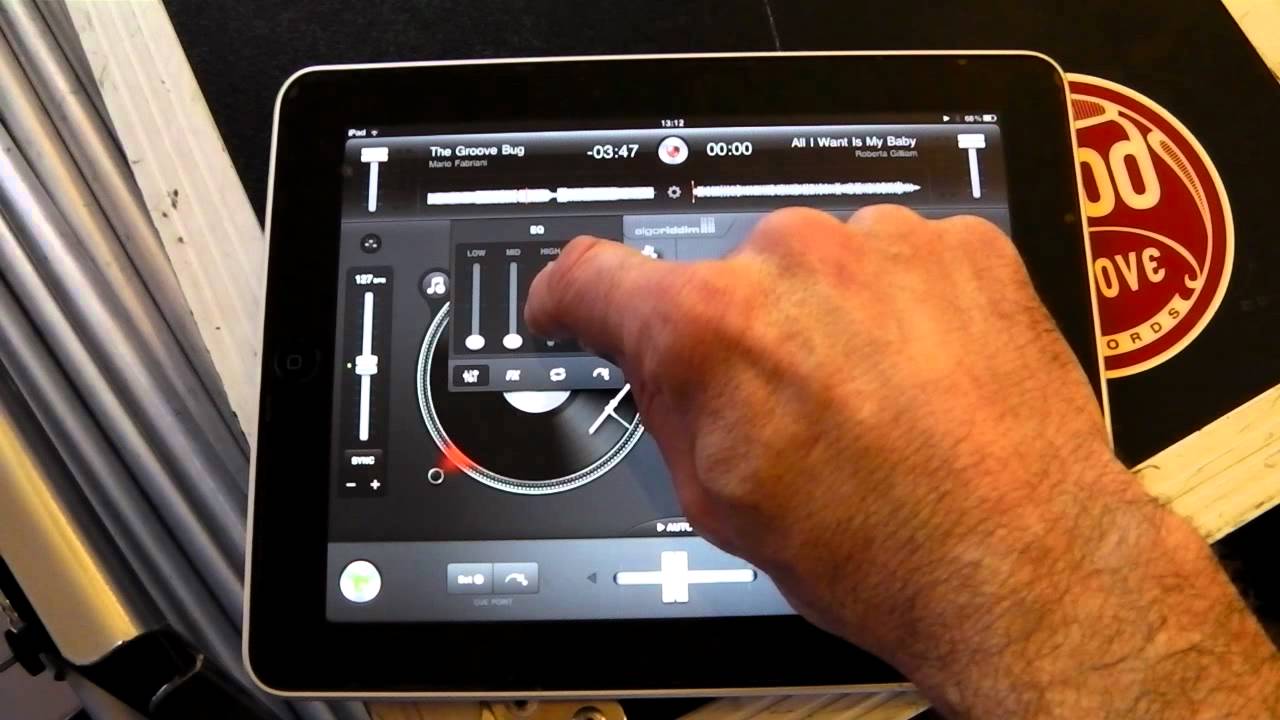
Alright guys, video 3 on the DJ program for the iPad. In this video we're going to have a look at this icon here which is just below the volume control for each track. So if I move the volume control down, volume's gone, up, and you can find the icon in between the pitch and the volume control. If we press that, you'll get this screen come up. What we can do is we can press And we can set cue points. The next icon, and we can loop. The third icon, we get effects. The fourth icon, which is the one we're going to look in this video, is for our EQ, also known as equalization. On the right-hand side, you can see a small icon there. If I move this up and down, this is like a gain control, which is also a volume control for the deck. So if we have a listen.
We'll take the music up, towards you we'll bring it down. Next to that we have high, also known as treble. So if I increase that, we can hear the high, almost like the hand clap increase. Bring that to the centre. The mid, that's like the vocals, the music, the melody. Bring that to the centre. And the low is the beat, the boom, the bass drum.
Bring that to the center as well. When you get the program, everything should be set to the center. If you want to EQ that one deck, you can change any frequency as you like. And then to remove this icon, just tap the first icon that you pressed just below the gain and that will disappear. To get back to that again, to change the EQ, press the icon again Thank you very much, practice and enjoy.
This transcript was produced automatically from the audio of the video and may contain mistakes.
Related videos
-
Complete Beginner DJ Lessons Tags Key BPM Etc
A more advanced lesson folded in early, and worth doing once rather than putting off, because everything it sets up gets used for years…
-
Complete Beginner DJ Mixing Lessons Video 19 Getting Your Kit Ready for an Easy Mix
A whole lesson on getting ready, which is the right call - the exercise in the next video only teaches anything if the two decks are…











