 3:49
Djay video 4. Cue points
Contents of the video
0:01 Small icon here that will take
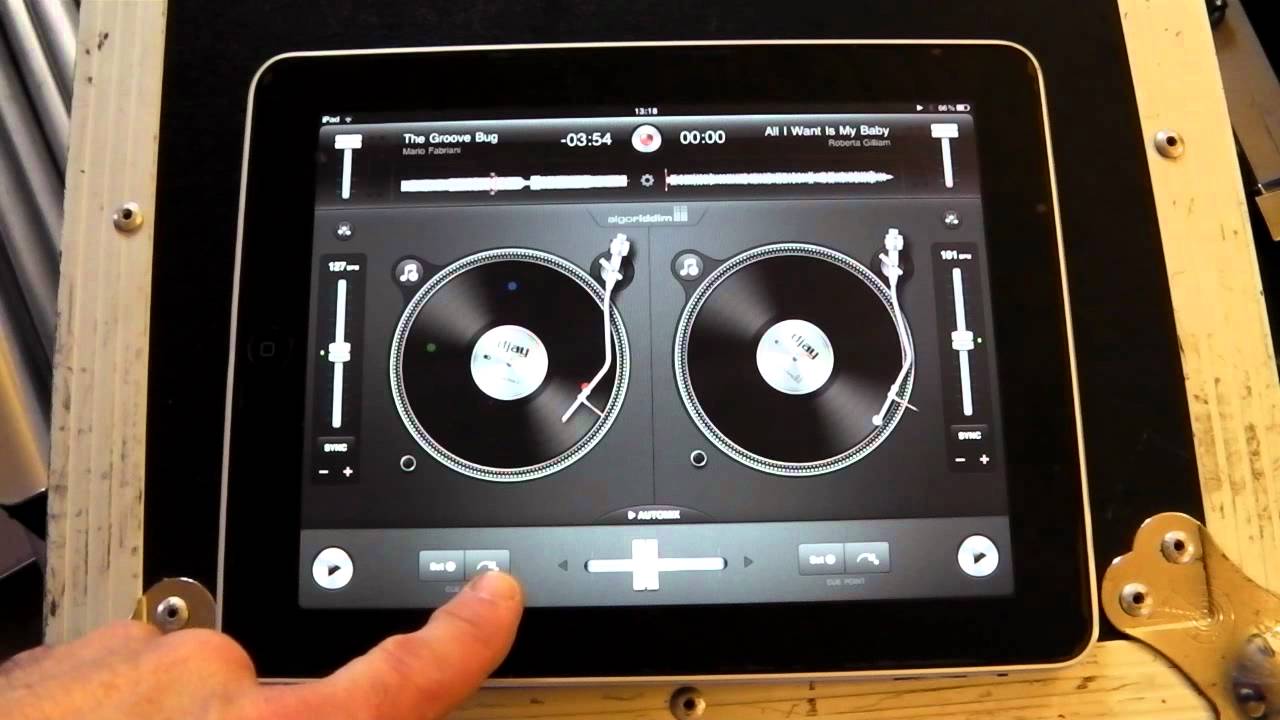
Alright guys, another demonstration stroke tutorial on the DJ app for the iPad. In this one we're going to look at the small icon here that will take you through to settings features for EQ, effects, also for looping and also for cue points. In this video we're going to look at the cue points. You can find the icon either side of the deck, below the volume control for each deck and also above the pitch control. In this one we're going to look at cue points. What we can do is we can set cue points on the track that's playing. So I'll give you an example.
0:51 Those cue points
Right, we've got cue points now. What we can do is we can go to those cue points. Quick tip for you as well. Now we actually really have four cue points because you can use the original cue point that you set at the beginning of the track anyway. So press play. Ok, now I'm going to explain exactly what I did to get those cue points. So we go again, we hit the icon just below the volume control. You can see red, green and blue and set. What you want to do is while the track is playing you can tap either the red, green or blue and whenever you tap red, green or blue that is the precise point. That is the precise point where you will get your cue point. If you want to change the cue point, just tap that icon again.
2:20 I've now got a different cue point
I'll give you an example there. So for example here, red, there. If I press this icon here, it's the white arrow with a small white dot. That's where that cue point will be. I'll just move the deck forward a little bit. Now if I want to go over, record over that cue point on the red set There. I've now got a different cue point. Use green, reset green. Now blue, reset the blue back to the beginning. Also here I can set this cue point at anywhere I want to. There. To get rid of that small area on the screen just tap below the volume control again and there you go. Also, you've got a visual way of seeing your cue points. The cue points because you will have on the deck the original white dot, the green, the blue and the red.
Have fun, practice and enjoy.
This transcript was produced automatically from the audio of the video and may contain mistakes.










