 5:32
DJM-400 In loop sampler, How to sample your voice!
Contents of the video
0:00 How you can sample your voice
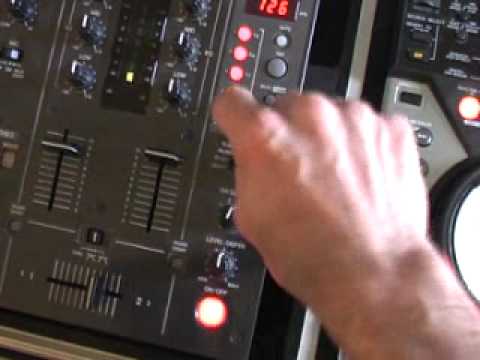
Alright folks, in this demonstration straight tutorial I'm going to show you how you can sample your voice on this guy here. It's the DJM400 mixer and also show you how to plug in your microphone. I know that sounds really silly but following this tip it could save you a lot of damage to your speaker so I'll take the fish off the camera and we'll have a closer look at the mixer. Okay, here we go. I've got the microphone plugged into the back of the mixer and here's the microphone. If I tap that now I'm not getting any sound at all. The reason being is, as you can see there, it's actually on, but we're still not getting any sound. That's because the actual volumes are near enough at zero position. Zero position isn't at 6 o'clock, zero position is at 7 o'clock. Maximum is at 5 o'clock. Now here is one very, very important tip. When you're plugging in your microphone, I don't care what you say, make sure...
The actual volume controls to your microphone are off, completely off, down, not even a tiny bit of the way up. The reason being is let's say for example this, let's take that out because I don't want any damage done to the speakers. Let's say I turn up and they're like that. If I plug my microphone in now and it's on, I could be putting too much sound Through, or should I say the microphone volume could be too high, so we could start to get a nasty feedback sound through the speakers because... The microphone could be too close to the speakers. I'll give you a demonstration. Let's turn those down again. Let's plug the microphone into the back of the mixer. I'm now going to talk through the microphone and slowly increase the actual dial on the microphone volume. 1, 2, 3, 1, 2, 3, 1, 2, 1, 2, 1, 2. There you go. So really what you need to do is basic steps. Step number one, make sure your volume is down. Step number two, plug your microphone into the back of the mixer.
1:49 You watch what happens if I move this too much
Step number three, make sure of course your microphone is on if there's a switch on the microphone. Also make sure the switch here on any mixer really is set to on and then slowly increase the volume on the actual dial until you get to an audible level. Now you watch what happens if I move this too much. Have a listen. There you go. That's what you don't want. Definitely you do not want that sound. Okay, really what we're going to be doing with this tutorial is looking mainly at this area here. It's on the DJM400 mixer. What I'm going to be doing is sampling my voice and then incorporating that into the music. Now first of all, level depth is set to 12 o'clock. I've got the channel select set to microphone and I've got this guy here, all the effects dials set to the in-loop sampler. What I can do now, if I press that button there and that's flashing, I can press any one of those banks
3:35 Oh God, I'm nuts, I don't give a monkey's a
Say something and it will sample what I say. So here we go. Uno, dos, tres, cuatro. Uno, dos, tres, cuatro. Uno, dos, tres, cuatro. Right, press that again. Now the sample is in that bank but I've turned it off if I press it again. Uno, dos, tres, cuatro. There you go. Now I'm going to do something else on bank number two. One, two, three, four, one. Turn it off. Now have a listen. Okay, there you go. Now we've just done one and two. I've got three, four and five, so I've got another three banks to do whatever I want with. Here we go. Happy birthday! Okay, I know it does get nutty but again it's about practice and just messing around. Alright, now we're going to do another bank. What can I do now? Oh, I know, here we go. You asked for it. Oh God, I'm nuts, I don't give a monkey's a... Alright, here we go. Oh dear, you wait for this. Here we go, here's the last one. Oh God, you want to try living with me?
All right, what I'll do, I'm going to take the fisheye. No, I haven't even got the blinking fisheye on the camera. I'm going to put the fisheye on the camera. All right, like so. All right, now what we're going to do is we're going to play the music and we're going to have a bit of fun. All right, so I'm not going to touch anything here at all. We've got the volume up and we're still on mic there. I'm just going to press the music, press play here. By the way, look to the side of the video for the actual name of the track, okay? I'm going to put the microphone down now and just turn the volume. And as I always say, practice and enjoy and have a bit of fun.
This transcript was produced automatically from the audio of the video and may contain mistakes.










