 10:32
DMX Setting up a Very Simple Guide on How to Get a Great Light Show
Contents of the video
0:00 I've thought, do I really want to start programming lighting?
Alright guys, I've always been a little bit reluctant about using DMX, simply because it has scared me a little bit. I've thought, do I really want to start programming lighting? Do I really want to get to a venue and have to go through the rigmarole, plugging everything in, making sure everything works, making sure it's set, you know, addressing and plugging in fixtures and so on and so on. So, I have taken it upon myself now to start to learn how to DMX lighting. Now, you can only take my word for it, you can believe me if you want to, but I've watched a video online. I will put a link in the description to the video that I watched and I thought, let's give it a go, let's bite the bullet and do the damn thing.
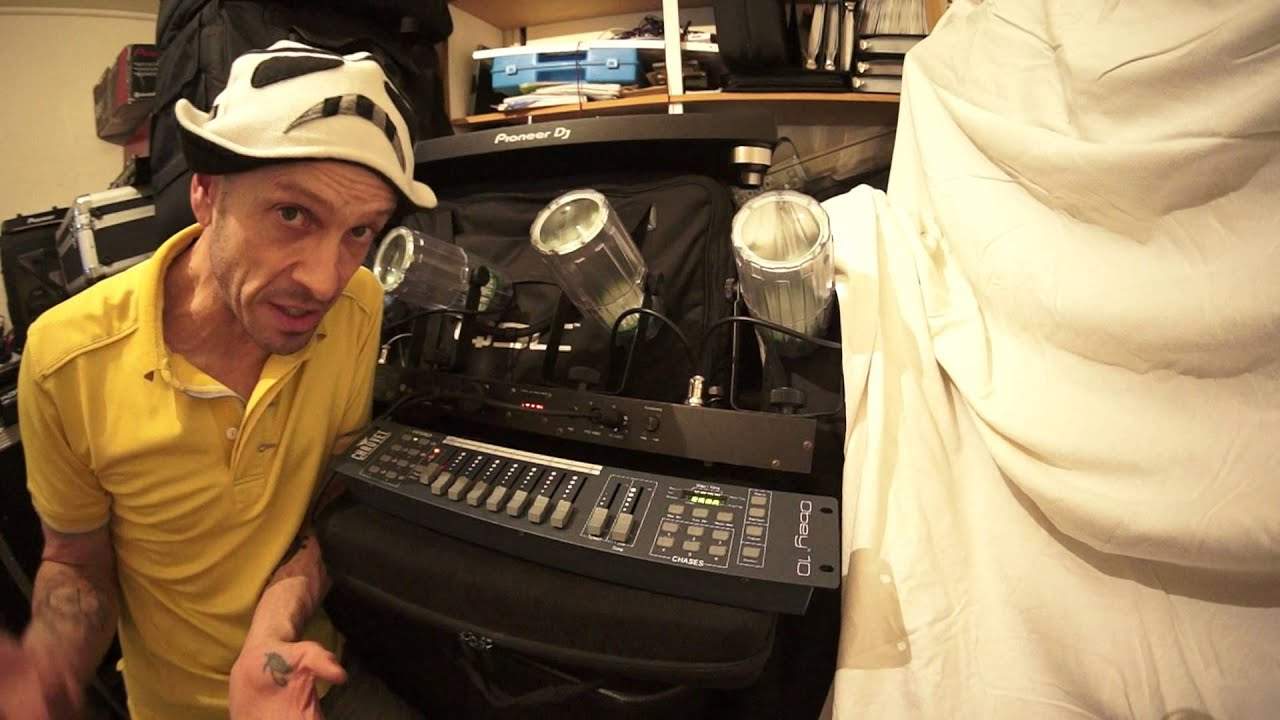
Now, in front of me I have a DMX controller, 19 inches. 19 inch rack mount and it's two units. 19 inch long rack mount because it will fit into a box standard rack mount flight case. Two units, a unit is a term used in the industry for the size of something that is rack mountable. Amplifiers, controllers, maybe effects units. This is two units. So, this controller is called the OB10. It's from Chauvet. DJ. And I have got the Chauvet 4Play in front of me. Now, all I can promise you is within roughly about four or five minutes, plugged it in. I set it to program number one or bank number one on here and I've got it working. And it was as simple as that. I've actually amazed myself. So, I'm going to pat myself on the back.
1:58 Couple of things
Thank you very much. That's my pleasure. No problem. Very good, lad. Well done. Thank you. Awesome. Wonderful. Right. So, how easy is it? Now, let me just explain a couple of things. Now, let's try and look at DMXing in its very, very basic form. And I mean in a way that a child would be able to understand. So, when you look at DMXing, you need to, of course, firstly make sure that the light unit, you have, is DMX compatible and you'll be able to find that out very simply. Does your lighting fixture have an XLR in and out? If it does, then we're halfway there. And you'll know because your lighting fixture, and I use the term fixture, I'll come into that in a second, should have something like the plug-in bit there.
Not this actual plug, but it will have. That is the male version of a DMX. So, it should have the female version on it as well as the other end, which is the female version. So, these are the actual DMX cables. Now, these are also microphone cables and DMX. You can use them for powered speakers and so on. Now, also on your fixture, you should be able to see the words, the letters DMX in and DMX out. Now, it is very important that you get it the right way around. And in a way, it's difficult not to because at the back of your DMX controller, you will have an output and the only way of plugging it in, of course, is one way. And that is if I turn that around, you can see I've got one part or one end of the DMX cable in there.
So, the easy thing to remember, look, it's going already. Easy thing to remember. Is so long as you plug in your DMX cable to the controller, then the other end has only got one place to go into your first fixture. And that will be undisputedly the DMX in. Now then, fixture. Forget lights now because we're talking DMX. Fixtures are your lights. And the first fixture you put in will be fixture number one. What you do is you... Go to settings. Now, on the foreplay here, I have a small little... There's some small LEDs there and we can go sound, master slave, sound to light. We can also go DMX. Now, when you do get to DMX 512, I will explain more about this in future videos. You need to assign your first fixture as number one now on the OB10 controller.
5:18 For example, a moving head could have more channels
We can assign 16 fixtures because I have one through to eight on here and then I have two pages. So, one through to eight. And then if I press onto B, I can now put another eight fixtures so I can have 16 fixtures assigned to this controller. Now your fixture, your light will have its own amount of channels that it'll work from. So for example, a moving head could have more channels. Then a relatively simple light like the foreplay here. Now I have, like I said, it took me minutes to set this up, literally minutes. And I've had this foreplay, Chauvet foreplay for a very long time. And as you'll see in a lot of my gig logs, I always take it with me. Why? Because it's a good light. It's simple. It is simple.
But... I've never really used it to its full potential because I've just bunged it on sound to light and let it just flash away quite happily. So, of course, when quiet music's playing, it's flashing. When fast music's playing, it's flashing. But it's always flashing the different colours, the same effects and so on. But now, if you look, you see, now I can, if I want to, set it. So green, move this slider up to blue and to red, to blue again. And red and blue, green and blue, and so on. Now also, check this out, see? So what's happened is the fixture is talking to the controller and on channel 12 now, I'm able to set what light I want to shine. And on channel 13, I'm able to get it strobe, flash and so on.
7:08 A little bit apprehensive about using DMX, then stop
OK, so I've never been able to do that before with this. I mean, I've had the damn thing nearly for two years and it's like, you know what? Eureka moment. 14. And then we've got more effects. Now, a lot of people who use DMX are going to be saying, well, hooray, you're finally doing it. Brilliant. Fantastic. But again, a lot of my videos about are about inspiration and inspiring other people to do the same. So if you were like me and you're a listener. A little bit apprehensive about using DMX, then stop. All right now, I'm not sure of the cost of the OB10, but controllers like this DMX controllers are very inexpensive compared to the lighting you bought. So let's imagine this. Let's imagine you've just spent £1000 on a stunning moving head.
You may be best case is you have two of them and you have Master Slade. So the master is picking up the sound, it'll pick up the sound. It'll move. The slave will move at the same movements as the master. Alternatively, with a couple of switches, you can make it so it moves the opposite. So you do get a nice sweeping effect. But imagine spending that tiny bit more, spending a bit of time programming it and getting the full potential from those moving heads. Now I'm going to be doing that very, very soon. I've bitten the bullet. As I said, I've taken the plunge and let's do this. All right, so I will put a couple of links in the description. I've got to pull a link to the foreplay. I'm not sure if they still make them, but if you are on a budget now again, I do get loads of people asking me about lighting.
If you're on a budget, then just go and check these out. What I like about the foreplay is it's not just one light, one direction, and that's it one direction. God, it's can you imagine having four one directions? Oh, I think there is four in there. I know it was a nine millimeter sorry about that. Yes, I'm sure some of you will agree with me there. Thank you very much. Anyway, moving on, you have four lights that you can point in different directions. So for example, we could point one of those on one wall, one of them on the other wall, one of them on the wall facing you. And the other one on the dance floor. So if you're on a tight budget, guess what? One light and believe it or not, invest in a DMX controller and you are completely in charge of the light show.
Now also on the back here, it's well better show you that hadn't I power in DMX and here you can just set the polarity to your DMX cable. So I'm not going to go into that. Just yet. But it's just, it means that plus and minus is minus and plus and so on ground. I'm pretty sure we'll always stay the same is one, but we don't need to go into that at the moment. All right. So once again, there will be a link in the description to the OB ten. There will also be a link in the description to the video that I'm watching at the moment. We're not literally at the moment. I just paused it and thought, you know what? Let's do this. And then also a link somewhere along the line to the show of a foreplay. So I'll finish.
I'll finish off with practice and enjoy and get DMXing. Thank you.
This transcript was produced automatically from the audio of the video and may contain mistakes.











