 10:14
How to plug two DJ mixers in togeather, Video 1
Contents of the video
0:00 Jonathan here and my son is playing with his Playstation
Alright folks, Jonathan here and my son is playing with his Playstation. And what are you playing mate? What is it? Not telling. No, he's not telling because he's underage. But it's lots of shooting, but anyway, there you go. Right now, I've had quite a few emails, people have said, how do I plug a mixer into another mixer? In other words, you know, I want my mates around and we want to battle it out. And in other words, you know, you've got a set of decks over one side, you've got a set of decks over the other side, but you don't really want to have two PA systems, you just want to go into one. So how do you do it? Right, now I'll give you a bit of a demonstration, okay. First of all, you need two mixers.
Secondly, most importantly of course, you need four entities of music. When I say a minimum of four, I mean, ideally if you think about it, if your mate's a DJ as well, then it's highly unlikely, unless of course they're saving up, it's highly unlikely they've only got one CD player or one turntable. Ideally, they've got two, you've got two, two mixers, so in other words you've got six pieces of equipment. Bung them all together and you can have a right mess if you don't do it correctly. Now we'll take a look, and I'll show you how to set it up. But first of all, we'll see where things need to be plugged in. And I'm sure if you think about it logically, it is quite logical. But sometimes it's that tiny little tip and it goes, that's how you do it. So we'll pause the camera and we'll have a look. Hold on.
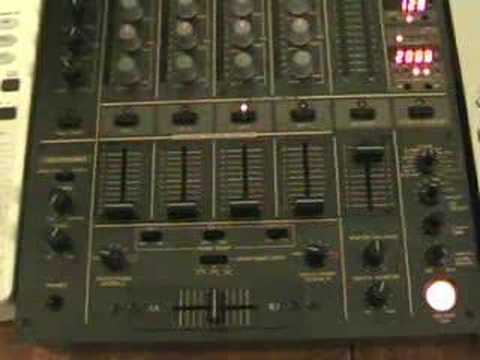
Right then, apart from a cup of tea and a tambourine, don't ask me why, we've got a mixer and two turntables there, and we've got another mixer and two turntables there. The only other thing of course you need is logically an amplifier and a speaker to make lots of nice noise with. Now then, first things first, okay, you can see there that is a two channel mixer, okay? That one there is about a four channel mixer, but put it this way, it's slightly more than two channels. First and foremost importantly, you do need one mixer to be more than two channels. That's very important. Now I'll explain why quite logically. This mixer here, okay, this is the one that you will use as the beginning of your setup. Now what I mean by the beginning of the setup is you've got that CDJ there, plugged into there.
2:35 There, that is your actual output
Then that CDJ is plugged into there. Now then there, that is your actual output. Now normally you would have that going directly to your amplifier or your powered speakers but the difference is that goes straight across and that will go into the input of that CDJ over there. Okay now that's quite important. Now also just a little bit of logic here. If the setup is on that side If you have a set of that mixer, then ideally you want the plug to go in on the same side. So in other words, if you think about it logically, this is quite logical, there's your one setup. Now imagine that was another turntable, okay? Now logically you would not have that turntable set on the other side of the mixer. You'd have it set on the side of the mixer associated with the side where your decks are. That's quite important because it just makes life easier.
So, what we're doing is we're going out of that output and we're going into, this is important, the line input or the CD input of that mixer. So there is the input from the other mixer. Then the next one is that CDJ there and then the next one over there is that CDJ turntable and then what I've done, I've gone from the output of that mixer All right, now we'll pause the camera and we're going to have a look at how to set the volumes because that is just as important. Hold tight. Right, now then, whether this be in your bedroom or in a huge massive nightclub of 1,000 people, the principle will apply and it's exactly the same. Now then, this is the mixer that's plugged into the other mixer and out of the other mixer we're going into the amplifier and the speakers.
5:24 There we are, we've set that, the actual master output
Now what you need to do, this is very, very important. You need to set both of these volumes to the max. Okay? This is important. You're probably thinking now, why on earth do we set both volumes to the maximum? But there's logic behind this. And also set bass, mid and treble just to 12 o'clock and then your trim, logically what you would do with that, if I put this particular track on there now and we look at the trim, slowly it's going to increase until we get to sort of This is the mixer that we will go from this mixer directly into the actual amplifiers. Now as you can see what I've done, I've set the level, the actual master output to about 7-8. From the other mixer. Now then, this is where logic comes in, OK? If I was to set this, say there, and thought that should be fine, and then we plug that mixer in and we started messing about with the actual levels on that mixer, for all we know, the output could be too high there, so what would happen is we would have some unknown output going into this channel, and all of a sudden, two things, it could be a lot louder...
Here's the deal now. There we are, we've set that, the actual master output. Now what we need to do is we need to press play on one of these guys over here. So we'll press play like that. That is the loudest that's going to go, unless of course the DJ starts turning the trim up too much. But if he does that, only one thing will happen. He'll think or she'll think, yeah wicked, we're getting a louder sound. Maybe you are. But eventually it'll be distorted and it'll sound absolutely atrocious. So what we need to do now, the phone's going, is we need to start turning this up. Now bearing in mind now, what's actually happening here is this now... That is, even though it's one channel on this particular mixer, this now has become our master output for that mixer over there. So what we need to do as well, we need to make sure that the amplifier is set as loud as we want it to be set and then by utilising this and turning this up, safely set it there. Right, I'm just going to pause that. Now just imagine now that that was the loudest you wanted.
7:20 It's not going to be too loud becau
That CDJ mixer, etc., the mixer to go. That's the very loudest you wanted it to go. Now the beauty about doing it this way, it means that near enough whatever happens over there, if all of a sudden, and we move back over here, if let's say the DJ now was playing at this volume and it was relatively loud, and then as he or she moved the volumes up it got louder and louder and louder, you know because you've set the volume on the other mixer To the optimum level, you will know as soon as those volumes go as far as they can, it's not going to blow the speakers. It's not going to be too loud because you've set the volume over that side. That's very important. And then all you need to do, if we then put the volume, sorry, put the press play again. I'm losing words here. Right, I'll just turn the actual main amplifier down. OK, now then. What we need to do now...
We can press play here, so that's running and then this is this side. And then we'll press play on that one. There you go. Now you can see now we've got a nice decent sound even though it's absolutely sounding terrible. There's beats all over the place. Pause those and we'll pause that now. At least by doing it this way we know that the person on the other end of that mixer isn't going to knack at anything because what you have to consider is this, alright? Let's say your mate's coming around and it's your PA system. You need to be in control of the master mixer. That's very important, okay? Exceedingly important. So there you go folks. So basically, very simply again, what we've done is we've had the CDJ there going to that mixer, the CDJ there going to that mixer, we've had the output go from that mixer into
This channel here. Now it can go into any channel, alright? But ideally because that mixer is that side have it in the right hand channel. If your mixer, the other one was on the left hand side over this side then you'd have it into that channel. That's just logic. It just means it's easier for you to know which side the actual sort of channel is as such so you don't mess around and you're not messing around with this side. And then of course you know then I'm going to have a bit of fun here because I'm going to try and mix these four tracks so they should be interesting the whole time.
This transcript was produced automatically from the audio of the video and may contain mistakes.











