 5:34
Looking at a DJ mixer, 4, A look at the back, The new DJ
Contents of the video
0:00 We looked at the bass, mid
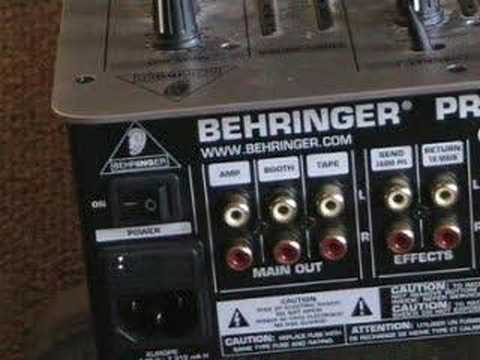
Alright folks, this is the fourth video in looking at a box standard DJ mixer. In the first video we looked at the crossfade volume controls, the second one we looked at the bass, mid and treble, the EQ. In the third one we looked at the gain controls and in this one we're going to be looking at the back of the mixer. The first three we looked at the Vestax mixer which you can see in front of you now. In this one we're going to be looking at a Behringer mixer and the workings of the back of the mixer, what they're there for. Bearing in mind these videos are dedicated to the newbie, the new DJ who does not know what all of these buttons do. Now then, if we have a bit of a close-up here, what we can see first is a button with on next to it. That basically does exactly what it says on the tin, it turns the actual mixer, the power on and off.
1:44 Proper stereo sound coming through your speakers
Nine times out of ten the power on and off will either be at the back of the mixer or on the top. It's highly unlikely it'll be on the side, it's highly unlikely it'll be on the bottom, and it's highly unlikely it'll be at the front. Now next to that we can see something called main out but there's actually three sections one two and three. Now very quickly as well you can see that these female version of phono plugs Thank you for watching. Proper stereo sound coming through your speakers. First one here we can see AMP on amp, the next one is booth, the third one along is tape. The three of them do near enough exactly the same thing but they're there named differently so you don't get confused. AMP or AMP which is here, that's meant to go into your main speakers for your gig.
If you're a mobile DJ, you'll basically have an output from there into a big power amp and then into your speakers. The booth here is let's say if you want a monitor system for yourself. So if you are a club DJ or if you have a big mobile setup and you need monitors, in other words a couple of speakers either side of you, then you would have another output from here going into a separate amplifier. And then you would have the separate amplifier going into separate speakers either side of you and then on the top of the mixer, which along here somewhere, there is a separate dial giving you a separate volume control for your output for the amplifier and for the speakers known as the booth speakers. The next one along is tape. Now that
3:36 Earth wire, line, phono
This will enable you to record the mix that you're doing while you're listening through the booth and also while the main speakers pumping out the music as well to your crowd or your punters. Now the tape can either go into a tape player, into a CD player or even into your PC. Now on this one here, on this mixer we have, if I can pan it a bit closer, we have something called effects. Now we have, you'll always find on effects you'll have send and return. The send will go out of the mixer into an effects pedal, into some reverb, some flange, etc. and then from that back into the mixer. And then next to that we have line and phono. Now above the line and phono, just in the centre you can see this dial here. Now that is there for one reason and that is to plug in your phono, your turntable earth wire.
Now the earth wire basically stops that silly buzzing sound, so always make sure that your earth wire is connected to one or two of the other ones. In other words you can see three there, so you could have an earth wire connected just to one there, the other earth wire connected to that one, or if you wanted to you could have them both connected to one. It doesn't really matter, the main thing is the earth cables from your turntables have to be connected To one of these, to stop you getting a buzzing sound. Now you can see on this one here, we have something called line and something called phono. Now the line input is for the likes of CD player, DAT player, your computer, your MP3 player. The phono is solely for your turntables, but you'll find that...
There are certain turntables, including the Newmark TTX1 that does have a switch on it, enabling you to go from the Newmark turntable into the line input. The next one you can see exactly the same, Line and Phono, and likewise with the third at the back, Line and Phono. Now that's roughly the sort of thing you'd be looking at with a basic DJ mixer. So there you go. I hope that's been a help. Thank you for watching. Don't forget this is dedicated solely for the total and utter beginner in the art of DJing. Practice and enjoy!
This transcript was produced automatically from the audio of the video and may contain mistakes.
Related videos
-
Complete Beginner DJ Lessons Tags Key BPM Etc
A more advanced lesson folded in early, and worth doing once rather than putting off, because everything it sets up gets used for years…
-
Complete Beginner DJ Mixing Lessons Video 19 Getting Your Kit Ready for an Easy Mix
A whole lesson on getting ready, which is the right call - the exercise in the next video only teaches anything if the two decks are…











