 17:08
Mash up Two Tunes but Don't over Power the Mix CD Pool Club November 2018
Contents of the video
0:01 What do I mean by big?
Right guys, we're going to do a bit of a mashup here. So first of all, if you're going to do a mashup with two tracks, you need to make sure that one of the tracks doesn't overpower the other. Also, you've got to make sure that the two tracks are not big. What do I mean by big? Well... Let's look at, say, minimal house. Minimal house, you know, there's a little bit going on. You know, you haven't got a full orchestra in the background. You haven't got loads of piano. You haven't got loads of vocals. Same with tech house. It's very kind of minimal that, you know, there are elements, small elements that are added to the track and taken away instead of a charty poppy track that's got vocals, a rap.
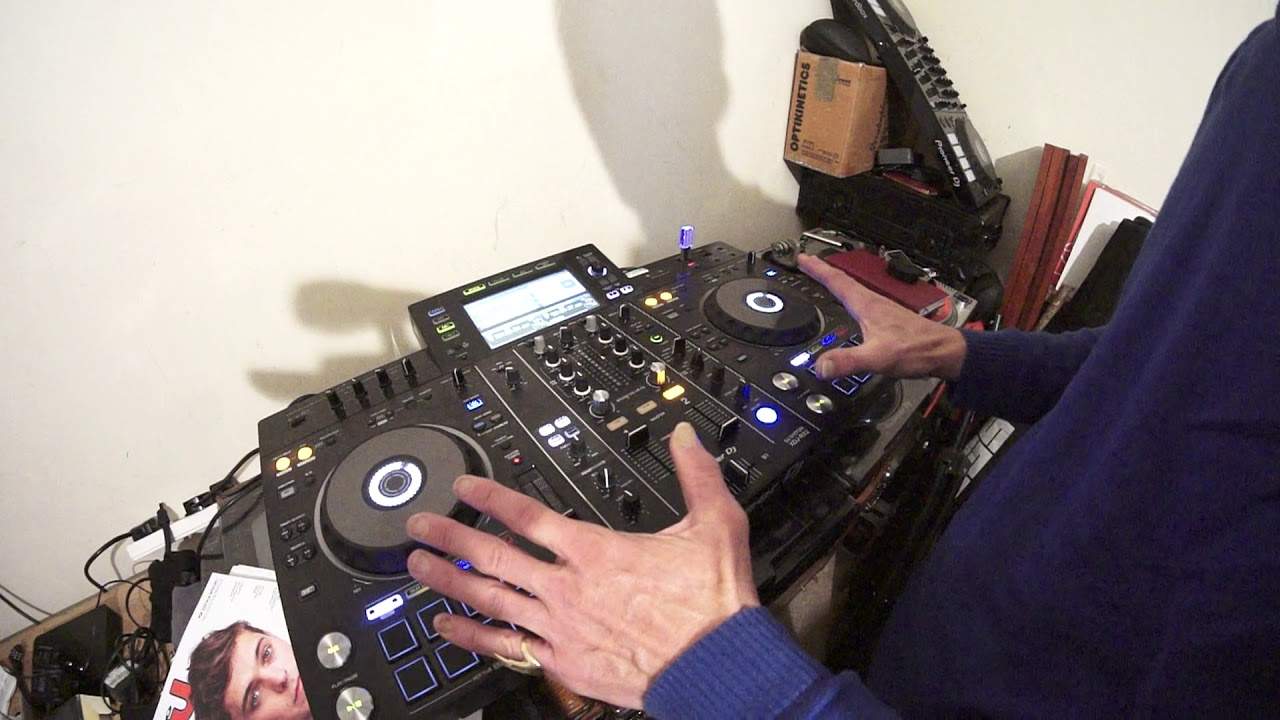
Loads of melody, loads of samples and whatnot. So what you need to do if you're doing a mashup with two tracks is make sure that you don't have two big tracks. Maybe one big track has got a lot going on, the other one slightly minimal or even better, a couple of minimal tracks. Now I've got on the right hand side a track entitled Hands Up, track on the left... Side we dance. And I'm not using any headphones, but if I do put the pitches in the centre, it's telling me they are both 125 BPM. So hopefully this will work. So once you've decided what tracks you're going to use, then you need to make sure when you put them together on your controller, your player, whatever you're using, that the levels aren't spiking.
Now what I tend to do is I will have both the up volumes all the way to the top. Why do I do this? Well, if you have them halfway and you accidentally knock one up or knock one down, then you're going to start changing the volume of that level. Now you may think, well you want to do that anyway because maybe you want to increase one or decrease one. You can do that with the trim. So there's no need once you're in the mix to use... The up-faders, you can change the sound, the volume of that said channel by just using the up-fader. So I can give you a demonstration there. Now at the moment you can't hear anything for the partially sighted. I will explain that the LEDs are flashing in 0 dB. Now even though the up-fader is all the way to the top, what I can do now is I can move the trim, turn it clockwise and you can see now we're going plus 3, plus 6, plus 9. We're going into red. Don't forget red is...
2:35 I could if I wanted to move the up-faders, but I don't know
So theoretically now if I want to increase or decrease either side, I can leave the up-faders there and I can move the trim slightly. I could if I wanted to move the up-faders, but I don't know. It's personal choice, personal preference really. We can always mess around with the bass, the mid and the treble as well, add some filter and add some effects. Now what I'm going to do, I'm going to press play. Let's just turn the master volume up. Press play on the hands up first. Nice little techy vibe to this. Let's just swing it forward a little bit. Nice rolling bass line in the background as well there, I like it. The one we're bringing in is a track entitled We Dance. Okay so the next thing we need to do is make sure that the other track we bring in, we bring in phrase. There's no point just chucking it in anywhere. Now also we need to make sure that the two tracks phrases align correctly.
So very quickly, what is a phrase? A phrase could be two bars or four bars if you've got a radio version of a track. More likely though, these two tracks are around about the same time. We Dance is 6 minutes 34, Hands Up is 6 minutes 27. So there's very little difference in time. So they're probably going to have the same phrasing. So what you do find is with the extended version, your phrasing is more likely to be 8. or 16 bars, sometimes 24, sometimes 32. So what I'm going to do, I'm going to let Hands Up play first. As I think I said, I'm not using any headphones now, so if it does go slightly off beat, I do apologise. Really, I want to concentrate more on what I'm doing and not moving headphones up and down, up and down and so on. Right, so I'm going to turn the bass down on the left hand side. Just bring it straight in.
5:52 We Dance coming in
Three, two, and turn it up a bit on the master. You see again, that's a nice sound. We're not peaking, we're in zero dB. There's no need to have it full on. If you want it louder, turn the master up. Simple. When we get to the next phrase, bass down on the right hand side, hands up, bass up on We Dance. Turning the mid up on hands up. Now notice while I move the mid up, the LEDs are starting to spike, but they're not going into the red. So if you think about it, reverse psychology, have the LEDs tapping into 0 dB to begin with, and if you do use more of the bass, mid and treble, of course the LEDs are going to tap further up the scale into plus say 3, 6 or 9, but hopefully not 12. Or go into the red. On the other hand, if you have them already in six and nine and start increasing mid and top, they're definitely or very likely going to go into the red. We Dance coming in. These Machines Remix and The Hands Up is the original mix. We have a spin back there. Okay, so I spun that back now. That is definitely going to be out of time. If I bring that in now, out of time. Listen. Okay? But on the other hand, what I could have done is...
7:31 No matter what you do
Engage slip mode. Now with slip mode, and this is with some of the Pioneer kit, this is the RX number 2, slip mode is ingenious because what it will let you do is set hot cues, loops, spin back, but what happens is the underlying track will carry on playing in its correct time signature. So no matter what you do... On effects, when I say effects, no matter what you do on the turntable, press a hot cue, do a loop, while that hot cue is being played, while you've got your finger on the hot cue, the hot cue will play. But as soon as you take your finger off, the track will jump to where it should be. So, for example, if you're forming a mash-up and you want those two tracks to move together in the correct time signature...
With slip mode engaged, that will happen even if you do a spin back. So let me give you a quick demonstration there. So hands up, put it forward a bit. Right, listen to this spin back without slip mode. It's out of time. Listen. Two, three, four. One, two, three, four. Now it's out of time. Slip mode engaged. Here we go. 1, 2, 3, 4. 1, 2, 3, 4. 1, 2, 3, 4. 1, 2, 3, 4. 1, 2, 3, 4. Always in time, okay? Alright, so there you go. A couple of tracks. These are from the club releases from November 2018, of course from CDPool. This one here is Dangerous. It's the dub version. Alright, now listen to that. I mean, come on. Anyone playing that track, listening to that first part would think oh my god what can we do with that tune?
9:57 Slip mode on the other side
Slip mode on the other side. Hot cue. Another hot cue. Now when you engage an echo and you have the level depth set to say 12 o'clock and you bring the volume down, that echo will of course carry on until it finishes completely. So have a listen. There, there it goes. That will carry on going until it's completely gone, okay? On the other hand, if you want the echo to finish at a set tempo, Time, this is what you do. I'll show you first and I'll explain. Okay, so what I did is I turned the level depth to the minimum position which is the 7 o'clock position and then that stopped the echo. So I'm going to do that again but this time not bring up the volume straight away. Okay? Here we go. Okay? The only reason I moved the volume up very quickly...
12:00 After I stopped the echo, is I didn't want a gap in the music
After I stopped the echo, is I didn't want a gap in the music. So of course if you think about it, it's engage echo, bring volume down, you have the echo when you want your echo to finish, level depth off, volume straight back up, so when the volume is back up, you haven't got remnants of the echo in the background that you had over the track that you've brought back in to, well you brought the volume back in should I say, okay? All right, let's... Bit of Sammy Porter breaking. Now this is a three and a half, three minute odd tune so here we go. Still hot. Okay, this one here is still hot, it's the original mix. We're still with the club tunes. From CDPool, and may I say, what a banging selection. I mean, come on, this is one of those tunes you just think... It's got that African sort of vibe to it. Ah, wow. This is just banging completely. And also as well, don't forget there is a link in the description. We'll take you to CDPool. Go to the club releases for November 2018.
You will be able to hear the tunes I'm playing as well as all of the other tracks on the compilation for November 18. Soundbites for every single one. Okay, let's find one more. Again, haven't got any headphones so... Okay, I want to bring it in there. 326. Now notice as well, this track, If You Ever Love, I'm bringing into the middle of the track, near the track.
What I want you to try and do if you are a beginning and end mixer. In other words, you wait for the end of one track and bring in the beginning of the next track. Try and get away from that. Try and be more creative with your transitions and listen to the vibe of the middle tune. Oh, sorry, the middle tune. The middle... The middle of the track. Oh God. Oh well, you know what I mean. Try and... Try and bring in the tune in a different place. Oh dear. All right, this one here, if you ever loved. All right, I'll finish off. Thank you very much for watching. Have fun and practice and enjoy. Nice one.
This transcript was produced automatically from the audio of the video and may contain mistakes.










