 7:40
MC, DJ how to set the level of your mic!
Contents of the video
0:00 In this lesson we're going to talk about microphones
Alright folks, in this lesson we're going to talk about microphones. This has taken quite a long time to record actually because I've got to get it right. This is a wireless microphone but all we're going to do is just pretend it's a normal average microphone. I have seen people in bands, MCs and artists are like, do this, well hello, or they've done this, like this. I mean I've seen people in speeches going hello and how are you and you know at the end of the day they might as well not have the microphone. It's better to hold it Just about here, alright? There's no point being an MC and having it stuck up here because basically if you've got it here, two things. Either one, it's not set correctly or the guy on the turntables doesn't like you and he's lowering the volume on the microphone. It's more than likely the latter. Okay, so what I'm going to do now, I'm going to just pause this and I'm going to put the camera closer to the mixer, so bear with me. Okay, first things first. What I want you just to take into consideration now is that we are classing the volume
And everything set here for this room. Okay, so you can see there's a speaker over there facing away from me and there's a speaker over there facing away from me. The reason they're facing away from me is if they were facing towards me I would straight away get feedback. Basically, sorry again, if they were facing towards me the volume of my microphone may only be able to go up to two. If they're facing away from me, I may be able to get the volume up to three or four. The reason being is because if you put a microphone anywhere near a speaker, or if you put a microphone facing a speaker, you'll get what's known as feedback. I will talk about that in another tutorial but at the moment all we're going to do is just basically go through the best way of setting the levels on your mixer to optimise the sound through your microphone.
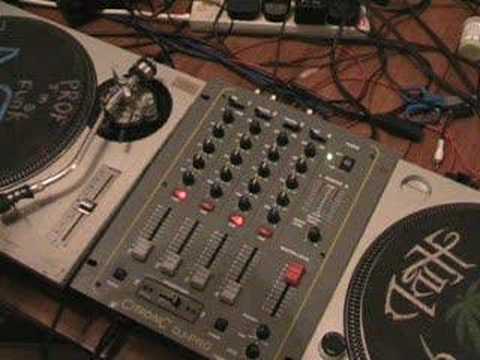
I turned my mixer on first. Everything is flat. We're not going to look at these three channels at the moment. All we're going to look at is this guy here, which is the master volume, and this guy here, which is the volume for the microphone. This microphone is a wireless microphone so it's turned off at the moment. So I can do that without any fear of contraception. You like that one? Alright, now what I have done again, mixer on. After I turn the mixer on, I've turned the amplifier on. Once I've turned the amplifier on, I will then turn the amplifier up. Right, now then, what I'm going to do now is just turn this microphone on here. Don't know if you noticed there, there was a click. That just tells me the microphone's on. Tap it and it's working. Now if I talk now through this microphone, 1-2-1-2, what you can see...
2:40 Even if I talk normally, 1-2, 1-2, it's going into the red
As you can see, it's going into the red. Now we don't want it going into the red. Now this is where we get a lot of problems. This is where the likes of some MCs sound pretty awful because they're going 1-2 and I'm checking out, checking out. Now that is basically giving me a distorted sound. Even if I talk normally, 1-2, 1-2, it's going into the red. It doesn't matter a tiny bit, that's fine. But as soon as it starts clipping up to plus 8, plus 5 dB, that's when you start getting distorted sound. Now then, what we're going to do is this. We're going to put this volume, the master volume, to about 8.5-9. Now then, if I was going to set that volume at 8.5-9 and set the microphone, I would leave the master volume there all night. If I reduce the master volume, what would happen then is when I've optimised the volume on the microphone...
Prior to bringing it down, it would mean the volume on the microphone all of a sudden has gone off sync and I would have to reset the volume on the microphone. If, on the other hand, at the beginning of the evening I put the master volume up and I leave it there until the end of the evening when I'm finished, then the level I have on the microphone will stay the same all the way through the evening. Now then, what I'm going to do, I've got the microphone on. First things first. 1-2, 1-2. At this point, without doing anything, I'm going to decrease the gain on the microphone channel, which is basically the microphone's own separate entity volume, until I start getting a nice level here where it's not going too much into the red. So I'm going to talk normally, if I really do that is, 1-2, 1-2, 3, 1-2, 1-2, 1-2, 1-2, 1-2, 3, 1-2, 1-2, 1-2.
5:01 Can you hear that whistle sound?
Right, that's fine for me. Now then, microphone here, line input. So we're just going to keep it on the mic. Now what I'm going to do now is slowly, while I'm talking, increase. And this is when you hear, when they're doing what's known as sound checking, you hear these guys doing 1-2, 1-2. They're known as the 1-2 people. If you ever walk up to them in the street and say, how are you? They'll go 1-2. So what I'm going to do now is I'm going to slowly increase the volume here. 1-2, 1-2-3, 1-2-3. One, two, one, two. One, two, three. One, two, three. One, two. Right, can you hear that whistle sound? That is basically called feedback. Now, that's the sound we don't want. There are two things we can do to eliminate, well, three things actually, we can do to eliminate that sound. One is we can move the speakers further away, have them pointing more away from the microphone.
The other one is we can lower the volume of the microphone or the other one is we can actually lower the high frequency, the treble on the EQ because here on this particular mixer I have a high, mid and low. Low is bass, the boom sound. Mid is vocals, the piano etc. The melody, high is the hand clap, the cymbals. So what we will do first is we will wait till we've got that tiny whistle and then we'll decrease the volume first. So we'll try again. One, two, three. One, two. One, two. One, two. Okay, we've got that sound. Decrease the volume slightly. One, two, three. One, two. One, two. There you go. That now is the optimum sound for this microphone. For this mixer, that amplifier, for those speakers where they're positioned in this room. If I had this set up here now, in any other room, it would either sound too loud if it was in a small room and it would be distorting and I'd have feedback, or alternatively, if it was in a huge big room, you would have the grandmas in the front line, the front queue of everyone listening and watching saying can you turn it up, it's not loud enough. Now then, the other way of...
Getting rid of that whistle sound is this. 1-2, 1-2, 1-2, 1-2, 1-2. Lowering the treble initially. It sounds muffled though. That is the main problem. But you do get rid of that high whistle sound. 1-2, 1-2, 1-2, 1-2, 1-2, 1-2. So there you go. There's your first lesson basically in how to optimise the best sound for your microphone. For the speakers you've got, the mixer you've got, the amplifier and the room you're in. We'll do it one more time. One, two, three, one, two, one, two, three, one, two, one, two. And then of course the best thing to do, instead of doing this all the time, basically just turn it off there. And of course the beauty about the on-off button, if you're a DJ and you've got an MC in front of you, the on-off button is one of the most wonderfulest things in the world. Okay, I hope I've been a help. Practice and enjoy.
This transcript was produced automatically from the audio of the video and may contain mistakes.











