 11:09
Mixing from Vinyl to MP3 and Back Again What to Look out for and WHY
Contents of the video
0:00 This video is all about mixing vinyl with MP3
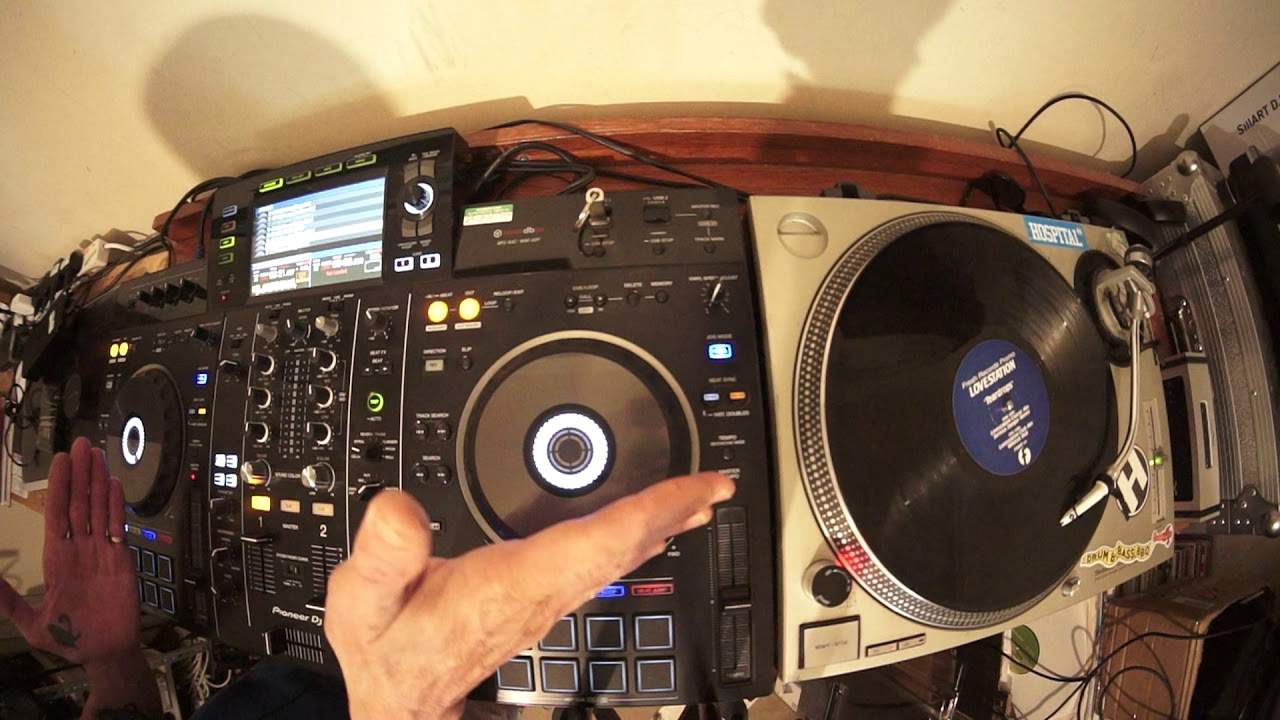
Right, this video is all about mixing vinyl with MP3. So, we have the heavyweight, in the world, numero uno, the best, beyond shadow of a doubt, forever, vinyl turntable, which is, of course, the Technics SL-1200 Mark Numero 2. The best for ever. But, here we have, in my mind, maybe you can agree or not, even with the turntable actually, is the Pioneer DJ system, the XDJ-RX2. In my mind, the best player, the best controller stroke player in the world. Why? Because I have a vinyl turntable plugged into it. I can play switching to phono. If I want to, on the exact same side, I can have a CD player plugged in. Or, if I want to, I can switch over to deck number two and use the thumb drive. Alternatively, I can press the MIDI and connect my laptop to the RX2 at the same time everything else is connected in and play off a laptop as well.
So, you've got everything here. You can go from laptop, you can go from thumb drive, turntable, to CD player. If you want to, and guess what? Cherry on the top, we have two plugs for your USBs. And if you've got one plugged into the right-hand side, you can record your set at the same time. Anyway, that's all the fluffiness over. Why am I doing this video? Very simply because turntables like this do not have master tempo, also known as key lock, which means when you start to change the pitch, not only do you increase or decrease the speed, you also increase the speed of the turntable. So, you can increase and decrease the overall feel, vibe and energy, but more importantly, the key of the track. Let me give you a demonstration. By the way, this track here is on Fresh Records. It's a promo from years gone by.
Love Station, track entitled Teardrop. And this side is the Wildcat dub. So, if you think that modern day dance music is pucker, amazing and fantastic, back in the day it was like average, think again. Check this out if you can. On YouTube, Improper Stereo, Teardrops. Wildcat dub. It is a killer cut. Just listen to this part here. Oh, no. Yeah, I've got it switched over. Never mind.
Amazing tune.
Okay, so, I'll just put it there towards the end of the last one and spin it forward, cue it up, there. Right, so that is set ready to go, the pitch center position, which means if this track is 120 BPM, it will be at 120 BPM. On the other side I have All The Way. It's the Mickey Moore and Andy T mix.
If I just go back. Hold on. No, we're in mixer mode. I need to go to USB. Not all night long. Okay, yeah, right. All The Way. It's entitled All The Way by Mickey Moore and Andy... Sorry, it's Mickey Moore and Andy T mix. So, let's go to where it starts. That kind of vibe.
3:53 We can hear nicely harmonically matched
Now, what I've done here is I've had to speed up this track to match the same BPM as the Teardrops and I've got Master Tempo engaged. We're going to do a bit of an experiment here as well, but let's have a listen. So, so we can hear nicely harmonically matched.
Let's do an experiment. Let's slow that one down. I'm going to put that to minus four. And of course, I'm going to have to do the same. On this side, but not minus four because I haven't got any numbers here. So I'm just going to begin with mix it into my headphones then bring it in and we'll see what it sounds like. So let's go back.
Doesn't sound as good.
Now, let's slow that even more.
Going to speed them up at the same time.
6:26 Why doesn't it sound the same?
Okay, so what exactly is going on? Why doesn't it sound the same? Well, it's because first of all, the turntable. The SL-1200 Mark II does not have what we call Master Tempo or Key Lock. So when you do slow the track down or speed it up, you're not going to slow it down, but you lower the key of the track. You bring it up towards you, speed it up. You will increase the key of the track. Now, the general rule of thumb with a vinyl turntable is if you go below or above around about three percent, you're going to start increasing, decreasing the track by sort of a semitone and or so on. And that's when you can start to get a little bit of a clash in sounds. Now, in a way, this isn't... This is sort of a tutorial, but also it's a demonstration as well.
You see, with the likes of your controllers or your modern-day CDJs or the likes of the RX2, a lot of people seem to think the best features of all time, the best effects are like the reverb, the echo, the filter and so on. Dub Echo, noise. Fantastic effects. But if we rip it all apart and we look at what we have got now, technology-wise that has opened the door much more to be able to form smoother transitions, it's Key Lock. It's Master Tempo because what that does, it means that you can slow down a track, speed it up and it doesn't change its feel. It only changes the speed of it. Okay, if you slow it down a lot, it's going to change the feel. So, for example, at the moment, I'm on 10%. So again, 122 in the center, which means if I slow that down,
I'm going to slow it down by 10% of 122, which is 12.2, hopefully that. Speed it up, 12.2. So add 12.2 to 122 is 134.2. I hope you get the idea. Now let's go to the wide... Hold on. The wide feature, which is of course 100%. So I will increase it to 244 or slow it down to bugger all. So let's have a listen.
8:47 Let's disengage Master Tempo
Stopped very fast. But listen, the key is still there. It isn't changing. Now let's disengage Master Tempo. This is where it gets very strange, eerie, but also now we can start to make wacky effects and so on. All right? So what you've got to think about is you've got to think of all you modern day DJs who are using controllers, laptops and that to you is life. Which of course it is. It's going to be, isn't it? Because it's the analogy like we're driving around in cars now and that is life. But you go back 50, 60 years or perhaps even earlier than that and probably most people used to drive around in horse and carts. It's sort of the same because you go back 30 years and it was vinyl and you had to get used to mixing in key.
And very close BPMs. If you didn't have two tracks that were very close BPMs, your ears had to be more open to the keys. Nowadays, you don't have to do that because the likes of players like this will match the... Well, no, I can't say will match the key for you. It won't unless, of course, you look at the software. In that case, the software will help you choose the right tracks that are in key. But using Master Tempo, what that means is that if you have a track on the right-hand side that is 130 BPM in one key and on the left-hand side, it's 100 BPM in the same key. So long as you are at the correct percentage of speed difference, in other words, you want to go to maybe plus and minus 16 or 20 or 25%, you can indeed beat match them
And keep them harmonically matched but it's a lot more difficult, should I say, to do that with the likes of a vinyl turntable and a controller like this because the vinyl turntable does not have key lock. All right? Hope that's been a help. Practice and enjoy. Thank you.
This transcript was produced automatically from the audio of the video and may contain mistakes.











