 17:27
New DJ Tutorial What the EQ Is for on a DJ Mixer BY Ellaskins the DJ Tutor
Contents of the video
0:01 Demonstration stroke tutorial for the new DJ out there
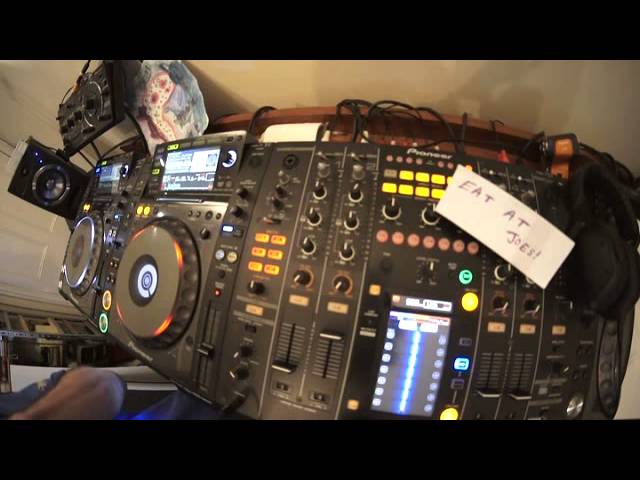
Alright, ladies and gentlemen, demonstration stroke tutorial for the new DJ out there. Track I'm using is by my main man, Dan McKee. Dan McKee versus Costa. This track here, Syantania, is the original mix. I hope I've got all that pronunciation correct. This video we're looking at low, mid and high, which are the EQs on a mix, so low, mid and high, sometimes known as bass, mid and treble. Like I said, this video is actually for the new DJ, so... If you are an established DJ who knows how to mix and scratch whilst you've got your eyes closed with one hand tied behind your back while you're on a, I don't know, roller skates flying down a hill at 500 miles an hour then I suggest you turn off and go and do something more interesting like maybe watching daytime TV. If you are on the other hand though a new DJ who wants a little bit more information on the curly wiggly waddly bits on a mixer then pay attention please have a look over here. Right so the track itself
Starts off with some hand clap. Now first and foremost, let's say you like to turn the bass up. Now you're probably thinking, well, you know, it's still alright. The LEDs aren't flashing in the red and it should be fine. We're not actually into the bass yet on this track, so watch what happens when we come into the bass. Bring it forward a little bit. We should have a little bit of red coming up here. There you go. My first bit of advice is try and keep out of the red if you've got LEDs on your mixer. The red is telling you that you're starting to push too much of a signal out through the master, in turn through your amp, in turn through the speakers, and I just stay clear of it, to be quite honest. Alright, we're really looking here at the low, mid and high. What do they do? What are they there for? I mean, how much do they cost? Are they Spanish, German, Italian?
2:29 Low, mid and high
Do they like fish and chips? No, but what they do do is they will make the sound of your track. They'll make it slightly more enhanced or reduce certain frequencies of the track. So press play again. Right, what I'm going to do is just turn the trim down. That of course in turn will... I don't know if you can see the LEDs are starting to move down now. The DJ Tutor offers a wide range of features and features that you can use to improve your sound quality. All right, low, mid and high. First of all, let's take away the low. Don't know if you can hear that now, but we've got rid of the bass sound. We've got rid of that boom. Bring it back in. Mid. Take away the mid. We've got rid of the melody now, the keyboards, the vocals. That's sort of the mid sound. Bring that back in. High. We've got rid of the high clap, the clapping sound, the snare drum, let's say.
Now on this mixer and quite a few mixes, what you can do, you can do two things. One is you can reduce those frequencies here by minus 26. Alternatively, what you can do on the DJM2000 is switch over the channel CH EQ to isolate. And what that will do now, that will completely isolate the low, mid or high. In other words, instead of taking a little bit... If I take away a little bit of it, I've still got some of it left but if I take away all of it I'm a fat bugger because it's all gone. So that's what's happening here. So have a listen now. Put it back up. This is the beginning of the track with just a hand clap. Right, if we have a listen at that point there and I'm going to form a hot cue, that is the point where the bass starts. Cue it up. Get rid of the low. Now I'm going to hit the hot cue again and have a listen. It sounds pretty much like the beginning of the track. Okay, we've got a tiny subtle sort of...
5:13 Many ways of using the low, mid and high
A little bit more of a lift with the kick there, but that's because the mid has started to come in as well. So let's put the bass back in, let's do exactly the same now with the mid and start off at the hot cue point. We can hear the high and we can hear the low because we've got those engaged, but we've taken away the mid. I'm going to do exactly the same now with the high, cue it up and hit the hot cue. If I start to move the high in, we can hear it's a lot more crisp now, it's a lot more vibrant. Okay, many ways of using the low, mid and high. We can do a natural sweep, so while we're in the mix we can slowly sweep up.
9:58 The sound seems to be disappearing too much
I'm just going to disengage the isolator now, so what we're going to be doing is only removing the bass, mid and treble a little bit, not... When you're counting bars. So, press play. So let's do a nice sweep. What I'm going to do now is exactly the same thing that I'm going to count. We'll go back to that break there. 1, 2, 3, 4. 1, 2, 3, 4. 1, 2, 3, 4. 1, 2, 3, 4. 1, 2, 3, 4. 1, 2, 3, 4. 1, 2, 3, 4. 1, 2, 3, 4. 1, 2, 3. Sausages. There you go. Okay, I'm going to do near enough exactly the same thing. This time, I'm just going to bring it straight in. We're coming up to that break again. Just turn it up a bit. There. We did have a break.
There was no bass in the break anyway, so it didn't really matter me bringing it slightly before because at least we had the bass ready at 12 o'clock when the bass on the track came in. I'm sure you can follow that. Okay, let's do the same thing with the mid.
So you can hear we've got a slow increase in that frequency. I'm just going to form another cue point. Okay, same with the high. You should be able to hear the difference as I increase the high and decrease it. Now have a listen to this. This is a good effect. Here we go. One, two, three, four. One, two, three, four. One, two, three, four. One, two, three, four. Okay, what I'm doing there is I'm increasing the high and knocking it up to about 1 or 2 o'clock. Now you can do that quite a bit with the high, not so much with the bass. He also covers bass and the mid, because the bass and the mid is really the body of the track. If you start doing that a lot with the low, you're going to lose a lot of the bottom end of the kick. You're going to lose a good percentage of the entire track, the audio of the entire track. So if you're in a nightclub situation and you do that a lot with the bass, people are going to be thinking, what's going on? The sound seems to be disappearing too much. We don't like that. They'll be scratching their heads and probably walking off the dance floor.
13:10 You have to be wary about how you treat high, mid and low
With the high is that that's only a very small percentage of the overall audio. I don't know the exact percentage, but it's probably going to be only about 5 or 6%. You do that with the low, you're probably going to be taking away about 40 to 50% of the overall volume, the overall sound. Now, with the low, well no actually, with all of them, right, watch this. If I start, let's just go back to that cue point there, if I start to increase the bass too much... We are going to completely overpower the rest of the audio. So what you could potentially be doing is if you increase the low too much, you're not going to get any mid or you're going to start to get less mid that's audible and less high. Now we're going to go slightly in depth here but if you imagine a speaker moving, boom boom, the speaker, the diaphragm is moving out.
14:27 Basic transition
Or let's say for example the monitors over there, the Pioneer monitors. Now if I start to make that speaker there move too much, it's going to then not be able to hold, not be able to handle the mid sound. You're going to get treble through the top speaker but you're going to start to lose the definition of the mid so it's highly advisable to keep your bass If you want to increase your bass, maybe to about one o'clock, maybe to about half one two. When you start going above half two three four five six it's too much. So just a recommendation there, maybe one o'clock but ideally twelve o'clock because again the track that has been produced by the producer in the studio has been produced to the optimum sound, sound levels
The DJ Tutor offers a wide range of sounds, including bass and drums. The DJ Tutor offers a wide range of sounds, including bass Thank you for watching. If you enjoyed this video, please like and subscribe. There are some speakers in nightclubs that is just the magnet and the diaphragm, not the horn. And that speaker could be, let's say, a thousand pounds just for the speaker and the diaphragm. That's excluding the horn and the box. That's just one speaker. That's not the cables, that's not the amplifier, that's just one speaker. And if you blow one of them, you might as well blow your job and kiss your ass goodbye. So you have to be wary about how you treat high, mid and low. So again, let's put this back on here. Let's have a listen to a bit more of the track. Right, what we're going to do now is have a complete mess around with the bass, mid, high, also known as treble. We've got a break here as well.
It's not much difference when we move the low, but there is with the mid and there is with the high. Again a tip, when you hear about people talking about an instrumental break, quite often, not all the time, quite often, it's not much low. Let's have a listen. What we're going to do now is have a look at a basic transition. Let's imagine that we have a track playing on channel 2. And we're going to bring a track in on channel 1. And also, we're just going to be using the up-faders. We're not going to do a mix, I'm going to show you what might happen in a nightclub environment, let's say. So we have a track playing on track 2, sorry, channel 2, and we're going to bring in a track on channel 1. We've got a bass line going through channel 2, so I'm going to keep the EQs at 12 o'clock.
The low on the track that's coming in and as I start to bring up the volume on channel one, what I'm going to do now is with the two volumes set at exactly the same, of course we haven't got much low on channel one, track one. That's the track we're bringing in so what I'm about to do now is decrease the low The DJ Tutor offers a wide range of features, including the ability to adjust the volume of each channel. The DJ Tutor offers a wide range of features. It does depend on different tracks you use, whether the bass comes in directly straight away or the bass slowly increases. Again, the track will tell you how it wants you to increase or decrease the EQ in the mix. It's very important and it comes with practice. Hope that's a help.
Big shout out to Dan The Man, 1980 Recordings. Don't forget, follow the link down there and check them out and sub to them on YouTube. Thank you very much. Practice and enjoy.
This transcript was produced automatically from the audio of the video and may contain mistakes.











